Aspecten
 Download (408 MB)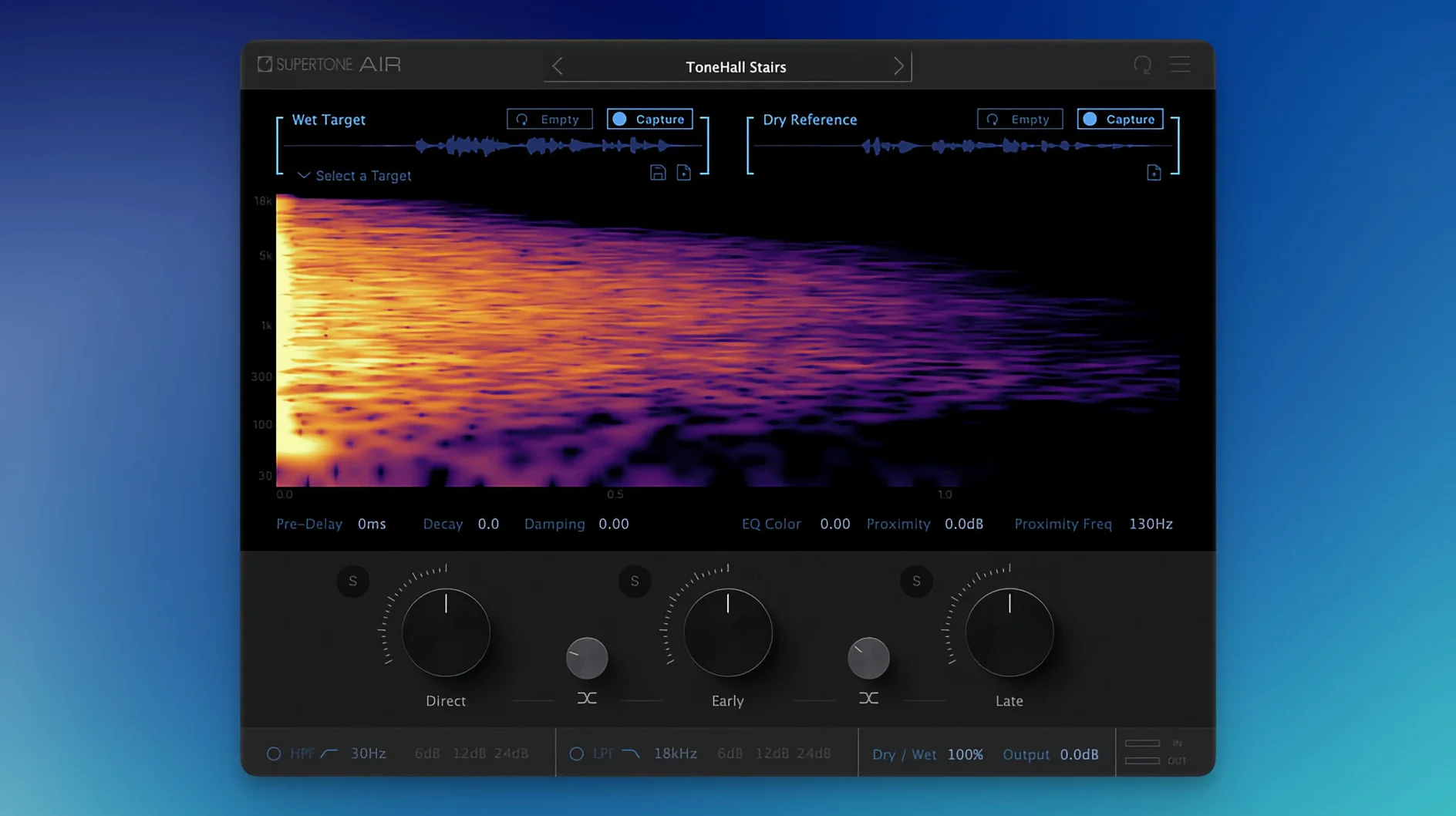
Supertone Air is a dialogue match plug-in that applies reverb and EQ characteristics from one recording to another using Acoustic Scene Transfer. The processing is based on neural networks and covers decay, damping, and proximity, alongside separate controls for direct, early, and late reflections.
On a dialogue track, Air works best when the source and target recordings differ in space. A line recorded in a small booth can take on the room tone of a location recording without sending the whole stem through a convolution reverb. The direct, early, and late reflection controls give you some say in how much of the original close-mic presence stays intact.
On a dialogue bus, Air is more of a finishing tool. Applying it across a group of clips keeps the room consistent when material comes from different sessions. The reverb controls for decay and damping become useful here, since a little tightening can prevent the matched space from blurring the whole bus.
Air is optimized for offline processing in Pro Tools AudioSuite, which suits repair and conform work. The plug-in runs natively on Apple Silicon and is available as AAX, VST3, and AU, with support for 44.1 kHz, 48 kHz, and 96 kHz sample rates. Air profiles can be imported and exported between systems, which helps when an edit suite and a mix room need to share a verified match.
Dialogue editors bridging boom-to-lav gaps fast
Dialogue editors working on drama and documentary pick up most of the immediate value from Air. A production sound track that shifts between boom and lav, indoors and outdoors, leaves gaps that traditional EQ and reverb matching fill slowly. Air collapses that process into a capture-and-apply move that respects the spectral detail of the reference clip.
Re-recording mixers on short-form content — commercials, trailers, game cinematics — get a different benefit. The plug-in lets them take a dry voiceover and seat it inside a location recording without building a separate reverb return. The direct and early reflection controls make this practical even when the reference is dense, like a street scene or a metal stairwell.
ADR supervisors appreciate the profile export. A captured space from the edit suite can travel to the mix stage as a WAV or an Air profile, so the matching logic stays locked. No one needs to eyeball reverb settings from notes.
Users who mix entirely on headphones also find Air helpful. Judging reverb tails on nearfields is one thing; on headphones, the early-to-late balance is harder to place. Air's separation of direct, early, and late reflections gives a tactile way to adjust what the neural network captured, without second-guessing the underlying match.
A noisy reference bakes defects into the target
The first mistake is feeding Air a noisy reference. The neural network treats the entire source clip as a target space, including handling noise, wind rumble, and intermittent bumps. If the reference has a fridge hum baked in, the target clip inherits it. A clean, representative section of room tone — even a silent gap with air — works better than a line delivered next to a busy road.
Another early misstep is overusing the late reflection control. Pulling late reflections up on a close-miked ADR line can push the voice backward in a way that fights the dialogue mix. Late reflections are best treated as a subtle bed; raising them more than a few decibels usually needs a specific creative reason.
Skipping the damping control is common too. A matched space can sound convincing at one playback level but splashy at another. A small damping adjustment — often just a quarter-turn — tightens the tail enough that the match holds across monitor levels without dulling the original presence.
Finally, new users sometimes apply Air per-clip without checking how the matched clips sit next to unmatched ones. A single dry line between two matched lines draws attention. Working in small batches across a scene, or applying the match at the clip-group level, keeps the edit from sounding patched.
A short scenario: documentary dialogue editor
A documentary editor has an interview recorded in a quiet living room. Weeks later, the director records a new line from the same subject — this time in a hotel room with hard walls and a glass desk. The hotel clip is dry, close, and entirely wrong for the scene. The editor captures a short section of room tone from the original interview, loads it as the reference in Air, and applies the match to the hotel line. The direct control stays at unity, early reflections lift slightly, and late reflections drop by a decibel to keep the voice forward. In under a minute, the new line sits inside the living room space. The editor exports the Air profile so the mix stage can reproduce the exact match later.
Workflow: matching ADR to a location recording
This workflow assumes a Pro Tools AudioSuite session with a dry ADR clip and a reference clip from the production sound.
- Select a section of the production clip that contains only room tone — no dialogue, footsteps, or transient noise. A half-second to two seconds is enough.
- Open Supertone Air as an AudioSuite plug-in. Set the process mode to Capture and click Analyze. Air extracts the reverb and EQ profile from the reference selection.
- Click Export Profile and save the .air file to the session folder. This makes the captured space available for other clips and other systems.
- Select the dry ADR clip. Switch Air to Apply mode. The captured profile loads automatically unless you loaded a different one.
- Play the clip with the default match. Listen for the direct signal staying present; if the voice pulls back, reduce Late by 1–2 dB and check again.
- Adjust Damping if the tail sounds glassy or ringy. Start with a small clockwise turn and A/B against the production dialogue.
- Set Decay if the space needs to feel smaller or larger than the reference. Shortening decay by 10–15% often helps when the reference is a large room but the shot is tight.
- Render the clip via AudioSuite. Check the edit point between the new ADR and the surrounding production lines. If the transition calls attention to itself, tweak Early reflections on the ADR clip and re-render.
For batch work, repeat steps 4–8 across all ADR lines that belong to the same scene. Keep the profile loaded and adjust only the per-clip reflection and damping settings where needed.