Aspecten
 Download (158 MB)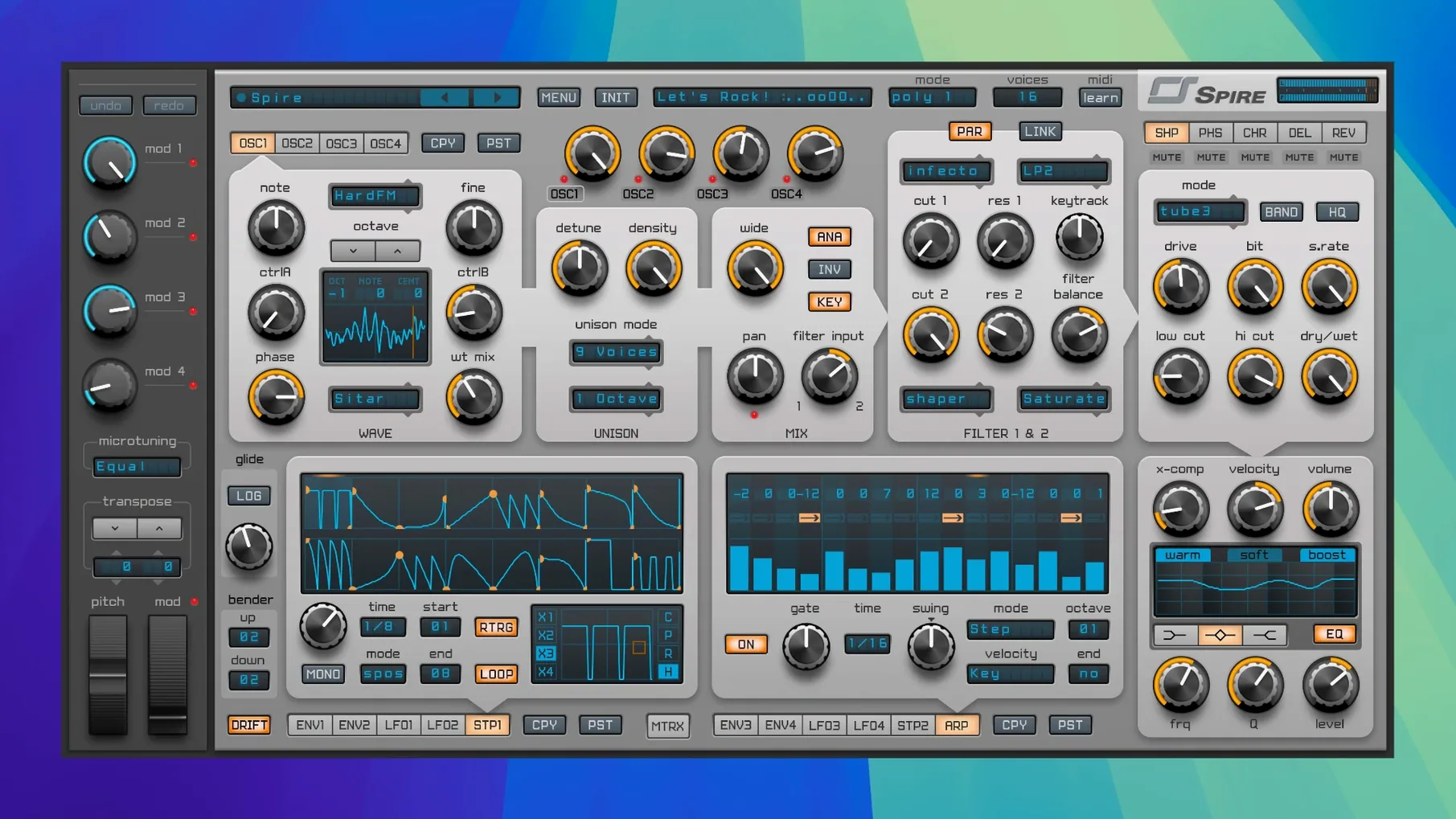
Finding a software synth that sits cleanly in a dense mix without swallowing the low end is half the battle in electronic production. Spire approaches this with a combination of polyphonic voicing and a signal path built around clarity rather than vintage grit.
Modern trance and house synth with a built-in arpeggiator
- Producers working in EDM, trance, house and dubstep who need a modern, precise tone
- Sessions where the arpeggiator and step sequencer are central to patch design
- Running natively on Intel and Apple Silicon Macs from macOS 10.13 onward
Effects chain shapes the core sound
- The plug-in is available in VST, AU and AAX formats — check your DAW’s supported types before installing
- The effects chain (delay, reverb, distortion, phaser and EQ) is integral to the sound, so raw oscillator tone is only part of the picture
AU, VST2 and AAX cover Logic, Live and Pro Tools
Spire loads as a VST2, Audio Unit or AAX plug-in on macOS. This covers the major DAWs on the platform — Logic Pro uses the AU, Ableton Live and Cubase pick up the VST, and Pro Tools sees the AAX. Because the synth runs native on Apple Silicon, there is no Rosetta overhead in current hosts. The installer places all three formats by default, and the activation system ties the licence to the machine rather than a specific plug-in type.
Sound character
Reveal Sound describe the tone as clean and modern, and that holds up when you layer multiple unison voices. The filters stay controlled at high resonance, and the effects section — particularly the phaser and the reverb — can widen a patch without washing out the transient. The arpeggiator and step sequencer share a tab in the interface, which keeps rhythmic programming close to the sound-shaping controls.
Building a pluck bass from scratch
A pluck bass patch reveals how the oscillator section and filter interact under quick amplitude changes. Start by initialising the patch — right-click the preset display and choose Init. Set oscillator 1 to a saw wave and disable oscillators 2 through 4 for now. In the amp envelope, drop the sustain to zero, set a short decay around 300 ms, and leave attack at minimum. The result is a blunt thump, not yet musical.
Next, route oscillator 1 through filter 1 in low-pass mode with a 24 dB slope. Bring the cutoff down to roughly 400 Hz and assign the filter envelope — envelope 2 by default — with a moderate amount, around 40%. Shape envelope 2 similarly: zero attack, decay near 250 ms, zero sustain. The tone should now have the familiar quick snap of a pluck. To add weight, engage oscillator 2 on a sine wave one octave below, blend it gently at around 30% volume, and send it straight to the main output, bypassing the filter. The sub layer stays clean while the saw carries the articulation.
Add movement through the modulation matrix. Assign LFO 1 to oscillator 1's wavetable position, set the LFO shape to a slow random curve, and keep the depth subtle — just enough to vary the harmonic content across repeated notes. Finally, insert a touch of the built-in phaser in the effects chain, mix set low, to give the high mids a slight metallic sheen without softening the transient.
Right-click knobs for MIDI learn and drag-and-drop modulation routing
Several interface details speed up patch design once you know they are there. Right-clicking most knobs opens a context menu with options for MIDI learn, modulation assignment, and value reset. The modulation matrix itself supports drag-and-drop routing: grab a source from the list, drop it onto a target parameter in the main panel, and the connection appears with a default depth. You can then adjust the amount in the matrix table without opening extra windows.
The arpeggiator and step sequencer share a tab, but switching between them preserves the last used pattern in each mode. Holding Shift while turning a knob in the effects section reduces the increment for finer adjustments — useful when dialling in reverb pre-delay or phaser centre frequency. A less obvious feature is the ability to lock individual oscillators to MIDI pitch. In the oscillator tuning panel, a small lock icon next to the semitone control fixes that voice regardless of incoming note changes, handy for creating drones or pedal tones inside a polyphonic patch.
For users who downloaded a spire vst mac bundle and installed all three formats, the plug-in remembers window size per format, so the AU in Logic Pro can be taller than the VST in Ableton Live without manual resizing each session.
Voice count and two other global settings to adjust first
Open the global settings panel — the gear icon in the top bar — and check three options immediately. The first is voice count. Spire defaults to a polyphony limit that suits most patches, but if you work with long release times and dense chords, raise it to 16 or 24 voices to prevent note stealing during held pads. The second is the quality mode for the oscillators. Switching from the default to the higher-quality interpolation reduces aliasing on wavetable sweeps, at a modest CPU cost that modern Macs handle without complaint.
The third is MIDI response. Under the MIDI tab, enable MIDI Thru if you chain hardware synths after the plug-in, and set the pitch bend range to match your controller — 12 semitones for standard EDM leads, 2 semitones for more realistic string-like bends. Also worth adjusting is the GUI refresh rate. Lowering it from the default 60 Hz to 30 Hz frees a small amount of CPU headroom on older Intel machines, though on Apple Silicon the difference is negligible.
September 2025 fix for window resizing after project reload
Build 5343 arrived in September 2025 as a maintenance update focused on host compatibility and interface behaviour. The most noticeable fix addresses a long-standing issue where the plug-in window would resize incorrectly in certain DAWs after a project reload. Users who keep Spire open on a second monitor during long sessions will see the window stay put between saves.
Reveal Sound also improved the preset browser’s search responsiveness. Typing a partial name now filters the list without the brief freeze that affected earlier builds when scanning large user libraries. For anyone working from a spire mac torrent installation that includes extensive third-party preset packs, the difference is tangible — navigation feels direct rather than hesitant. Under the hood, the update tightened the way the arpeggiator syncs to host transport during tempo changes, so patterns no longer drift a few ticks behind when the DAW tempo ramps mid-bar.
No new effects or oscillators were added in this version, but the build includes several small refinements that reduce CPU spikes when loading complex patches during playback. In practice, this means switching presets mid-session is less likely to produce an audio dropout, particularly in projects running at low buffer sizes.