Aspecten
 Download (625 MB)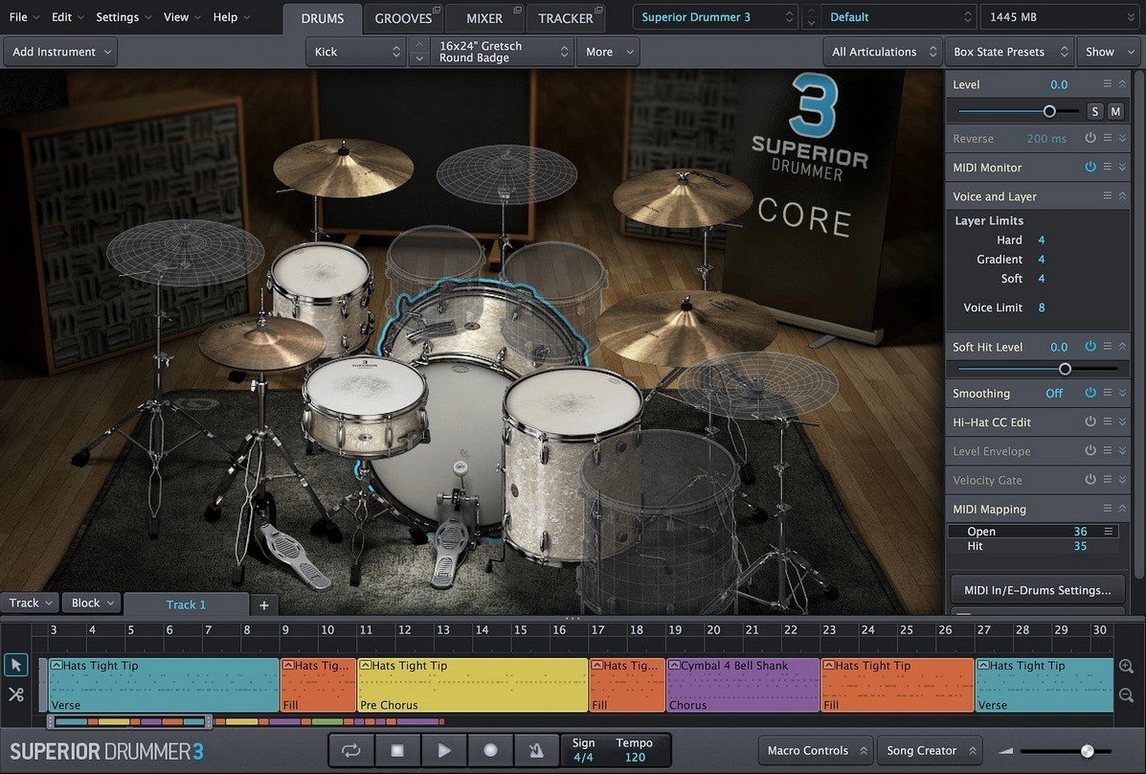
Track bleed control in the mixer is not the first place most users go, but it is where Superior Drummer starts to separate itself from a conventional drum sampler. The bleed routing lets you treat snare wires humming in the tom microphones as a mix component rather than a problem, pulling it forward or tucking it back without touching the direct signal. That degree of control runs through the entire instrument.
Audio to MIDI and the search browser
The drum audio-to-MIDI conversion is built for a working drummer who records a live kit and then wants to reinforce or replace hits with the internal sample library. It processes a monophonic or multi-channel recording and maps transients to MIDI notes, preserving timing and velocity layers. The result is not a cleaned-up grid; it carries the original performance feel. Pair that with the 230 GB library, and you can keep a live snare take while switching the kick and toms to a drier room, all inside one instance. The tap-to-find search in the browser narrows seven core kits and expansion content by sound character rather than filename, which speeds up auditioning when you know the texture you want but not the exact articulation.
Mixer and macro controls
The 35 mixer effects cover the expected (multiple compressors, EQs, saturators) and a few tools that change how you build a kit sound. The transient shaper can isolate the stick attack on a hi-hat without thinning the body, and the convolution reverb loads impulse responses that match the rooms the samples were recorded in. Bus routing is free enough to send the snare bottom microphone to a parallel crush bus while the top mic stays clean, all without leaving the plug-in window. Macro controls let you assign a single knob to crossfade between a tight funk kit and a washy, compressed rock kit, which makes the instrument playable during arrangement rather than something you set once and print.
Buffer size, velocity curves, and fade fixes to apply early
A fresh install of Superior Drummer opens with sensible defaults, but three settings repay an early visit. The first lives in the audio/MIDI setup pane: the buffer size for the internal sample engine. It defaults to a conservative value that keeps CPU load low, yet raising it to 256 or 512 samples on a modern Mac tightens the timing of dense hi-hat patterns in a way that quantise cannot fix later. The second is velocity curve mapping. The plug-in ships with a linear curve, which assumes your pads or keyboard send a perfectly scaled response. Most controllers do not. Pull the curve down slightly in the middle range so that ghost notes on the snare read as velocity 20–40 instead of jumping straight to 70. That one change makes a programmed groove breathe.
The third setting is less obvious: the default mixer state for new kits. By default, the mixer loads with all ambient microphones active, which produces a full, glossy sound during browsing but buries the close mics when you start layering. Save a template that mutes the room and overhead channels, sets the close mics to unity gain, and leaves the ambience channels available but silent. You push them up later when the core sound works, rather than fighting a wash of early reflections from the first kick hit.
Abandoning full presets instead of swapping a single drum
The most common early misstep is treating the library like a rompler. A user drags in a full preset, plays a few bars, decides the snare lacks crack, and swaps the entire kit for another preset. The cycle repeats until they explore a more focused approach. Superior Drummer rewards the opposite method: pick a kick drum that works, then a snare with the right shell depth, then hats with the stick tip sound you hear in your head. Building a kit piece by piece from the seven core libraries teaches the instrument faster than preset-hopping ever will.
Another mistake sits in the MIDI editor. Dragging a factory groove onto a track and looping it without opening the grid editor leaves the hi-hat articulation untouched. A ride pattern mapped to a closed hat articulation sounds stiff and synthetic. Opening the articulation lane in the MIDI editor and manually shifting a third of the hat hits to half-open or edge-triggered samples turns a mechanical loop into something a drummer would recognise. Beginners also tend to ignore the bleed channels entirely, muting them to clean up the mix. The overhead and room mics carry the tone of the cymbals; cutting them removes the glue that makes the kit sound like one instrument in one space.
From acoustic demo to full arrangement with grooves and macros
Songwriters who build arrangements from a single acoustic guitar and a vocal line find the instrument transformative, because the built-in groove library and the macro controls let them audition a verse in half-time rock feel and then switch to a brushed jazz pattern without touching a MIDI note. The tap-to-find browser means they can search for dark or ringy and land on a snare that fits the mood before they have named the track.
Mix engineers who receive poorly recorded drum stems benefit from the audio-to-MIDI conversion in a different way than the manual describes. Feeding a mono overhead track into the detection engine often yields a messy trigger map, but isolating a single tom close-mic track and converting just that channel produces a clean MIDI performance they can feed to a Superior Drummer tom sound that sits in the same stereo field. The original recording supplies the timing; the sample library supplies the body.
Electronic producers who want acoustic textures without losing synthesis control find value in the macro system and the envelope shaper. Loading a dry funk kit, shortening the kick decay to a tight thump, and routing it through the saturation bus while the snare gets a gated reverb creates a hybrid kit that punches like a drum machine but carries the air of a live room. The instrument does not force a choice between acoustic realism and electronic precision.
Copy full articulation sets to another slot via right-click
The right-click menu on any drum piece in the kit view holds a copy articulation command that few users discover in their first weeks. It duplicates the entire articulation set — all velocity layers, all round-robins — to another slot, which is useful for stacking two different snare samples on the same MIDI note without building the second one from scratch. Holding Option while dragging a mic fader in the mixer links it to its paired channel, so the snare top and bottom mics move together as a stereo pair rather than drifting apart.
The search field in the groove browser accepts tempo ranges. Typing 90-110 filters the library to performances recorded within that bracket, eliminating the need to time-stretch a 70 BPM shuffle up to a pop tempo where it falls apart. In the envelope section, double-clicking any knob returns it to its stored value — not zero — which matters on the transient shaper where the neutral position is rarely the default knob position.
A less visible convenience is the MIDI learn toggle in the macro panel. Right-clicking a macro knob, selecting learn, and moving a physical fader on a controller maps it instantly. Stacking four macros on one control surface page turns the whole instrument into a performance tool: crossfade between verse and chorus kits, bring the room mics up for a bridge, and tighten the kick envelope for an outro, all from hardware, without opening the plug-in window.
A workflow: replacing a live kick drum in a dense mix
Start with a stereo drum stem that contains a full kit performance — kick, snare, toms, cymbals — recorded in a treated room but with a kick that sounds boxy and lacks low-end weight. Soloing the kick close-mic channel, if available, gives the cleanest detection result. If the stems are already summed to stereo, a high-pass filter at 80 Hz in the DAW before the sidechain input to Superior Drummer helps the transient detector ignore bass guitar bleed and focus on the kick attacks.
Open the audio-to-MIDI panel, route the filtered signal to the detector, set the sensitivity so that only the loudest transients register — typically around -18 dB threshold with a hold time of 15 ms — and press capture. The resulting MIDI track appears on the instrument's internal timeline. Listen through once with the original stem muted and a factory kick sample loaded. Note any double triggers on fast double-kick passages; reduce sensitivity by 2 dB and recapture only that section.
With a clean MIDI performance locked in, browse the kick library by searching for punch and low together. Audition three candidates with the full mix running, not in solo. A kick that sounds huge in isolation often masks the bass guitar. Pick the sample that cuts through the 60–80 Hz range without clouding the bass fundamental. Switch the kick articulation to the sub-mic channel and blend in just enough of the direct mic to retain attack, then route both to a bus with the FET-style compressor from the 35 built-in effects. Set the attack to 10 ms to let the transient through and the release fast enough to recover before the next hit at the song's tempo.
Finally, send a small amount of the replacement kick to the convolution reverb on an aux channel, using the same room impulse response that the original overhead tracks capture. This glues the new sample into the live space. Print the result as a new stem and align it with the original track. The process takes under ten minutes once the routing is saved as a template, and the detection accuracy at version 3.4.4 holds tight across most contemporary genres.