Aspecten
 Download (358 MB)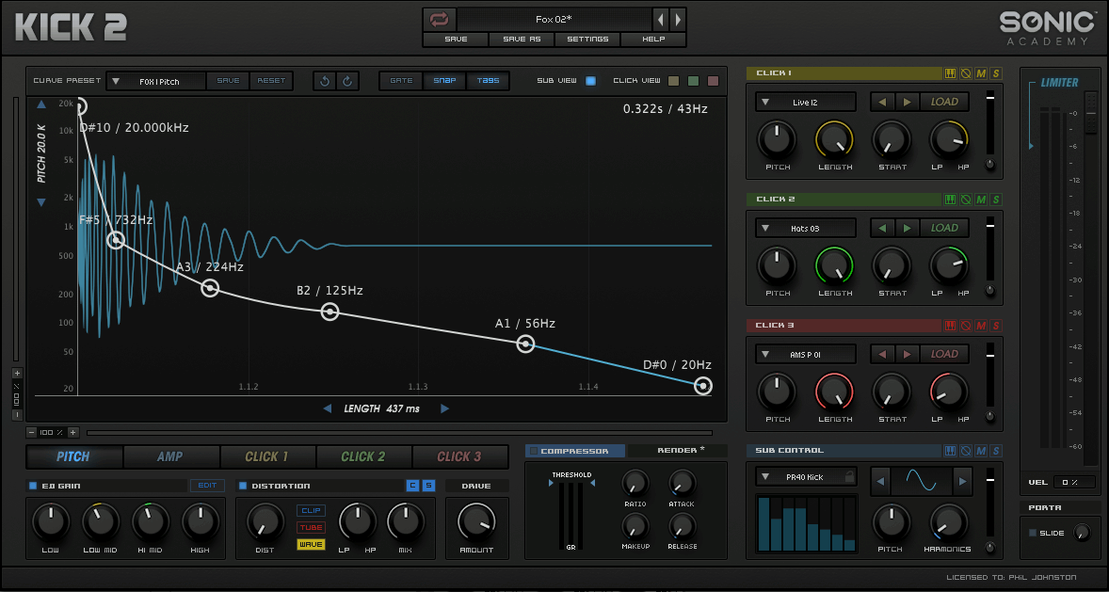
Sub oscillator and click layer
KICK builds its core sound from two parts. A synthesised sub oscillator handles the low-end weight, with several waveforms available beyond a standard sine. Layered on top, a sampled click section supplies the attack transient. The two sources are mixed before passing through a chain of four processors: an equaliser, compressor, limiter and a distortion stage. One low-frequency oscillator is included for modulation.
Good for- Producers who want to construct kick drums from scratch rather than browsing sample libraries
- Quick shaping of sub weight and click character from a single window
- Keeping the kick contained with the built-in limiter, without leaving the plugin
- The plugin is 64-bit Intel only; native Apple Silicon is not supported
- Modulation is limited to the single LFO provided
- The earlier version carried the name Kick by Nicky Romero
Intel-only Audio Unit on Apple Silicon Macs
Sonic Academy KICK runs as a 64-bit x86 plugin on macOS. Hosts that load Intel-only Audio Units or VST instruments can open it, provided the session is not running natively under Apple Silicon. The interface and workflow remain the same across supported formats. The package contains installation and activation instructions; following those steps places the plugin where the host expects to find it.
Can KICK replace your kick sample library
One of the first things producers ask is whether KICK can fully replace a kick sample library. The answer depends on how you work. If you tend to layer two or three samples and spend time shaping envelopes, the plugin covers that ground inside a single interface. If you rely on heavily processed acoustic kick recordings, KICK sits more comfortably as a supplement — it excels at electronic weight and clean transients, but it does not pretend to be a multi-sampled acoustic drum.
Another frequent question concerns the Intel-only build. On Apple Silicon Macs the plugin runs through Rosetta 2, and many hosts handle that without fuss. The practical consideration is whether your DAW itself runs under Rosetta or natively. A host booted in native Apple Silicon mode will not see an Intel-only Audio Unit. The workaround is to launch the DAW using Rosetta, or to check whether your host offers a hybrid loading mode. Performance is rarely a problem for a single kick instance, but it is worth understanding the architecture before you start a project with deadlines.
People also want to know about the click layer. The sampled clicks are built in — you are not loading your own samples, and the earlier Kick by Nicky Romero had the same design. The three click-shaping areas let you adjust tone, length and pitch independently, so the range of attack textures is broader than it first appears. If you absolutely need to drop in a specific transient sample, you would route KICK without its click layer and add the transient on a separate channel, but the internal clicks cover a lot of ground for electronic styles.
Activation is handled by instructions included in the package, and the process is straightforward enough that most users are up and running within a few minutes. The plugin does not require a constant internet connection once activated.
First days with KICK
When you first open the plugin, resist the urge to turn every knob. A better approach is to pick one of the factory presets close to the style you are working in and study how its sections are set. Pay attention to the relationship between the sub waveform choice and the distortion algorithm selected — those two decisions shape the fundamental character more than any other parameter. The sine wave into the softer clipping algorithm gives you a round, controlled low end, while a triangle or square into the harder distortion stage produces something far more aggressive.
Spend an early session auditioning the click layer in isolation. Mute the sub oscillator temporarily and listen only to the transient. Adjust the three click-shaping areas while a four-to-the-floor pattern plays, and you will quickly build a mental map of which click settings work for techno, which suit house, and which push into harder territory. Once the click feels right, bring the sub back in and focus on the phase relationship. A sub and click that sit well together at the transient peak tend to translate better across playback systems than ones that fight each other in the first ten milliseconds.
The built-in limiter is useful for keeping peaks predictable during sound design, but it is worth trying the plugin without it engaged while you shape the tone. Get the sub and click balance right first, apply EQ cuts rather than boosts where possible, and only then engage the limiter to catch any remaining peaks. This habit prevents the limiter from masking balance problems early in the process.
A practical tip for the first week: save your own preset after you make a kick that works in a track. The factory bank is generous at over two hundred presets, but your own starting points, tuned to the kind of music you actually make, speed up later sessions considerably. Name them clearly — key, style, and a one-word character description works better than "Kick 1" through "Kick 12".
How KICK compares with similar tools
Several Mac plugins cover kick drum synthesis, and the choice usually comes down to how much control you want versus how quickly you need a result. Kick 2 by Sonic Academy sits in a middle ground — more hands-on than a preset player, less modular than a full synthesizer patched for percussion.
Compared to Waldorf Attack, an older percussion synthesizer that some producers still keep installed, KICK offers a more focused workflow. Attack spreads itself across kicks, snares and toms with a shared engine, which is flexible but less refined for kick-specific tasks. KICK's click layer and three distortion algorithms give it an edge for modern electronic kick design, though Attack still holds its own for percussive sounds beyond the kick drum. If your sole need is a dedicated kick tool, KICK gets you there with fewer detours.
Another point of reference is Plugin Boutique BigKick, which also combines a synthesized body with a sample layer. BigKick lets you load your own click samples, which KICK does not, but KICK's three click-shaping areas and the integrated limiter make it quicker to reach a finished sound without leaving the plugin. BigKick suits producers who already have a curated transient library and want that flexibility, whereas KICK rewards those who prefer to shape what is already provided and move on.
Producers who have used Kick 2 VST free download Mac sources or searched for Kick 2 torrent and Kick 3 torrent files often wonder whether the updated versions change the core workflow. The version 1.1.1 build discussed here remains a capable tool, and the differences in later iterations are incremental rather than transformative for basic kick design tasks. The engine that combines a sub oscillator, click layer and processing chain is well established. Those exploring Kick 3 Mac torrent options might find that this version already handles the majority of electronic kick duties without the added complexity of a newer release.
Building a kick from scratch: a workflow
Here is a method for creating a clean, weighty techno kick that sits well in a mix without eating up headroom. The steps assume you are working in a DAW with a four-to-the-floor pattern already playing, and that KICK is loaded on a new instrument track.
Start by initialising the plugin to a blank state. Select a sine wave for the sub oscillator — it provides the most controlled low end for this style. Set the sub envelope so the decay is moderately short, roughly 300 to 400 milliseconds, with no sustain. The pitch envelope deserves attention here: a quick drop from a slightly higher starting pitch gives the kick a sense of forward motion. Keep the pitch range modest, perhaps two or three semitones, to avoid losing the fundamental weight.
Move to the click layer. Browse the built-in click selections and choose one with a sharp, short transient — something that sounds almost like a closed hi-hat blended with a low-mid knock. In the three click-shaping areas, roll off the low frequencies to prevent the click from muddying the sub, trim the length so the transient is tight, and adjust the pitch so the click sits just above the sub in the frequency spectrum rather than clashing with it. A pitch offset of a few semitones upward often works.
With both sources playing, open the EQ section. Apply a narrow cut around 200 to 250 Hz if the kick sounds boxy, and a gentle high-pass filter set around 30 Hz to remove subsonic rumble that most playback systems cannot reproduce. The compressor comes next: set a moderate ratio, around 4:1, with a fast attack and a release timed to the track's tempo so the gain reduction returns to zero before the next kick hits. The goal here is control, not squashing.
Now choose a distortion algorithm. For techno, the second algorithm — slightly overdriven, with a warm saturation character — tends to add presence without turning the kick brittle. Drive it until the kick gains a little harmonic edge in the 1 to 3 kHz range, then back it off slightly. Engage the limiter last, setting the ceiling just below 0 dB and pulling the threshold down only enough to catch the loudest peaks. The result should be a kick with a defined transient, a solid sub presence, and enough upper-harmonic content to cut through a dense mix.
KICK alongside other tools and macOS features
KICK fits neatly into a Mac producer's toolkit because it does one thing and routes like any other Audio Unit instrument. In a DAW such as Logic Pro, you can place it on a software instrument track and follow it with your usual processing chain — an additional EQ, perhaps a transient shaper, or a saturation plugin for more colour. The built-in processing inside KICK means the external chain can be shorter than what you might need with a raw sample.
One combination that works particularly well is KICK paired with a spectrum analyser on the master bus. Because the plugin builds the kick from first principles, you can watch the fundamental frequency land exactly where you want it, then tweak the sub tuning until it aligns with the track's key. This is harder to do precisely with a sampled kick, where the pitch centre may drift slightly across the sample.
macOS features such as Audio Unit hosting and aggregate device routing do not interact with KICK in any special way — it behaves as a standard plugin. Where the Mac environment helps is in the broader workflow. You can save KICK presets into a folder synced via iCloud, making your custom kick collection available across multiple Macs. The plugin also responds to MIDI note input for pitch tracking, so you can sequence kick patterns with note variation if your track calls for a pitched kick line rather than a static fundamental.
For sound designers who work with multiple drum plugins, KICK sits well alongside sample-based tools. A common setup uses KICK for the primary kick, a sample player for layering additional textures, and a bus compressor gluing them together. The KICK output routes cleanly into the bus, and because its own limiter handles internal peaks, the bus compressor can focus on overall drum group glue rather than taming an erratic kick signal.