Aspecten
 Download (38 MB)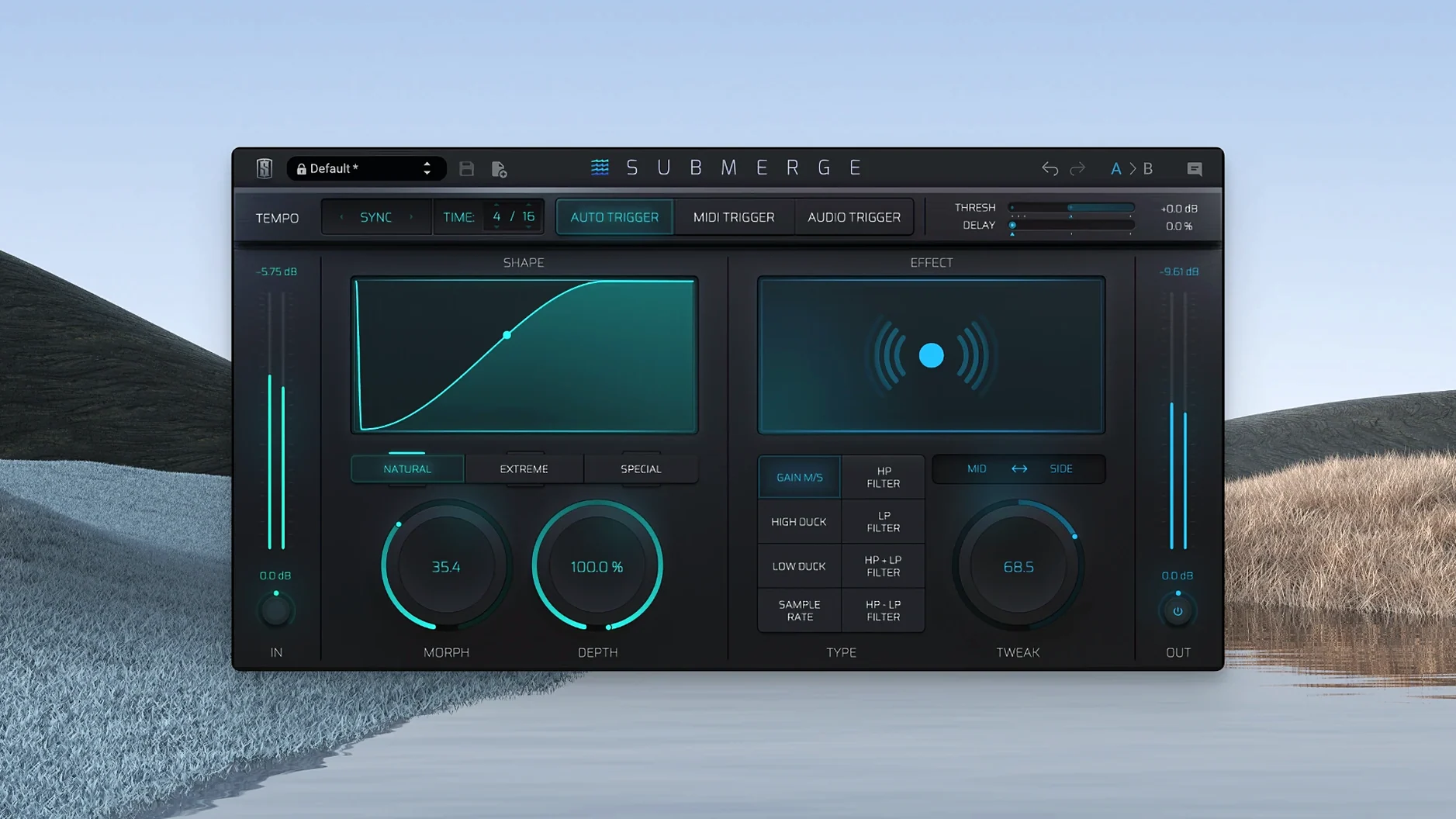
Feature set frozen at launch on Apple Silicon
Version 1.0.5 is the current release and the developer lists no specific changes for it. The plug-in remains at its initial feature set, running on Apple Silicon Macs under macOS 11 and later.
DAW routing that feeds the automatic sidechain
Submerge is an automatic sidechain plug-in, so it runs inside any DAW that can load the same plug-in format you installed. Slate Digital delivers it through their own installer, and the host needs to support standard routing for the audio and MIDI trigger modes to work correctly.
How does the triggering work?
Three trigger modes cover different setups. The audio mode reacts to an external side-chain signal, MIDI mode follows incoming MIDI notes, and auto mode syncs to the project tempo without any extra routing. The MIDI trigger means you can draw the ducking pattern yourself in the piano roll.
Threshold, Speed, Morph, Depth, and Tweak contour
Controls include Threshold, Speed, Morph, Depth and Tweak. Three curve types — natural, extreme and custom — set the contour. Holding Shift inverts the curve, turning ducking into a pushing effect. Mid/Side processing and eight built-in effects let you treat the centre and sides differently, which moves it beyond simple volume ducking.
Sidechain signal never reaches the plug-in
One of the first things that trips people up is the plug-in not reacting when they expect it to. In audio trigger mode, the most frequent cause is a sidechain signal that never reaches Submerge. The DAW’s sidechain routing is separate from the insert slot, and forgetting to assign the kick track to the plug-in’s sidechain input means the Threshold knob has nothing to grab onto. Check your DAW’s plug-in header — most hosts show a sidechain menu right there.
Another point of confusion is the relationship between Threshold and Speed. Setting the threshold very low in a dense mix can make the ducking feel sluggish, not because Speed is wrong, but because the trigger never fully releases between hits. Raising the threshold a touch often tightens the response more than adjusting Speed alone.
With the MIDI trigger mode, missed notes tend to come from an unarmed MIDI track or a mismatched channel. Submerge listens on whatever channel the DAW sends, so a kick pattern accidentally placed on MIDI channel 2 when the track outputs channel 1 will produce silence. Keeping the MIDI send on channel 1 avoids this entirely, unless you deliberately split channels for layered ducking.
The auto trigger mode syncs to project tempo, but tempo changes mid-arrangement can catch it out if the DAW does not send updated time-position information to the plug-in in real time. Most modern DAWs do, but pausing and restarting playback after a tempo shift forces a resync. A few users also report that the eight built-in effects apply in a fixed order, and pushing sample-rate reduction hard before high-pass filtering sometimes leaves aliasing artefacts that sit above the filter cutoff. Swapping the order is not possible internally, so placing a separate EQ after Submerge in the chain is the clean workaround.
When someone grabs a slate digital torrent and installs outside the hub, a separate snag appears: the plug-in may not register its factory presets because the installer from a slate digital mac torrent sometimes omits the supporting preset folder. Dragging the preset files manually into the Slate Digital presets directory restores them. Likewise, a slate digital crack mac version occasionally loads with the GUI offset in certain hosts — resizing the plug-in window typically snaps the layout back into place.
Behaviour carries over without adjustment from earlier builds
Version 1.0.5 is a maintenance release that kept the feature set unchanged from the initial launch. For daily work, this means the behaviour users learned on earlier builds carries over without adjustment. The architecture remains ARM-only, so Intel Macs are not supported and the plug-in simply will not scan in an AU or VST3 wrapper running under Rosetta on those machines. On Apple Silicon Macs, the plug-in loads as a native process, which keeps CPU draw predictable even in larger sessions.
No new effects, curve types or trigger modes arrived with 1.0.5, and the control ranges — Threshold, Speed, Morph, Depth, Tweak — are identical. What changed under the hood is stability around tempo reporting in Logic Pro and Ableton Live, where earlier builds occasionally lost sync after a long loop cycle. The current build holds the grid tighter, which matters most in auto trigger mode on projects with gradual tempo ramps.
Bass line pumps in time with the kick on a held legato patch
A mix engineer working on a synthwave track wants the bass line to pump in time with the kick, but the bass part is a held legato patch with no natural rhythmic gaps. Routing a sidechain compressor works, but the release curve is never quite right — it dips too hard or recovers too slowly for the 120 bpm tempo.
They drop Submerge on the bass channel, set the trigger to audio and feed the kick into the sidechain input. The curve type goes to extreme for a sharper dip, and Speed gets dialled to match the sixteenth-note subdivisions. Morph is pulled back slightly to soften the very bottom of the curve so the bass never fully disappears. With Mid/Side engaged, the side signal ducks more heavily while the centre stays a little more present, keeping the low-end weight centred in the mix even during the pump. The built-in high-pass effect trims sub-40 Hz rumble from the ducked signal, tightening the overall low end without patching in another EQ. The whole setup takes under two minutes and stays phase-coherent because Submerge handles the stereo field internally rather than splitting to two bus channels.
Load Submerge on a kick-and-pad loop first, not a full mix
After the standard installation procedure, load Submerge on a simple kick-and-pad loop first — not a full mix. Switch to auto trigger mode and set the project tempo to something steady around 100 bpm. Watch how the Depth and Morph controls interact: Depth sets how far the signal drops, while Morph changes the shape of the drop from a hard V to a softer U. Getting a feel for that pairing without a dozen other tracks playing saves time later.
Test the Shift-invert behaviour early. Holding Shift while adjusting a curve turns ducking into pushing, which is useful for emphasising transients on percussion loops. Mapping that to a MIDI controller — if your DAW supports it — makes it a performance tool rather than a set-and-forget insert.
Build a small user preset library in the first few sessions. Save a preset for a standard audio-triggered kick-duck, one for a MIDI-triggered pattern with a custom curve, and one for a subtle Mid/Side pump on a synth group. The plug-in ships with factory starting points, but your own presets tied to your monitoring environment will translate faster across projects.
If Sidechain routing feels tedious in your DAW, keep a template project with a kick track already routed to Submerge on a bass, pad and reverb bus. Dragging stems into that template later means the ducking skeleton is already in place, and you adjust only Threshold and Speed per track. For users who source the plug-in via a slate digital torrent, verifying that the presets folder landed in the correct Library path prevents a blank preset browser on first launch. A quick spot-check of a slate digital mac torrent install against a known working preset list catches missing files before a session starts. And if a slate digital crack mac version throws a licence prompt, a reinstall with the standard procedure usually clears it without touching any other Slate plug-ins already on the system.