Aspecten
 Download (179 MB)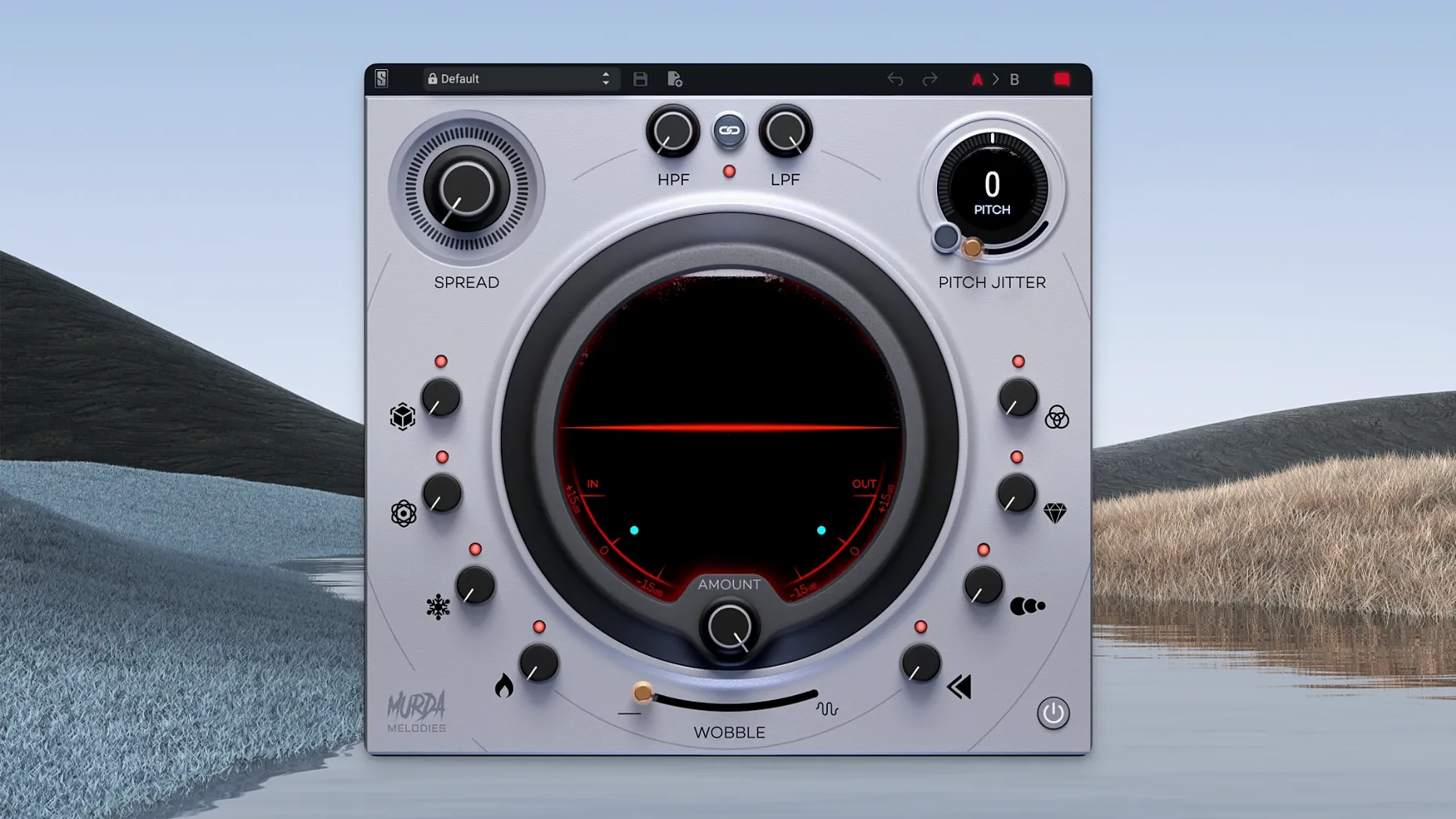
Anyone who has used a simple doubler or pitch plugin to thicken a melody line will recognise the starting point, but Murda Melodies pushes the idea much further. It is a multi-effects processor developed with Murda Beatz, built specifically for reshaping melodic material into something less predictable.
On individual tracks
Place it on a lead synth or vocal line where a dry signal feels too static. A single instance can introduce subtle pitch drift via the Jitter control, widen the stereo field while keeping the low end mono-safe, and add a short reverse swell that pulls the phrase forward.
On return buses
Send a handful of elements to a shared aux channel carrying Murda Melodies. The synced delays and reverb sit well in a parallel chain, letting you wash a pluck or arpeggio in texture without losing the transient of the dry track beneath.
From octave doubles to formant-smeared sound design
Its four-octave pitch shifter handles both tight octave doubles and formant-smearing extremes. Combined with the modulation section and the fifty-plus presets from Murda Beatz and Slate Digital, the plugin suits quick sound design as much as it does careful mix detailing.
Processor load on an Apple Silicon Mac
People often ask whether a plugin like this needs a powerful machine. The answer is no in the ordinary sense: Murda Melodies is not a heavy convolution reverb or a circuit-modelled channel strip. On an Apple Silicon Mac it sits lightly on a single core, and you can run several instances before the buffer crackles become a concern. What it does need is a clear idea of where you want the sound to go. The eight knobs are simple, but stacking pitch jitter, reverse, and a wide reverb without a plan will turn a tight melody into mush faster than any CPU meter can spike.
Another common question is about the mono compatibility, especially with the stereo widener. Early versions of the plugin would collapse awkwardly when summed to mono, but the 1.0.8 update addressed that. The widener now keeps the centre information intact, so a hook that sounded wide in headphones will not disappear on a club system. That said, it is still wise to check the mix in mono after dialling in extreme width: the effect is mono-safe, not mono-transparent.
People also ask whether the plugin works as a straightforward pitch shifter for vocal ad-libs or 808 patterns. It can, but that is not its strongest side. A four-octave range sounds promising on paper, yet the algorithm is tuned for character rather than surgical clean shifting. Pitch a vocal up seven semitones and you get a grainy, slightly chorused result that might be exactly right for a bridge section, but it will not replace a dedicated vocal tuning tool. Consider it a texture generator first, a corrective tool second.
Widening an arpeggio into an evolving hook
Start with a simple four-bar arpeggio from any subtractive synth, dry and centred. Insert Murda Melodies on the track and call up the default preset, then dial everything back to zero. The goal here is a wide, evolving melody that still reads as one sound, not three separate layers.
Step one: bring the pitch shifter up by twelve semitones and blend it to about thirty percent wet. The octave-up layer adds air without sounding like a separate synth. Step two: set the delay to an eighth-note sync, feedback low enough that only two repeats are audible, and pan the taps slightly left and right. This spreads the arp across the stereo field without the mud that a chorus might bring. Step three: engage the reverse effect, but only for the second half of each bar. Automating the wet-dry balance with a simple ramp achieves this; the reversed tail pulls the ear into the next phrase.
Now the pitch jitter. A value between fifteen and twenty percent introduces the kind of unstable pitch fluctuation you hear on worn-out tape, enough to make the arp feel organic but not so much that it sounds out of tune. Finally, the low-pass filter tames the top end of the octave layer and the delays, rolling off around six kilohertz so the texture sits behind the vocal that will eventually occupy the centre. Save the result as a user preset. The whole process takes under two minutes once you know the knob positions, and the arp now fills stereo space without competing for the midrange.
Fixed effect blocks versus a chainable module pool
Next to Soundtoys Effect Rack, Murda Melodies occupies a narrower lane. Effect Rack lets you build chains from a deep pool of modules — Decapitator, EchoBoy, Crystallizer — and reorder them freely. Murda Melodies gives you eight fixed effects with one knob each, no routing matrix, no drag-and-drop. That limitation is also its speed: where Effect Rack invites experimentation that can eat half an hour, Murda Melodies pushes you toward a finished sound in a few moves. For a producer who wants a murda melodies free download to try a quick idea, the simpler tool often wins the race.
Compared with iZotope VocalSynth 2, the overlap is smaller. VocalSynth is a vocoder and harmoniser with a set of character modes, but it is fundamentally a vocal processor. Murda Melodies works on anything melodic — a guitar line, a sine pluck, a sampled flute — and does not try to follow pitch or generate harmonies. VocalSynth can sound huge on a rap ad-lib, yet it would be an odd choice for a synth melody. Murda Melodies is the more flexible of the two for instrumental work, though it lacks VocalSynth's spectral display and tuning feedback.
Devious Machines Texture presents a closer comparison. Both plugins layer pitched, delayed, and modulated copies of the source to create width and movement. Texture adds granular processing and a more visual modulation system, while Murda Melodies keeps the signal path simple and analogue-flavoured. On a trap hi-hat pattern, Texture might yield glitchier, more digital results; Murda Melodies leans toward the vinyl wobble and filter drive that fit the genre it was named for. Choosing between them depends on whether you want surgical grain control or quick, characterful sweetening.
Breaking digital stiffness with the Jitter knob
The Jitter knob defaults to zero on most presets, and that is the first thing to correct. Even a small amount — three to five percent — loosens the stiffness of a purely digital pitch shift. On a held pad note, the difference between zero and five percent is the difference between a static layer and a living one.
Next, the filter section. The low-pass and high-pass filters are placed after the effects chain, which means they shape the combined wet signal rather than the source. Pulling the low-pass down to three or four kilohertz on a bright preset tucks the texture under the lead vocal without needing a separate EQ. Few presets exploit this, so making the adjustment early becomes a habit.
The stereo widener has a sweet spot. Past sixty percent, the side information begins to outweigh the mid, and the effect can sound hollow on smaller speakers. A setting between thirty-five and fifty percent gives the sense of width while keeping the body of the sound present in the centre. For anyone who got a slate digital mac torrent and is exploring the plugin for the first time, setting the widener to forty percent and leaving it there is a safe baseline. From there, the other seven knobs become a playground.