Aspecten
 Download (7 MB)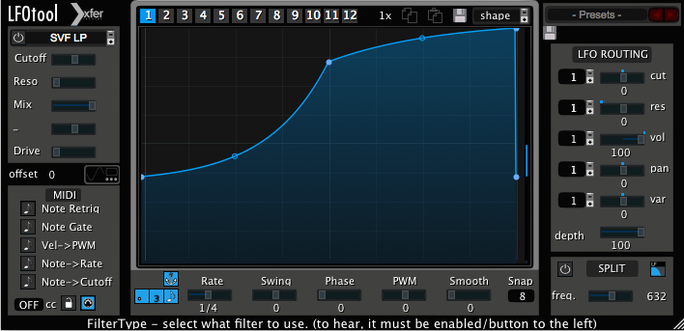
1. Pick a format and host
LFOTool loads inside any VST, AudioUnit or AAX-compatible DAW on macOS 10.11 and later, running natively on both Intel and Apple Silicon. The C++ codebase keeps CPU draw low even with multiple instances, and sample-accurate sync keeps modulation locked to the timeline.
2. Set the rate
LFO rate is controlled in hertz or synchronised to host BPM. A swing parameter offsets every second step when BPM sync is active, pulling rhythmic feel away from a rigid grid without touching the DAW’s own groove settings.
3. Draw a shape
A customisable point-and-curve editor drives up to four graphs simultaneously. Assign them to cutoff, resonance and pan, then drag nodes to build anything from a smooth sine to a stepped gate pattern. The same editor also feeds the MIDI output stream, so one LFO shape can modulate an internal filter and an external synth at the same time.
4. Put it to work
Common uses sit close to the mixer: AutoPan and tremolo for movement, sidechain-compressor pumping simulation for ducking, and auto-filter sweeps that follow the curve exactly. Because LFOTool processes incoming audio and generates MIDI messages in parallel, it works as both an insert effect and a modulation source for other instruments.
Apple Silicon bug fixes and preset-switching stability
Version 1.768 arrived as a maintenance update rather than a feature release, tightening the plug-in’s behaviour on Apple Silicon hosts and fixing a handful of edge-case bugs that could interrupt MIDI output when switching presets rapidly. No new graphs, no redesigned editor, no added effect modes. The changes most users notice are under the surface: smoother GUI rendering on high-DPI displays, and a more predictable recall of swing values when reopening projects saved in an earlier point release.
For everyday use that means less time nudging a parameter back to where it was yesterday. Automation lanes that previously drifted by a few samples on loop boundaries now stay put, and the plug-in recovers cleanly after a host buffer-size change — something that used to require removing and reinserting the instance in certain DAWs.
The preset browser remained untouched. The same dozen-graphs-per-preset ceiling applies, with four graphs live at once. MIDI CC routing still uses the same simple dropdown assignment. None of that needed changing, and the developer left it alone.
Minimal CPU footprint across dozens of instances
A single instance of LFOTool draws little from the CPU meter. On a busy mixing session with forty or fifty tracks, inserting it on every channel that needs ducking or pan movement does not suddenly push the system into overload territory. The C++ foundation shows its hand here: the plug-in runs lean, processes audio in tight blocks, and does not load sample libraries or background processes of its own.
Stability holds up in long sessions. Crashes traceable to the plug-in itself are rare in version 1.768, and the common DAW hosts — Logic Pro, Ableton Live, Cubase, Reaper — handle it without complaint. Where occasional hiccups appear, they usually involve MIDI routing to external hardware; a port assignment can get lost after disconnecting and reconnecting an interface, and the plug-in does not always re-establish the link automatically. A quick manual reassignment fixes it.
Memory footprint is minimal. The plug-in stores curve data and preset graphs, nothing more. It does not cache audio or build large internal buffers, so RAM use stays flat regardless of how many instances are active. That makes it viable on older Macs still running macOS 10.11 through to current Apple Silicon machines without any noticeable difference in behaviour.
VolumeShaper, MMultiBand Tremolo and Tal‑Filter 2 approached side by side
Three other modulation tools often sit alongside LFOTool in a producer’s folder: Cableguys VolumeShaper, MeldaProduction MMultiBand Tremolo, and the free Tal-Filter 2. Each approaches LFO-driven shaping from a different angle.
Cableguys VolumeShaper specialises in precise volume curves and multiband ducking. Its editor is more detailed for gain shaping, with separate bands that LFOTool does not offer. But VolumeShaper stays in the audio domain; it does not generate MIDI CC streams, so it cannot simultaneously modulate an external synth while processing an audio track. LFOTool’s dual role — audio processor and MIDI source — gives it an edge in setups where hardware or other plug-ins need synchronised control signals.
MeldaProduction MMultiBand Tremolo splits modulation across frequency bands and adds harmonic controls LFOTool never attempts. Its interface is deeper and busier, and the CPU load climbs faster with multiple bands engaged. LFOTool feels quicker to set up for straightforward tasks like sidechain simulation or auto-pan, partly because it presents fewer options on the surface. The trade-off is less surgical control over which frequencies receive modulation.
Tal-Filter 2 is a free alternative that covers basic volume and filter LFO duties with a simple envelope editor. It lacks the point-and-tension curve precision of LFOTool, cannot send MIDI, and does not support sample-accurate sync. For a producer wanting reliable sync, MIDI output and fine curve control in one plug-in, LFOTool still occupies a spot the free options do not reach.
Where LFOTool sits apart is the combination of sample-accurate sync, MIDI output, four simultaneous graphs and an editor that feels immediate. An xfer lfo tool free search yields alternatives with overlapping features, but none that bundle audio processing and MIDI generation with the same curve editor in one window. The lfo tool mac community tends to keep it installed even when other modulation plug-ins are available, mainly because it replaces two or three separate tools on a channel strip.
Clearing space for a kick in a stacked synth chorus
A mix engineer in a Utrecht project studio opens a track with a dense synth chorus that fights the kick drum for space. The arrangement is busy: stereo pads, a percussive arpeggio line and three layers of vocals stacked on top. EQ alone will not clear the low end without thinning the synths too much.
She inserts LFOTool on the synth bus. From the preset menu she picks a sidechain-style ducking curve, then adjusts the point editor so the release slope matches the decay of the kick rather than the default linear fall. She assigns the first graph to volume, sets the rate to quarter-note BPM sync, and dials in a touch of swing — just enough to stop the ducking from sounding machine-like.
The second graph she assigns to a low-pass filter cutoff, drawing a shallower curve that darkens the synth bus only when the kick hits, leaving the upper harmonics open the rest of the time. Graph three goes to pan, opening the stereo field slightly on the offbeat. The kick now punches through without the synths sounding squashed, and the stereo movement stays subtle enough that it does not distract from the vocal.
She copies the instance to a bass track and tweaks the release time, then routes LFOTool’s MIDI output to a compressor sidechain input on a reverb return, ducking the reverb tail in sync with the same LFO shape. The whole process takes under five minutes. No automation lanes drawn, no external sidechain routing set up, no additional plug-ins loaded.
After printing the mix, she saves the preset — all four graphs, rate settings and MIDI assignment — as a single recallable patch for the next project with a similar arrangement. That preset, one of twelve graphs stored in the bank, can be recalled or switched via MIDI note during a live set if needed.
Sidechain simulation and auto-pan for beat-driven workflows
Electronic music producers building tracks in Ableton Live or Logic Pro gain immediate use from the sidechain simulation and auto-pan effects. The swing parameter and BPM sync fit naturally into beat-driven workflows, and the ability to send MIDI CC from the same LFO that shapes audio means a single curve can control both a plug-in parameter and an external synth filter.
Sound designers working on film or game audio benefit from the four simultaneous graphs per preset. Assigning separate curves to volume, cutoff, resonance and pan on a sustained texture creates evolving movement that would take multiple automation lanes to replicate. Switching between presets via MIDI notes lets a single instance cycle through twelve distinct modulation states without reloading a session.
Mix engineers who handle dense arrangements value the speed of setup. Dragging a few nodes to shape a ducking curve and assigning it to a bus takes less time than routing a traditional sidechain compressor and adjusting attack, release and threshold. The sample-accurate sync means the ducking lands exactly on the transient, every time, regardless of buffer size or plugin delay compensation chains.
Users who work primarily with acoustic recordings or sparse arrangements where subtle, natural dynamics are the goal will find less use for LFOTool’s rhythmic, curve-driven approach. It is not a general-purpose dynamics processor, and it does not replace a compressor for tasks that need program-dependent response rather than a fixed LFO shape. But for anyone who regularly carves rhythmic movement into audio — pumping basses, pulsing pads, stepped filter sequences — LFOTool earns its place on the insert slot.
Producers looking for an lfo tool mac torrent or an xfer lfo tool crack should know that version 1.768 installs and activates cleanly when the included instructions are followed, and the demo limitation is simply a 15-minute timeout that resets on reload. The plug-in itself is compact, stable and built to stay out of the way, making it a persistent tool in Mac-based studios that rely on tight modulation without bloated CPU overhead.