Aspecten
 Download (97 MB)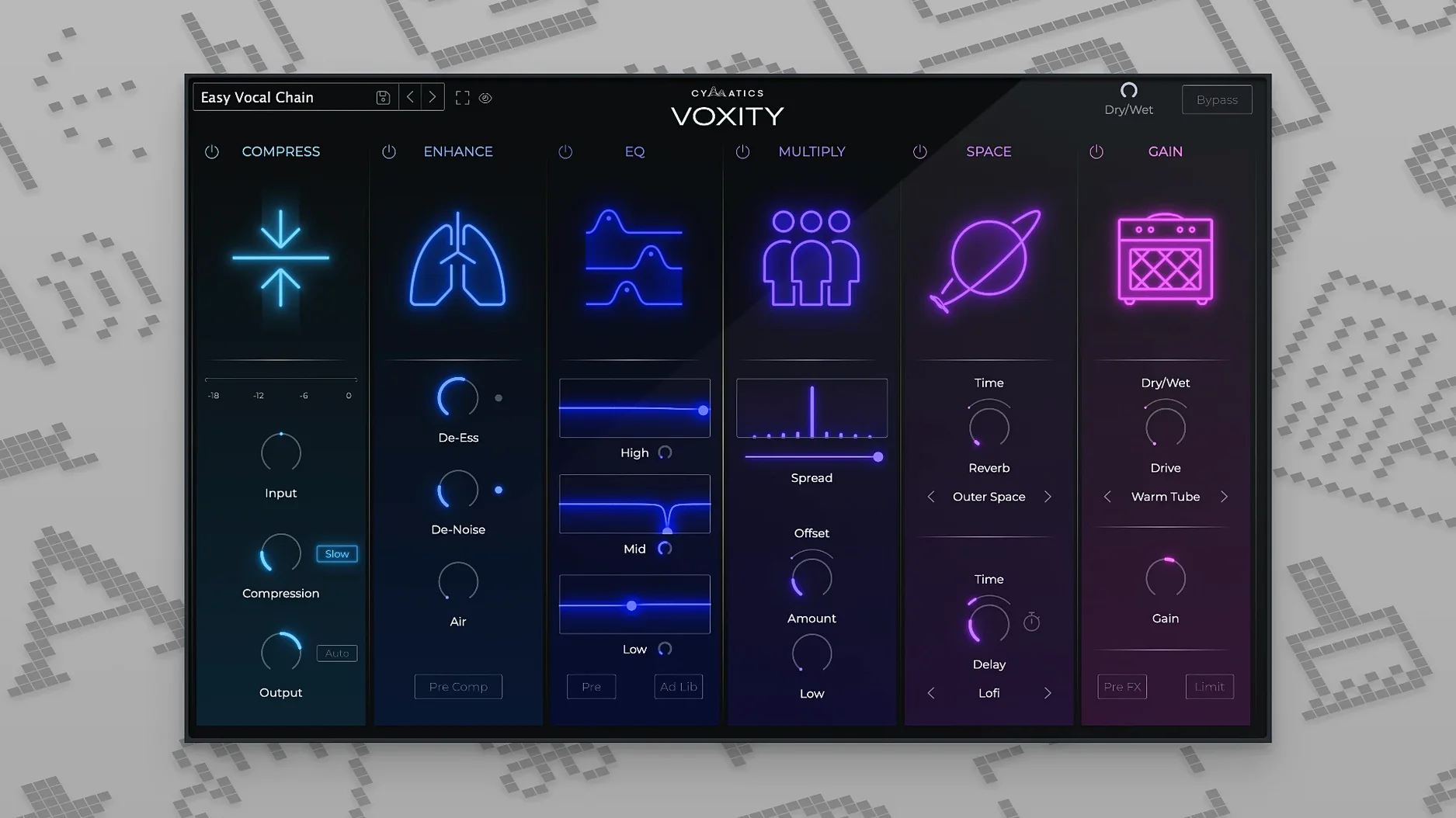
A vocal track sits in a Logic session, dry and a little uneven. You load Voxity, step through a few presets, and the recording gains presence and control without a chain of separate processors.
Formats and hosts — VST3 and AU plug-in formats for 64-bit hosts on Intel and Apple Silicon Macs. It runs in Logic Pro, Ableton Live, FL Studio, Cubase and other DAWs that support these standards.
Compatibility — Requires macOS 10.14 or later. Native support for both Intel and Apple Silicon processors means no Rosetta translation layer on newer machines.
Signal path — The processing moves from cleanup to shaping. First-stage modules handle de-harshing and breath control, pulling back sibilance and intake noise. Volume levelling follows, evening out phrases without manual clip gain. The final stage adds brightness, depth, echo and reverb in one combined section.
Presets — A set of ready-made configurations cover common vocal styles. You can start from a preset and adjust parameters to suit the recording, which makes quick work of getting a usable tone.
Latency while tracking and the low-latency toggle workaround
A few sticking points come up often enough to note. The first is latency during tracking. Voxity is not a zero-latency plugin; its processing adds a small delay. If you monitor through the DAW while recording, switch the plugin into bypass or use direct monitoring from your interface instead.
Another snag is preset volume jumps. Some presets apply heavier compression and make-up gain than others. When browsing presets during playback, keep a hand near the output fader. A quick workaround is to insert a gain plugin after Voxity and set it a few decibels lower while you audition sounds.
The de-harsher can dull consonants if pushed too far. Back the intensity off until sibilance is controlled but the vocal still has bite — around 40 to 60 percent on the dial often lands in the right area for close-miked recordings. Breath control behaves similarly; dial it back if the start of each phrase sounds gated or unnatural.
Some DAWs, particularly older Logic versions, may report the AU component as unvalidated after installation. Rescanning the plugin in the DAW's plugin manager usually clears it. If the VST3 version does not appear in Ableton Live, a host rescan or a restart of Live typically picks it up.
On Apple Silicon machines, running the DAW in native mode gives the cleanest performance. Running under Rosetta with the Intel build can introduce small timing inconsistencies with the volume-levelling module, especially at lower buffer sizes.
A narrower, speed-first vocal chain versus iZotope Nectar’s full toolkit
Placed alongside iZotope Nectar, Voxity takes a narrower approach. Nectar offers pitch correction, harmonisation, de-essing with visual feedback and a full EQ section. Voxity strips the vocal chain back to a handful of broad controls and favours speed over surgical control. For a mix engineer who wants to notch out a specific resonance, Nectar is the more precise tool. For a producer who wants a vocal to sit in a beat without building a six-plugin chain, Voxity is quicker to a result.
Compared with Waves CLA Vocals, the workflows feel related — both present a compact set of sliders for bass, treble, compression, reverb and delay. The difference is in the clean-up stage. CLA Vocals has no equivalent to the de-harshing and breath-control modules; it assumes the source recording is already edited. Voxity handles those chores upstream, which can mean one less editing pass before mixing.
Set against Baby Audio Crystalline — a reverb and delay plugin sometimes used on vocals — the comparison is looser. Crystalline does one ambience job with a lot of character; Voxity bundles a simpler reverb and delay into a full vocal chain. Choosing between them comes down to whether the task is colouring a space or building a complete vocal sound from raw material.
Clean AU and VST3 registration right from the first install
As a first-release product, version 1.0.0 establishes the baseline. There are no earlier builds to measure against, so the picture is what a producer gets on first install. The installer delivers both AU and VST3 formats; they register cleanly in most hosts on macOS 10.14 through to current releases.
The preset library shipped with this version leans towards contemporary vocal styles — tight pop, rap, lo-fi and a handful of ambient treatments. There is no user preset saving within the plugin panel yet, which means any tweak you want to reuse must be saved as a DAW preset or project template. A few producers get around this by noting their settings in the track name field.
On the stability front, the plugin recovers cleanly from host sleep and session reloads on both Intel and Apple Silicon Macs. No recall issues have surfaced with the volume-levelling module, which is where some dynamics processors lose their state across saves.
Twelve to sixteen instances on an M1 Mac mini without strain
Voxity sits comfortably in the lightweight-to-moderate range for CPU load. A single instance on an M1 Mac mini shows roughly the same draw as a stock compressor plus a short algorithmic reverb. Stacking twelve to sixteen instances in a dense mix session pushes the buffer up a step — from 128 to 256 samples — but does not trigger dropouts or crackling on recent hardware.
Memory use is modest. The plugin allocates a fixed block on load and holds it steady, without the slow creep that signals a leak. Overnight sessions with repeated bypass toggles and preset cycling have not triggered a crash in testing, though the occasional preset-change click can appear if the DAW transport is rolling through heavy audio regions.
Graphics redraw at a responsive rate. Knob movements track mouse input without lag, and the UI does not stutter when other plugin windows are open. One minor note: the interface uses OpenGL rendering, which on older Intel Macs with integrated graphics can push the GPU temperature up slightly if the window is left open for long stretches. Closing the plugin window when not adjusting settings keeps things cooler.
A real-world scenario — bedroom pop producer
A producer working on a three-track bedroom pop EP records vocals through a condenser mic in an untreated room. The raw takes have some low-end rumble from traffic outside, uneven phrase levels and a few sharp esses. After comping the best takes, she loads Voxity on the vocal bus.
She starts with the Clean Pop preset. The de-harsher catches the worst of the sibilance straight away. Breath control softens the sound of two sharp intakes at the start of the chorus without making the performance sound edited. She nudges the volume-levelling knob up until the quiet ad-libs come forward and the louder belted notes settle back into the mix.
In the final section, she adds a touch of brightness — enough to open the top end without making the room reflections obvious — and widens the stereo image a small amount to push the doubled backing vocals outward. A short echo with the mix set below twenty percent gives the lead phrase tails some movement without a full wash of delay.
The whole process takes under four minutes. The vocal now sits in the track without additional EQ or compression plugins, and the producer moves on to balancing the instrumental bus. For someone more interested in songwriting than in engineering, the plugin removes the friction between a decent recording and a usable vocal sound.