Aspecten
 Download (37 MB)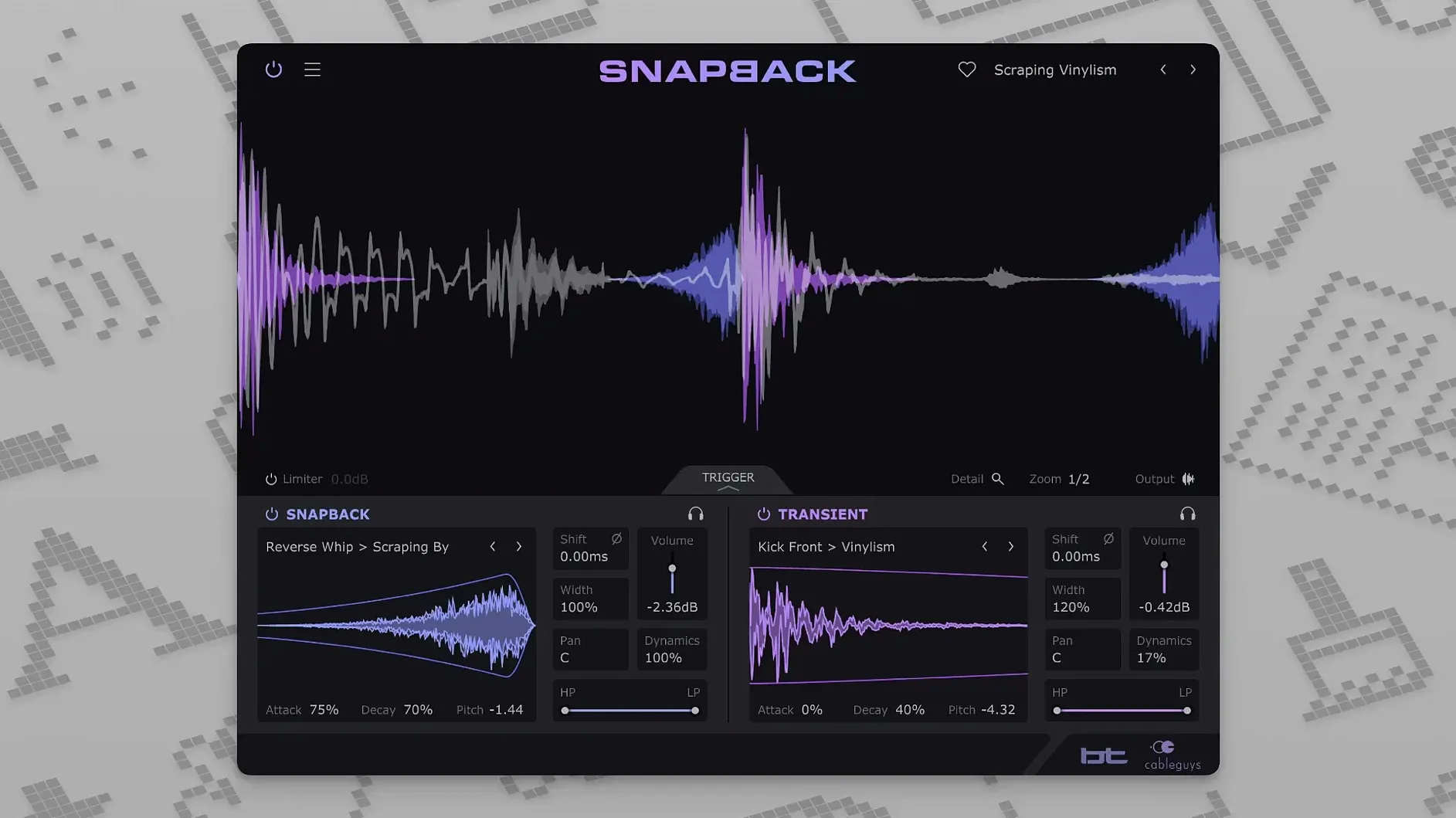
If you have used Cableguys’ time-shaping tools before, Snapback applies a similar precision to drum reinforcement. Developed with BT, it detects transients in a track and layers a chosen sample directly onto each hit, with control over timing, pitch and shape. The plug-in runs in VST 2, VST 3, AU and AAX hosts on macOS 10.13 and later, on both Intel and Apple Silicon machines. Hosts confirmed by the developer include Ableton Live, Logic Pro, Pro Tools, Cubase, Bitwig Studio, FL Studio and REAPER.
- Four plug-in formats: VST 2, VST 3, AU and AAX.
- Sample placement can be shifted ahead of the transient for pre-hit weight.
- Pitch adjustment and amplitude envelopes shape the layered sound.
- A waveform visualiser shows the relationship between the dry signal and the sample.
- Over 200 ready-made samples are included.
- A Reverse button, added in version 1.1, flips the sample playback.
The sample library provides a practical starting point, and the envelope section keeps the layer tight. With the ability to nudge a sample before the transient, you can add attack to a soft kick or reinforce a snare without the processing feeling disconnected from the source. The pitch control moves in semitones, so tuning a sample to the track is straightforward.
Transient detection latency at a 128-sample buffer
One common question is whether Snapback adds noticeable latency. The transient detection happens quickly, and in a typical project at a 128-sample buffer the timing feels immediate. It is not a lookahead processor in the traditional sense — it analyses the incoming audio and places the sample in real time, so you can track through it without a distracting delay.
Another question concerns the plug-in formats. The installer places VST 2, VST 3, AU and AAX components. People on newer Apple Silicon Macs sometimes ask if it runs natively or under Rosetta. The answer is native ARM support alongside Intel — the plug-in appears as a universal binary, and the DAW loads whichever slice matches the host architecture. No bridging utility is needed.
Some producers also ask whether Snapback can layer multiple samples on a single instance. It handles one sample at a time. If you want a kick that combines a click layer and a sub layer, you would insert two instances on separate tracks or use a routing trick inside the DAW — sending the kick to two aux channels, each with its own Snapback instance, for example. The streamlined design keeps the interface uncluttered, but it does mean you plan your layering across channels rather than stacking samples inside one window.
Why a +6 dB sample layer wears thin fast
A frequent early misstep is setting the sample level too high before dialling in the envelope. A layered snare crack that sits six decibels above the dry signal sounds exciting for a few bars, but the impression wears thin in a full arrangement. A better habit is to bring the sample fader all the way down, shape the amplitude envelope until the tail behaves, then raise the level until the layer reinforces rather than replaces the original hit.
Another mistake is ignoring the phase flip switch. When a sample contains prominent low-frequency content — a sub-bass thump under a kick, for instance — it can partially cancel the dry transient if the waveforms oppose each other. Flicking the phase button while watching the waveform visualiser often reveals whether the combined signal gains or loses body. Doing this early prevents a thin-sounding drum bus later in the mix.
Some users treat the pre-transient placement as a simple offset slider and push the sample far ahead of the hit. In most drum reinforcement tasks a shift of a few milliseconds is enough to add perceived attack without the sample sounding disconnected from the groove. Shifts beyond fifteen or twenty milliseconds start to feel like a separate flam, which can work as an effect but rarely serves the purpose of tight reinforcement.
Sensitivity control on dense ghost-note loops
The default state opens with the sample library visible and the timing controls centred. Two adjustments repay attention immediately. The sensitivity control on the detection side determines which transients trigger a sample. On a dense percussion loop with ghost notes, lowering the sensitivity prevents Snapback from firing on every quiet hit, keeping the layer clean. On a sparse kick pattern you can raise sensitivity without risk, so the plug-in catches softer pedal strokes.
The high-pass and low-pass filters sit after the sample playback, and they are worth setting before you adjust pitch. Rolling off low end on a click sample stops it from competing with the dry kick body, while trimming high frequencies on a noise layer keeps the hats from becoming abrasive. A small cut with a gentle slope often does more for blend than aggressive EQ further down the chain.
For users who trigger Snapback via MIDI instead of relying on audio detection, the expanded MIDI port range in version 1.1 — up to 256 addressable ports — means you should check that your controller or sequencer track is assigned to a port the plug-in actually listens to. The default works in most setups, but complex templates with many virtual MIDI cables can mask the connection.
CPU meter with 24 tracks on M-series Mac
On an M-series Mac with a modest session — twenty-four tracks, a handful of virtual instruments, a few Snapback instances on kick and snare — the CPU meter barely shifts. The plug-in uses a lean detection algorithm that does not scan ahead by a large window, so the per-instance load stays low. Even on Intel machines running older macOS versions, stacking four or five instances across a drum kit feels comfortable.
Stability in Pro Tools and Logic Pro has been uneventful. The AU and AAX versions recall settings reliably after saving and reopening a session, and automation of the level and pitch parameters follows the DAW envelope without stepping. In Ableton Live, dragging a sample from the browser onto the Snapback waveform display imports it directly, which saves a few clicks compared to navigating the built-in library browser.
The reverse function added in version 1.1 behaves like a real-time playback flip rather than an offline render, so you can toggle it during playback without a dropout. Used on a short click sample, it turns a sharp attack into a sucked-in swell that lands just before the transient — a trick that works well on snare rolls. The waveform visualiser updates immediately to show the reversed shape against the dry signal, which helps when you are nudging the timing offset to land the swell exactly where you want it.