Aspecten
 Download (786 MB)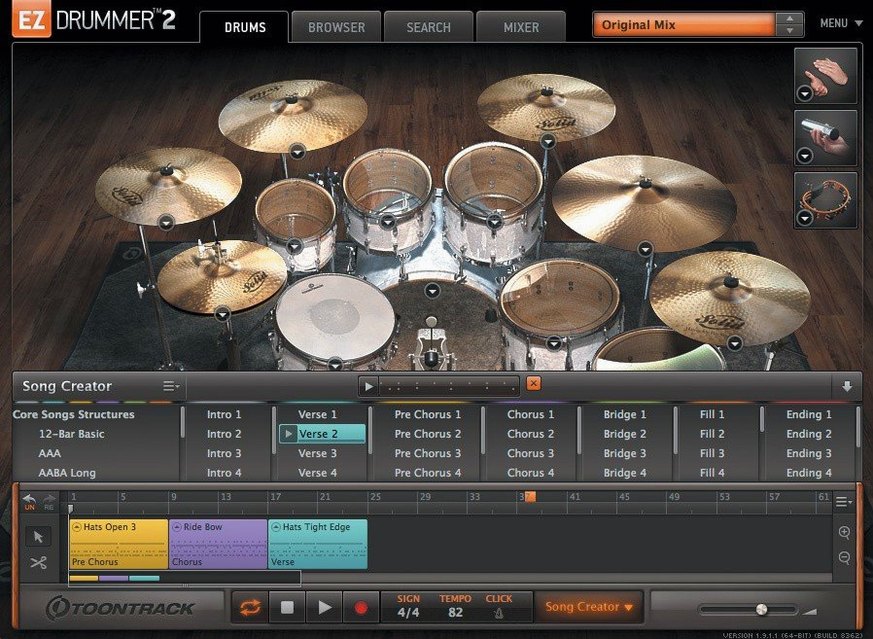
Songwriters who need a drum track without leaving the writing headspace reach for EZdrummer. It is not a mixing engineer’s deep-dive kit builder — it is a musical sketchpad that happens to sound finished. The current version centres on a mixer with seven kits and three room ambiences, fed by a library of MIDI grooves that can be auditioned, starred and dragged straight onto a song track.
The drag-and-drop core is surrounded by tools that nudge ideas forward. Tap2Find lets you tap a rhythm on a key or pad and immediately see matching grooves from the library. Bandmate goes further: drop in an audio or MIDI riff and it suggests drum parts that fit the feel. Once a groove lands on the track, Edit Play Style can reshape it in real time — more ghost notes, simpler kick pattern, opened hi-hat — without opening a piano roll. When a library groove does not fit, the built-in Grid Editor is there for writing a pattern from scratch.
Mix-ready presets tie the pieces together. A few clicks move a part from dry close-mics to a treated room sound, and the three rooms let a verse and chorus sit in different spaces without loading a new kit.
Good for
- Songwriters building arrangements without a collaborator behind the kit
- Turning a tapped rhythm or short audio idea into a usable drum part
- Shaping a groove’s feel through play-style controls rather than note-by-note editing
- Placing sections in different room ambiences within one project
Keep in mind
- Before version 3.1.2, toggling Solo or Mute in the mixer could clear the opposite recall state.
- Seven kits and three rooms cover a lot of ground, but the palette is fixed — no deep sample import.
Building a verse‑chorus drum track from scratch
Most sessions start with a guitar or piano idea already recorded elsewhere. Here is one plausible path when you have a short audio riff and want a full song structure underneath it. Drag the audio file into EZdrummer’s Bandmate panel. After a few seconds it lists several groove suggestions, ordered by how closely they match the transients and rhythmic density of the source. Pick one that feels right for a verse — often a straight eighth‑note rock feel with a closed hi‑hat — and drag it to bar one of the song track.
Tap2Find is the next stop for the chorus. Tap the basic kick‑snap pattern on a laptop key; the search narrows the library to grooves with that accent shape. Audition a handful, star the two strongest candidates, then drag the chosen chorus groove to bar nine. The jump in energy between the verse and chorus is immediate, but the transition feels abrupt. Cut the last bar of the verse, open the Grid Editor on that bar, and add an open hi‑hat hit on beat four and a snare flam across beats three and four. That is enough to signal the shift.
With the main sections in place, use Song Creator to fill out an intro and outro. Select the verse and chorus blocks, set a four‑bar intro and an eight‑bar outro, and let the tool generate connecting fills and a closing pattern. The results are rarely perfect; dragging the intro to a half‑time feel with Edit Play Style and switching the outro to the brushed room preset can make them sit better in the arrangement. By now the song track is a continuous twelve‑bar structure that can be cut, copied and rearranged as the writing evolves.
The whole process — audio in, tapped search, grid tweaks, room changes — takes perhaps fifteen minutes. Nothing leaves the plugin window. That is the point: the writing flow stays intact, and the drum track feels like part of the sketch, not a separate production exercise.
Kits load in seconds, switch instantly
EZdrummer loads a kit in roughly three to five seconds on a modern Apple Silicon machine, slightly longer on an Intel Mac with a spinning drive. Once loaded, kit switching between the seven included sets is near‑instant, because the samples for the active kit are already in memory. The three room channels — close, mid and far — engage without a pause, and switching a preset from a dry indie room to the large ambient room adds no perceptible latency during playback.
Memory use sits around 1.2 to 1.8 GB for a full kit with all articulations loaded, which is modest for a multi‑sampled drum instrument. The CPU hit is spread across cores reasonably well; a moderate song‑track arrangement with grooves running across twelve bars and the mixer’s built‑in effects active adds roughly eight to twelve percent load on an M‑series processor. That leaves plenty of room for amp sims, virtual instruments and effects in the same session. On older Intel hardware, the figure climbs but rarely trips over itself unless the buffer is set below 128 samples.
Stability has been steady under everyday use. Crashes are rare during song‑track editing or groove browsing, and the standalone application behaves as reliably as the plug‑in. The one recurring annoyance fixed in version 3.1.2 — hi‑hat pedal CC messages dropping during song‑track recording — was a genuine workflow stopper for anyone who tracked MIDI drum parts with an e‑kit. Since that patch, real‑time CC recording has been dependable, and the mixer Solo and Mute toggles no longer interfere with each other’s recall state. Daily use now feels uneventful in the best sense: the tool stays out of the way.
Drag audio and MIDI straight into your DAW
EZdrummer runs as an AU or VST3 plug‑in inside a DAW, or as a standalone application that can pipe audio directly to an interface. Drag‑and‑drop works in both directions: audio and MIDI can be pulled from the plug‑in into the DAW timeline, and audio files can be dropped from the Finder or a DAW onto the Bandmate panel. In Logic Pro, dragging a groove from the song track onto a software instrument track places the MIDI region with all velocities and articulations intact, ready for further editing in the piano roll. The same works in Ableton Live, Studio One and Reaper.
On macOS, the standalone app integrates with Core Audio and Core MIDI without extra configuration. Selecting an audio interface and a MIDI controller in the preferences panel is enough to start playing. The recent 3.1.2 update brought the standalone and project icons in line with the macOS Tahoe visual style, a small change that keeps the application looking at home on current desktops. It also respects standard macOS conventions: native full‑screen mode, standard file dialogs and proper multi‑display behaviour.
Some users search for ezdrummer 2 crack or ezdrummer 3 torrent to explore earlier versions, and the current build’s integration points — drag‑and‑drop MIDI, Bandmate audio analysis, the Grid Editor — are tightly woven into version 3’s architecture. Older versions lack the Song Creator, Tap2Find and Edit Play Style, which change the writing workflow enough that moving back feels like a different product. Expansion packs, especially those released after Q4 2025, require version 3.1.2 to load at all, so an ez drummer torrent of an older build simply cannot access the newest EZX libraries.
Beyond the DAW, EZdrummer’s exported MIDI plays well with other drum instruments. Dragging a finished song‑track arrangement into Superior Drummer 3 preserves the groove structure and opens up deeper mixing possibilities. Percussion parts from the included percussion set can be separated onto their own MIDI channels and routed to a dedicated percussion sampler for further processing. The workflow is deliberately portable: the drum part is never locked inside EZdrummer’s mixer.
Hi-hat pedal fix stops missing CC data
Version 3.1.2 is a maintenance release, but it tidies up several rough edges that affected daily sessions. The hi‑hat pedal CC fix alone saves a frustrating cycle of recording, noticing the missing data, and re‑recording — something that bit anyone who tracked a full e‑kit performance onto the song track. With that resolved, the song track behaves as expected for both programmed and performed parts.
The mixer Solo and Mute recall fix is subtler. Before the patch, soloing a single channel and then clicking Mute on another could lose the solo state when you returned to it; now the two states are independent and predictable. For a songwriter moving fast through an arrangement, that predictability means fewer interrupted listening passes to confirm what is actually playing.
The internal improvements for Infinity Grid EZX point forward. That expansion pack uses a different approach to pattern generation, and version 3.1.2 smooths its integration. Even without the expansion, the underlying Grid Editor benefits from the same code path improvements, making pattern entry feel slightly snappier on large song tracks.
The updated macOS Tahoe icons are cosmetic, but they signal that Toontrack is keeping the Mac build current with Apple’s visual language. In practice, it means the standalone app no longer sticks out in the Dock among other recently updated software. Small details like this accumulate over a long session of switching between tools.
Runs native on Apple Silicon, no Rosetta needed
Will it run on my Mac? The minimum requirement is macOS 10.15 Catalina, and the build is universal — it runs natively on both Intel and Apple Silicon processors without Rosetta. Anyone on an M‑series or recent Intel machine from the last several years is well within the supported range. The installer is a standard disk image; mount it and run the installation, no extra steps needed.
Can I use it without a DAW? Yes, the standalone application is fully functional. You can load kits, browse grooves, tap rhythms into Tap2Find, build a song track and export the audio or MIDI directly. It is a self‑contained writing environment that does not require a host. That said, most users will eventually bring the plug‑in into a DAW to layer other instruments around the drum part.
Do I need an e‑kit? No. Every feature works with a mouse and a computer keyboard. The Grid Editor lets you click in patterns note by note, Tap2Find works with any key that sends a MIDI note, and grooves can be dragged directly onto the song track without playing a single hit. An e‑kit or pad controller opens up real‑time performance and the CC recording improvements in 3.1.2, but it is entirely optional.
Can I add more sounds later? EZdrummer works with the Toontrack EZX expansion line, and version 3.1.2 is required for EZX packs released from Q4 2025 onward. Each expansion adds new kits, grooves and mix presets that integrate into the same interface. The base installation’s seven kits and three rooms are the starting point; the library grows through expansions rather than through importing third‑party samples directly into the sampler.
What about earlier versions? A search for ez drummer 3 torrent or ezdrummer torrent often turns up older builds, which naturally miss the version 3.1.2 fixes and the ability to load the newest EZX expansions. The song‑track CC bug and the mixer Solo/Mute recall issue alone make the current build the smoother experience for daily work. The Bandmate, Tap2Find and Song Creator tools are exclusive to version 3; anyone moving from EZdrummer 2 will find the writing workflow fundamentally changed.