Aspecten
 Download (81 MB)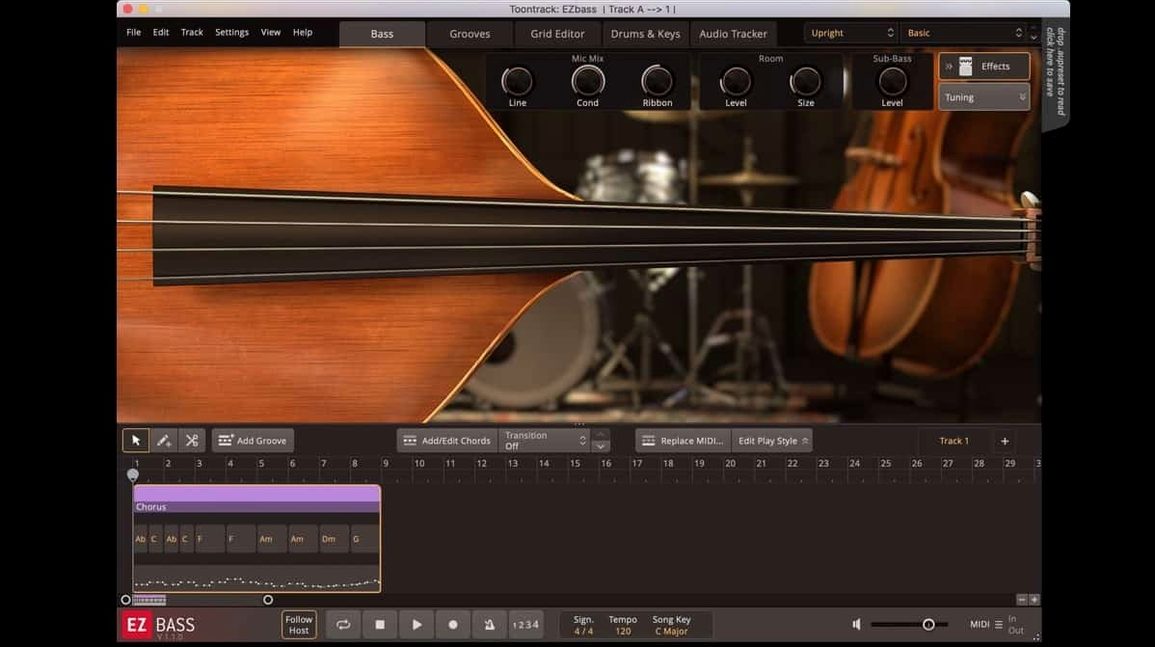
1. Pick a bass
The software comes with two sampled instruments: a vintage bass with a warm, rounded tone and a modern model that sits tighter in a dense mix. Right-hand mute articulation — one of the additions in version 1.3.3 — is available for the Rock Legend EBX expansion, giving a percussive, dampened attack that cuts through busy rock arrangements.
2. Get a bassline
You can drop a drum or keyboard MIDI clip onto the track and let the software generate a matching bass part. The conversion studies the incoming notes and builds a line that follows the rhythmic and harmonic shape. If you already have an audio recording, the audio-to-MIDI conversion — borrowed from the engine in Superior Drummer 3 — pulls pitch and timing data straight from the waveform.
3. Shape the part
Inside the plug-in you can arrange, rewrite and reposition bass phrases without leaving the window. Sections can be shortened, notes moved and articulations swapped. Version 1.3.3 also fixes a menu click response issue that affected newer Apple hosts, so adjusting note lengths and velocity in the editor now responds without lag.
Format and host notes
EZbass runs as a VST, Audio Units or AAX plug-in under macOS 10.15 and later, with native support for both Apple silicon and Intel 64-bit Macs. The interface is English only. Menu behaviour in recent Logic Pro and other Apple host updates is now stable thanks to the 1.3.3 fix, and you can remap a handful of keyboard shortcuts from the Settings pane.
Feeding single-note clips without harmonic context
The most common stumble is feeding the Track function a MIDI clip with no harmonic context. EZbass looks at the incoming notes and tries to infer a key and chord movement; if you drop in a single-note kick drum pattern, the generated bassline will often sit on one root and feel static. Even a simple two-note keyboard sketch gives the engine enough to work with. A related misstep is forgetting that the audio-to-MIDI path expects a clean, monophonic source. Running a full mix or a busy guitar stem through it produces garbled pitch data. Feed it a DI bass recording or a soloed vocal line instead.
Another beginner habit is treating the Grid Editor like a piano roll and clicking in notes by hand before letting the software do its job. The built-in playing styles and the Song Track arrangement tools are faster for sketching structure, yet many users open the plug-in and immediately zoom into per-note editing. That path works, but it sidesteps what the software is designed to do well. Let the browser suggest a few phrases first, then edit the result.
Also easy to overlook: the two stock basses respond differently to the same MIDI. A line that sounds tight on the modern instrument can feel thin on the vintage model, and vice versa. Switching instruments after building the part is a quick way to test whether the arrangement actually suits the bass — but beginners often commit to one sound early and adjust the MIDI around it instead.
Audition three bass variations from a short drum loop
Start with a short loop rather than a full song-length timeline. Drop four or eight bars of drums into your DAW, feed that clip to EZbass, and let it generate three or four variations using the Song Track. Audition them back to back. In the first hour you learn more about how the engine interprets rhythmic density and ghost notes than you would by building a three-minute arrangement straight away.
Keep the audio-to-MIDI conversion for a second session. Early on, the MIDI-based Track function gives you more predictable results and a better sense of the software's default phrasing. When you do reach for the audio path, use a short section — a verse or a chorus — and compare the generated MIDI against the original waveform immediately. The timing fix for sample rates other than 44.1 kHz that arrived in 1.3.3 means exported audio now stays in sync, so you can bounce the generated part and A/B it against your reference without drift.
Run the standalone application at least once before you load the plug-in inside a DAW. The standalone icon and project icon were updated in 1.3.3 to the macOS Tahoe style, but more importantly, launching outside a host lets you confirm the instrument loads correctly and that your audio interface routing is solid. If something is off, you have fewer variables to chase than inside a busy project.
Remap keyboard shortcuts that clash with your DAW
Open the Settings pane and check the keyboard shortcut remapping, which became available in version 1.3.3. The default bindings are reasonable, but if you use a DAW that already maps the same keys — common with Logic Pro and Cubase — you will want to reassign the transport controls or the Record toggle before they clash. The change takes effect immediately and persists across sessions.
Next, verify the sample rate setting matches your typical session. The 1.3.3 update fixed timing inconsistencies during audio export at rates other than 44.1 kHz, but it is still worth confirming that the plug-in follows the host rate correctly. If most of your work runs at 48 kHz, set that as the default in your DAW template and check that EZbass locks to it without a manual override each time.
The velocity response curve is also tucked away in the settings and is easy to miss. Out of the box it works for a standard MIDI keyboard, but if you are tapping parts on pad controllers or drawing velocities with a mouse, a slight curve adjustment can make the difference between a line that breathes and one that sounds flat. Try a gentler curve if your playing feels too aggressive, or a steeper one if the quieter notes are getting lost.
Drag verse blocks to reorder the Song Track instantly
The Song Track supports drag-and-drop reordering of sections. You do not need to copy and paste blocks manually — just grab a verse block and slide it before the chorus. The software reflows the arrangement and keeps all generated variations intact. This is especially useful during the first writing passes when structural changes happen fast.
Right-clicking a note in the Grid Editor opens a context menu with articulation options, and the right-hand mute articulation added in 1.3.3 for the Rock Legend EBX appears there when the expansion is loaded. The menu also gives quick access to slides, ghost notes and vibrato without opening separate panels. It is faster than hunting through a sidebar and worth building into muscle memory early.
A less obvious shortcut: holding Alt while dragging a MIDI clip into the plug-in forces the Track function to reanalyse the clip from scratch rather than recalling a cached interpretation. When you are tweaking a drum pattern and want a fresh bassline each time, this saves you from manually clearing the generated part first. On Mac, the Option key serves the same purpose.
If you are searching for an ezbass free download or an ezbass torrent to try the software before committing, you will find the current version — including the 1.3.3 fixes — on several trackers. A toontrack ezbass torrent typically bundles both the base instruments and the core MIDI library, while an ez bass torrent or ezbass mac torrent will give you the native ARM build that runs smoothly on Apple silicon Macs. To ensure a smooth experience, verify that the disk image matches the build specs you expect and that your DAW host is updated to the latest version.