Aspecten
 Download (587 MB)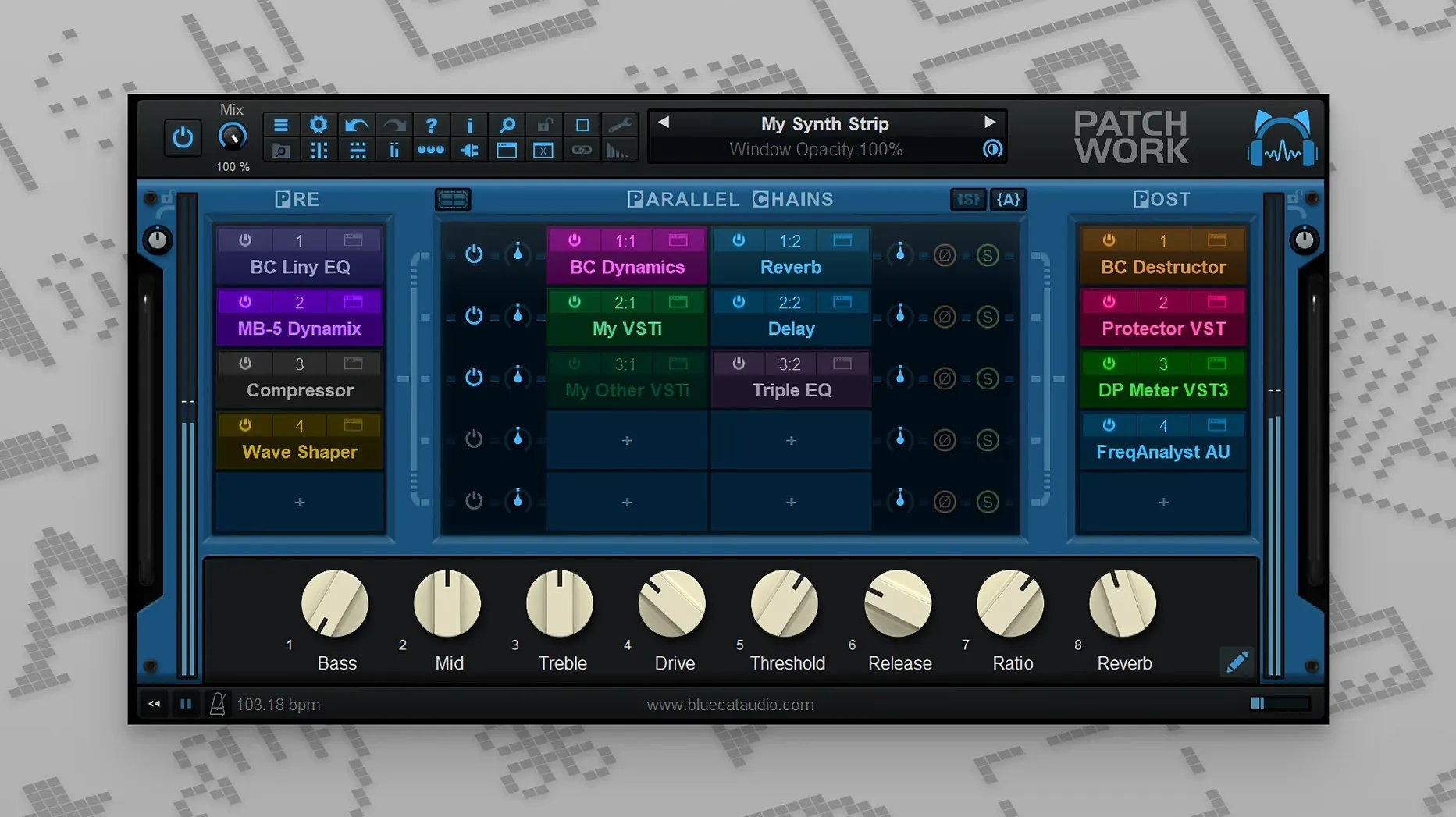
The 2.75 release brought a built-in audio recorder, chain management via copy and paste, and MIDI control over individual plug-in bypass states.
Chain clipboard — An entire row of effects can be copied, saved, and reloaded as a single block. Moving a vocal chain from one session to another becomes a single action rather than a manual rebuild.
Recorder tap — Up to 16 channels can be captured at any point in the signal flow. The recording sits inside the plug-in, independent of the DAW transport, so a reamp pass or a long modulation sweep can be grabbed without arming tracks in the host.
MIDI bypass — Each plug-in slot accepts a MIDI assignment for bypass and for showing or hiding its interface. A controller can mute a compressor, open a delay editor, and close it again without reaching for the mouse.
Live search — The plug-in browser filters results as you type. Combined with the scanner that catalogues AU, VST, and AUv3 formats, locating a specific saturation unit across several hundred plug-ins takes a few keystrokes.
Browser remembers your last search across sessions
Several details in PatchWork's operation are easy to overlook in daily use. The plug-in browser remembers the last search term between sessions, so recalling a frequently used reverb requires no typing on the second visit. Dragging a plug-in from the file system onto an empty slot installs its interface without opening the browser at all — useful when a component file is already sitting in a Finder window alongside the project.
Parallel chains are set up with a single right-click on the routing grid. A new row appears, and dragging the crosspoint determines how much dry signal bleeds past the processing. Holding Shift while dragging a plug-in duplicates it with all current parameter values intact, which speeds up dual-mono processing or layered parallel compression.
The built-in plug-ins — gain, polarity invert, basic metering — load instantly and consume negligible CPU. Keeping a gain stage and a phase flip in the first two slots of a default chain makes it straightforward to correct a miswired stem before it hits the heavier processors downstream. The chain clipboard stores not only the plug-in order but also their bypass states, so a saved chain can be reloaded with some modules intentionally muted.
Formant shift and impulse response on a vocal
A sound designer working on a creature vocalisation opens a DAW session with PatchWork on a dialogue track. The source recording is clean but lifeless. An AU pitch shifter drops the formant, followed by a convolution reverb loaded with an impulse response captured inside a steel water tank. A VST3 distortion pedal adds harmonic grit, but only above 800 Hz via a parallel band-split using two instances of the built-in crossover inserted on separate rows.
A long, evolving growl is needed, so the designer inserts a modulation plug-in with a slow LFO mapped to the pitch shifter's cent offset. The 16-channel recorder starts capturing the output. Fifteen minutes later the recording contains several usable takes, each one a variation as the LFO drifts. The designer copies the whole chain, saves it to disk, and pastes it onto a second track for a different creature with only the distortion type changed. No routing was touched in the DAW beyond the initial plug-in insert.
Latency is the sum of loaded plug-ins only
Does PatchWork add latency? The host itself introduces no additional buffering beyond what the loaded plug-ins require. If every plug-in in the chain reports zero latency, PatchWork reports zero latency to the DAW. When a high-latency linear-phase EQ is loaded, that figure passes through transparently and the DAW's delay compensation handles it as usual. The recorder and routing engine operate sample-accurately without introducing extra offset.
Will it load plug-ins from different formats together? A single instance can hold VST, VST3, Audio Unit, and AUv3 plug-ins side by side in the same chain. The scanner indexes all formats and presents them in one unified browser. VST3 editor windows on macOS load only when the interface is made visible, which keeps the screen uncluttered when many plug-ins sit in a chain but only one or two need constant display.
How does it handle parameter automation? Every exposed plug-in parameter appears in the DAW's automation list with its own lane. PatchWork's own controls — slot bypasses, wet/dry balances, the recorder transport — are also available as automatable parameters. The MIDI control addition in the 2.75 line means bypass and window visibility can also be triggered by note events or CC messages, independent of the host automation system.
Is there a practical limit to the 64-slot capacity? The slot count rarely becomes the bottleneck. Real-world use is constrained by CPU headroom and the threading behaviour of the loaded plug-ins. A chain of thirty lightweight utilities and EQs runs comfortably on a modern Mac; a chain of ten heavy convolution reverbs with long tails will tax any host regardless of the patchbay. The routing grid remains responsive even when many parallel rows are active, and the search field in the browser helps keep large collections navigable.
Users looking for a way to evaluate the plug-in often search for bluecat patchwork download or blue cat patchwork torrent. The architecture runs natively on both Intel and Apple Silicon Macs from macOS 10.9 upward, with a 64-bit requirement across both platforms.