Aspecten
 Download (1.8 GB)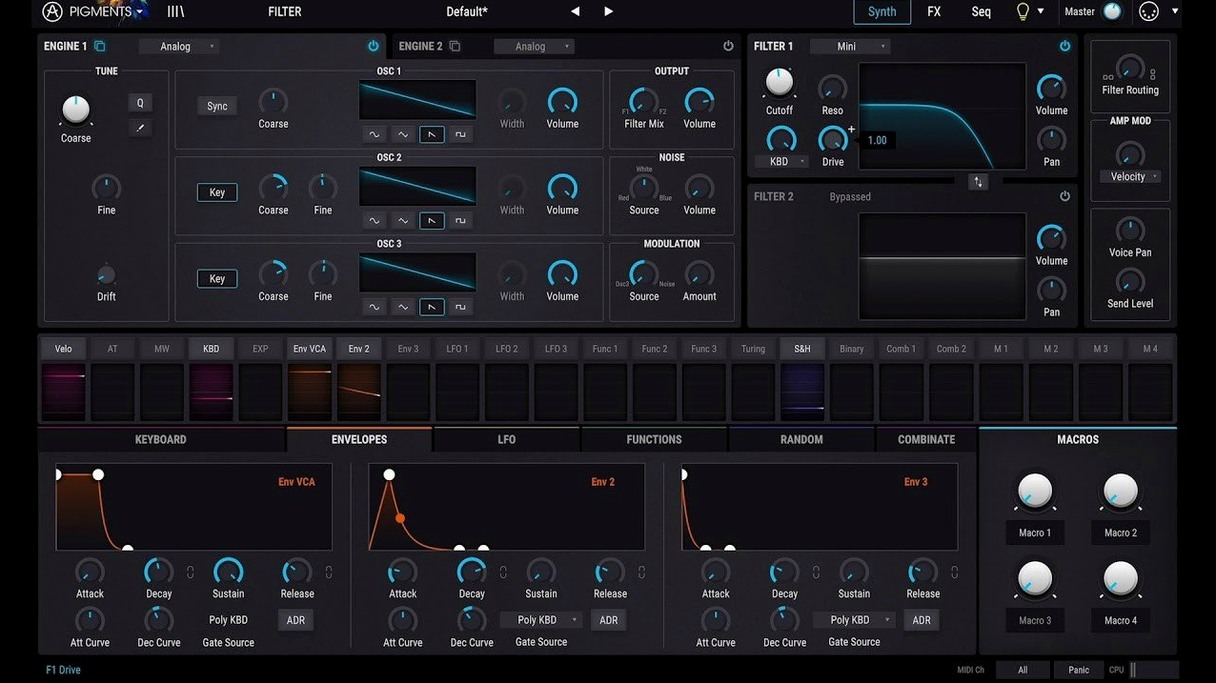
You load a simple two-oscillator patch, dial in a slow-moving wavetable, and feed it through the new Ripple filter. The sound shifts from a gentle pulse into something granular and unpredictable, while the Corroder effect in the insert slot scuffs the edges with a grainy, broken-speaker texture. Within a minute, a polite preset turns into a lead that sits at the front of a mix without extra processing.
Blending two engines into a cross-modulated source
Pigments builds its core from two parallel engines — virtual analog and wavetable — that you can blend, cross-modulate, or use as the input for a deep modulation system. The 7.0.1 update adds three new filter types: Rage introduces aggressive, distorted resonance; Ripple creates rippling, liquid movement; and Reverb places the filtering inside a diffused space, blurring the line between tone-shaping and ambience. Alongside these, the Corroder effect degrades the signal with bit-crushing textures that work well on drums, basses, and pads that need to feel less polished.
Modulation and movement
Modulation sources feel practically unconstrained. Envelopes, LFOs, function generators, and random sources can be assigned by dragging a virtual cable to nearly any parameter. The generative sequencing tools let you set probability rules for pitch and gate, so a bassline or arpeggio mutates each time it cycles. The redesigned Play Page surfaces macro controls and key performance parameters, which reduces the need to scroll through the full interface when you are adjusting a sound in context with other tracks. A combination of the new wavetables and samples with the existing engine makes it straightforward to build patches that evolve over time rather than repeating statically.
A bowed cymbal drone through the FX grid
A sound designer working on a science-fiction game needs a drone that shifts between a mechanical hum and a breathy, organic texture. She starts with a sample of a bowed cymbal from the new 30-sample pack, routes it through the Reverb filter with the cutoff modulated by a slow random source, and layers a wavetable oscillator an octave below. The Corroder effect sits second in the chain, dialled to around 20% wet so the degradation only flickers in when the filter opens. She saves three macro assignments — filter depth, Corroder mix, and wavetable position — to the Play Page, then records a four-minute take while riding those controls with a MIDI controller. The result sounds like machinery breathing, and it took under ten minutes from blank patch to final bounce.
Reining in unison voice CPU spikes
One issue that surfaces regularly is CPU spikes when stacking multiple unison voices on a wavetable patch with heavy effects. Reducing polyphony per engine and switching the Corroder or Reverb filter to a send rather than an insert usually brings the load down without gutting the character of the sound. Another point of friction is the sheer number of modulation assignments becoming hard to track in a complex patch. The colour-coded modulation view helps, but the quicker fix is to right-click any parameter and choose Remove all modulations, then rebuild the routing deliberately rather than untangling a knot of forgotten assignments.
Some users report that the new Play Page does not always recall macro mappings when a preset is loaded from an older version. Clearing and reassigning the macros once, then resaving the preset, resolves the recall issue. On Apple Silicon machines, a handful of third-party DAWs still default to opening the Intel build via Rosetta; forcing the native ARM version through the DAW's plugin manager eliminates a noticeable latency difference on larger sessions.
Skipping the modulation panel leaves the sound flat
The first mistake is treating Pigments like a preset player. The factory library sounds polished because each patch uses layers of modulation and effects that are meant to be pulled apart. A beginner who never opens the modulation panel misses the entire drag-and-drop system that defines how the synth breathes. A related error is ignoring the utility section: the tuning, drift, and phase controls per engine add subtle movement that separates a flat digital tone from something that feels alive in a mix.
Another common misstep is stacking effects in series without touching the dry/wet mix or the routing order. The Corroder placed before the Reverb filter produces a completely different texture than the reverse, but beginners often drop effects into slots and leave them at default settings. A useful habit is to toggle each effect off and on while adjusting a single parameter — gain staging through the effects chain prevents the output from clipping before it reaches the DAW channel.
Macro controls move to a dedicated Play Page
Version 7.0.1 reworks the front panel so the Play Page acts as a performance hub rather than an afterthought. Before this, reaching for a macro meant paging through tabs or remembering which CC number was assigned. Now the most-used controls sit in one view, which speeds up sound adjustments during arrangement and mixing. The three new filters — Rage, Ripple, and Reverb — expand the tonal palette beyond the clean digital filtering of earlier builds, and they push the synth closer to the character of hardware units without needing external processing.
The addition of 150 presets, 50 wavetables, 30 samples, and 20 noises fills gaps that users previously filled with third-party imports. The new wavetables lean toward textured, noisy waveforms that work well with the Corroder effect, and the sample pack includes transient material that maps naturally to the granular engine. In-app tutorials, introduced with this update, guide new users through specific techniques rather than explaining every control in isolation, which cuts down the time between installation and a usable custom patch.
Native Apple Silicon support built into the installer
Does it run natively on Apple Silicon? Yes, the package includes a universal binary that runs on both ARM and Intel 64-bit Macs without translation layers. The installer places the correct build automatically, though checking the DAW's plugin manager to confirm the ARM version is loaded can prevent performance quirks.
How does it compare to a dedicated wavetable or analogue-modelling synth? Pigments covers both territories in one plugin, but it does not specialise as deeply as a single-engine instrument. The wavetable engine imports standard-format tables and includes morphing controls, while the virtual analogue side models oscillator drift and filter nonlinearities. For someone who already owns a dedicated wavetable synth, Pigments acts more as a modulation and layering environment that brings those sounds together. The hybrid architecture suits producers who want to blend synthesis types without juggling multiple plugins.
Is the factory library enough, or do I need to import my own samples and wavetables? The 7.0.1 update brings the factory count to a substantial number, and the new wavetable and sample content covers ground that earlier versions left to user imports. That said, loading your own field recordings or custom single-cycle waveforms unlocks the engine's real flexibility. The import process is straightforward: drag a WAV file onto the wavetable display or the sample slot, and Pigments analyses and maps it automatically.
Will it overload a modest Mac? A single instance with a complex patch can tax older Intel machines, but freezing tracks or bouncing in place is a standard workflow in most DAWs. The plugin also includes a quality setting for the effects section that reduces CPU at the cost of some fidelity in the reverb and delay algorithms. On an M1 or later Mac, multiple instances with polyphonic patches tend to run without needing to print tracks until the session grows large.