Aspecten
 Download (285 MB)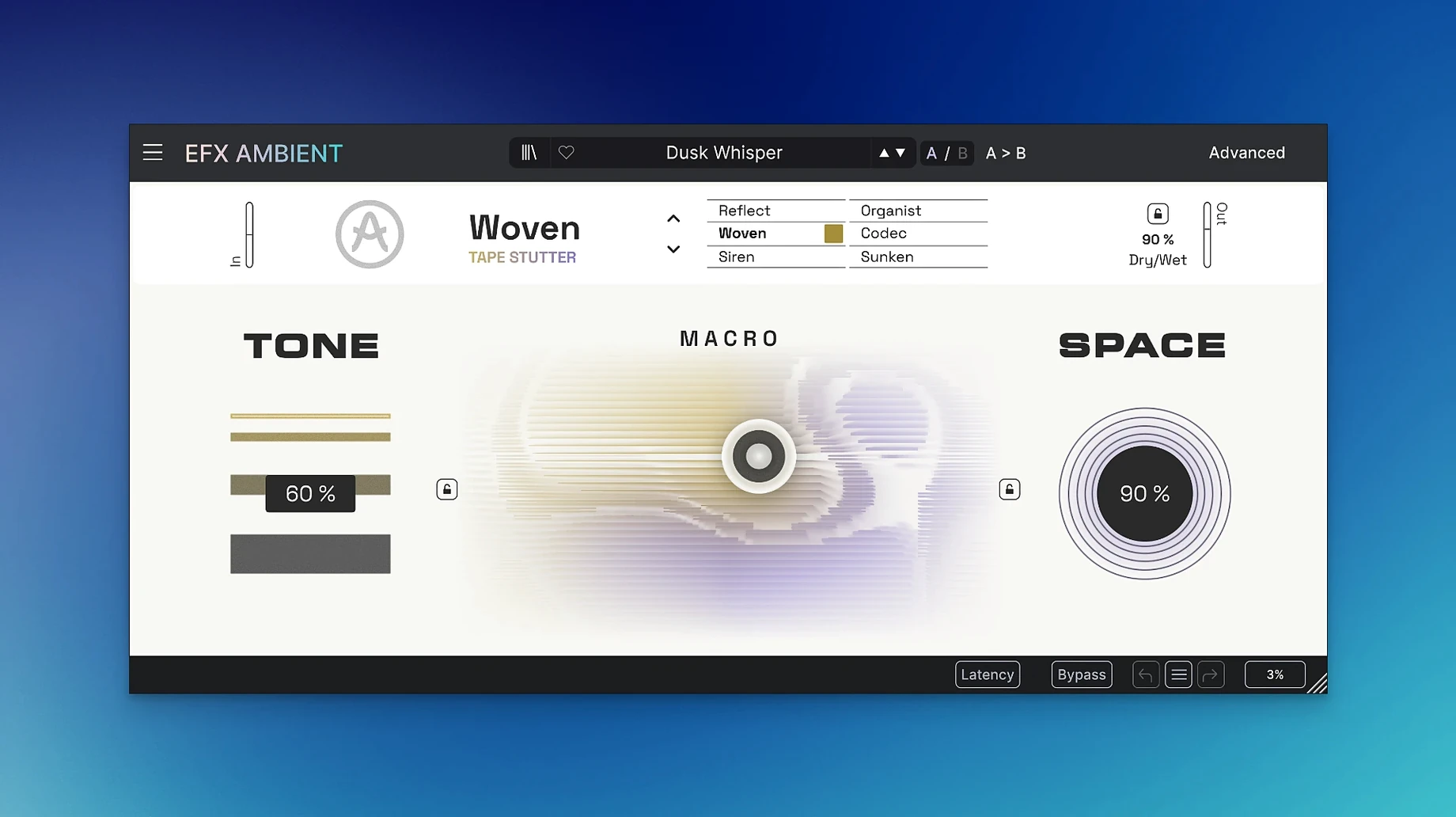
Efx AMBIENT is a single audio effect that routes sound through spectral processing, Feedback Delay Networks and complex effect pathways to build dense, moving spaces.
Turning a transient into a minute-long tail
On an instrument track it pushes a simple piano phrase or synth stab into a slow-evolving pad. The Advanced panel gives you detailed time-based control over how the space forms, so a short transient can bloom into a minute-long tail. On a vocal it works less as a conventional reverb and more as a texture layer — useful when you want the voice to dissolve into the background rather than sit in a room. Because the processing is heavy, placing it on a dedicated send lets you feed multiple sources into the same ambient field without multiplying the CPU load. You can also drop it directly on a bus to treat a whole stem group, which suits cinematic cues where strings, brass or synth layers need a shared sense of distance.
Smearing drums into a grainy rhythmic wash
One mode set covers detailed sound deformation, so the plugin moves beyond pad-making into experimental design. On a drum bus it can smear a kick and snare into a grainy wash that pulses with the original rhythm. On a Foley track it turns ordinary room recordings into unsettling backgrounds. It is one of the effects in FX Collection 6, and the 64-bit build supports both Apple Silicon and Intel Macs running macOS 11.0 or later. You reach for it when a standard reverb feels too literal — Efx AMBIENT thinks in textures, not rooms.
Mapping macro sliders to automation lanes
Efx AMBIENT works as a plug-in inside any DAW that hosts VST, AU or AAX formats, so it slots into Logic Pro, Ableton Live, Cubase and similar environments without friction. Automation lanes map cleanly to the two Macro sliders, which means you can draw sweeping changes over a full arrangement. The plug-in also pairs naturally with Arturia's own instruments: a simple sequence from Pigments or a few held notes from Augmented STRINGS can feed the effect and produce results that feel like a separate sound-design session rather than an insert chain.
On the macOS side, Audio Unit hosting works reliably and the plug-in appears in the system-level plug-in list without extra configuration. You can combine it with Space Designer or ChromaVerb in Logic by placing one before and one after, using Efx AMBIENT to create the broad texture and a second reverb to anchor the result in a more recognisable acoustic space. MIDI control of the Macro XY pad is possible via DAW learn functions, though the plug-in itself does not include a standalone application — it exists only inside a host.
Building a reverse transition from a taiko strike
A practical example makes the signal path clearer. Start with a dry percussion hit — a single taiko strike on an audio track. Add Efx AMBIENT as an insert effect:
- Set the mode to one of the reverse-playback options so the tail builds backwards from the transient.
- Pull the Depth slider to about 70 % to push the processed signal further from the dry source.
- Assign the X-axis of the Macro to a slow left-to-right sweep and the Y-axis to a gentle rise over four bars.
- Open the Advanced panel and extend the decay time to a full eight bars.
- Bypass the dry signal entirely using the mix control so only the ambient tail remains.
What you hear is a swelling cloud that seems to suck the original hit into itself, then release it as a slow-moving pitch smear. Record the result to a new audio track, reverse that audio in the DAW, and place it just before the next scene's downbeat. The transition lands with a sense of motion that a crossfade alone cannot deliver. For more complex builds, send a synth pad to the same instance on a bus and automate the send level to rise as the percussion tail fades, so the two sources share the same spectral imprint.
Instant preset changes with real-time FFT animation
The plug-in loads quickly — typically under two seconds on a recent Apple Silicon Mac — and the interface draws without lag, even when the Advanced panel is open and the FFT display is animating. Preset changes are immediate on ARM hardware; Intel machines show a short pause when switching between modes that load different delay network configurations, though the pause is under a second and does not interrupt audio playback.
CPU demand varies sharply by mode. The softer, blurred-texture modes run economically: you can stack three or four instances on a 2021 MacBook Pro before the buffer strain becomes audible. The deformation and granular-style modes are heavier. A single instance with a long decay and active Macro modulation consumes roughly the same headroom as a dense convolution reverb, so freezing or bouncing the track is sensible once you have dialled in the sound. Memory usage stays modest — the plug-in does not load large impulse libraries — and the 64-bit build keeps its footprint well within modern project sizes.
Stability has been uneventful in daily use. No sudden dropouts, no preference-file corruption, no conflicts with other Arturia effects in the same session. The one limitation worth noting is that the plug-in does not provide a low-latency mode for tracking: the processing introduces enough delay that you will monitor through the DAW's compensation rather than in real time. This is normal for spectral effects and does not affect mixing or sound-design workflows.
Compared with a few similar Mac effects
Placed alongside Eventide Blackhole, the differences in philosophy become clear. Blackhole excels at vast, pitch-stable reverbs that stretch a tail into infinity without losing the harmonic structure of the source. Efx AMBIENT is less interested in preserving the input signal recognisably; its modes push towards blur, reversal and granular breakup, so the output often bears little resemblance to what you fed in. Where Blackhole creates a cathedral around a sound, Efx AMBIENT dissolves the sound into the air inside the cathedral.
Valhalla Supermassive covers some of the same ground — long decays, pitch-shifted feedback, a freeform approach to space — but its control set is more traditional. You dial in delay lines, feedback percentages and modulation rates. Efx AMBIENT abstracts those parameters behind the Macro XY pad and the mode selector, which makes it faster for exploratory gestures but less suited to precise delay tap programming. If you already know the delay time and pitch interval you want, Supermassive gives you direct access. If you want to sweep through three modes and land on something unexpected, the Arturia approach pulls ahead.
Output Portal shares the granular and reverse-playback territory, and both plug-ins can turn a vocal snippet into a pitched-down pad. Portal leans harder into rhythmic gating and step-sequenced effects, so it suits beat-synced transformations. Efx AMBIENT stays closer to free-running, asynchronous movement — it thinks in continuous motion rather than grid divisions. The two complement each other well, and a session that already contains Portal would still find room for Efx AMBIENT on the less rhythmic material.