Aspecten
 Download (4.8 GB)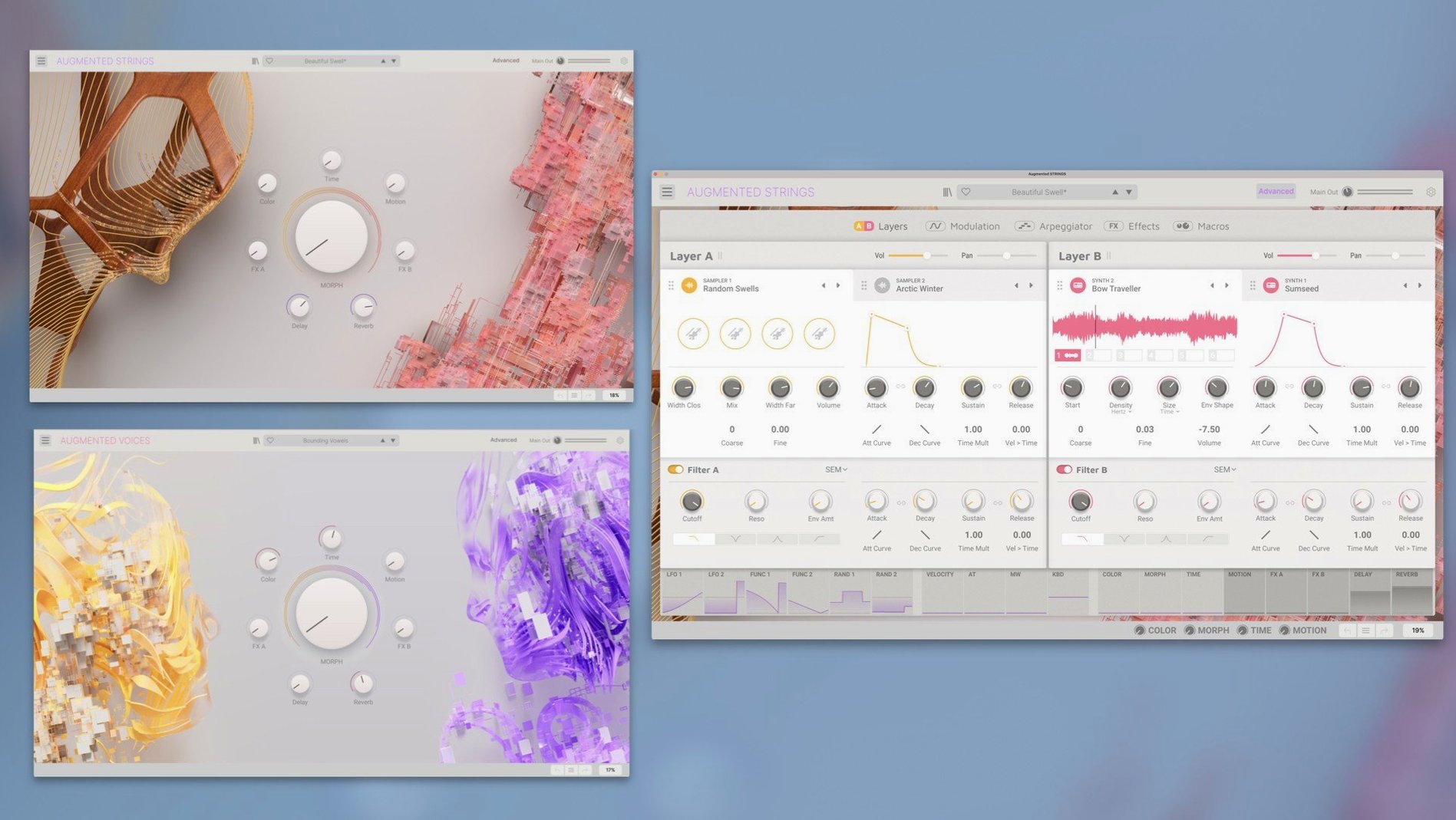
Arturia Augmented Voices is a software instrument that fuses vocal samples with synthesis engines in a dual-layer architecture.
Track duties
On a MIDI or instrument track, Augmented Voices works as a straightforward polyphonic sound source. Each of its two layers holds two sound sources, drawn from a set of more than fifty vocal articulations and a range of synthetic waveforms. The layers can be blended, split across the keyboard, or set to crossfade via modulation. This makes it practical for pads that sit behind a verse, lead lines with a soft vocal edge, or textural beds that evolve slowly across a section. The arpeggiator and modulation panel, tucked into the advanced view, let you add rhythmic movement without leaving the instrument — useful when a track needs to push a simple chord progression forward without piling on extra plug-ins.
Bus and group processing
Augmented Voices tends to land on a dedicated instrument track, but its output often ends up on a shared vocal or texture bus. The instrument’s own engine settings — filter, envelope, effects — handle basic shaping. Sending it to a bus alongside live vocals or other sample-based parts can help it feel part of the same space. A modest amount of shared reverb or a gentle compressor across the group usually does more to seat it in a mix than over-processing the instrument itself. Because the Mac build is a native Apple Silicon and Intel binary for macOS 11 and later, it slots into most current setups without bridging.
Small macro moves, not extra processing
After installing the 4.84 GB Mac build, give the plug-in a few minutes inside a DAW before reaching for third-party processing. The main panel’s macro controls — brightness, movement, space — reward small, deliberate adjustments. A common early misstep is dialling in too much Morph between layers; setting it around 30% and assigning a slow LFO from the modulation panel often yields a more natural sense of drift than manual automation.
Loading one of the fifty-plus articulations into each layer and switching between the four synthesis engines reveals how differently the same sample behaves. Spend an hour with just two articulations and the engines: try a breathy sustained vowel through the wavetable engine, then the same sample through granular. The contrast teaches more about the hybrid architecture than scanning through presets.
If the instrument sits in a busy mix, check the advanced panel’s envelope settings before adding external EQ. Shortening the release by a few hundred milliseconds on a pad articulation can clear low-mid mud without losing the vocal character. The built-in effects — particularly the delay and reverb — are voiced to suit the source material; bypassing them early on lets you hear what the engine provides before layering in your usual bus treatments. The standalone mode is handy for sketching ideas without launching a full session, and its response to a MIDI keyboard feels immediate enough for quick auditioning.
Between a choir and a synthesiser pad
Consider a sound designer preparing ambience for a short film. The scene calls for an otherworldly texture that still carries a trace of human presence — something between a choir and a synthesiser pad. She opens Augmented Voices in standalone mode on a Mac running macOS 11, loads a soft oo articulation into layer one with the virtual analogue engine, and a staccato mm articulation into layer two with the harmonic engine. Layer one supplies a steady, glassy wash; layer two adds a brittle, rhythmic pulse. She assigns the Morph control to a slow inverted envelope so the layers trade dominance every few bars. A touch of the built-in shimmer reverb and a narrow band-pass filter from the engine settings push the result into the territory she needs. Within twenty minutes the texture sits under the dialogue track, shifting enough to hold attention but never distracting.
Alongside comparable Mac instruments
Augmented Voices occupies a niche between pure vocal libraries and spectral processing tools. Three instruments often mentioned in the same conversation are Native Instruments Pharlight, Output Exhale, and iZotope VocalSynth 2.
Native Instruments Pharlight also layers vocal samples with synthesis, but its sample pool leans toward cinematic one-shots and granular textures rather than sustained articulations. Pharlight’s architecture favours quick, striking results from its preset library, whereas Augmented Voices offers more direct control over engine type per layer and a deeper set of macro routing options. Someone who values patch speed may prefer Pharlight; someone who wants to build a sound from the engine up will find the Arturia approach more open-ended.
Output Exhale processes vocal material through an engine geared toward contemporary pop and electronic production, with a strong emphasis on rhythmic slicing and loop-friendly presets. Exhale excels at delivering production-ready vocal chops with minimal effort. Augmented Voices provides a broader synthesis palette — four distinct engines versus Exhale’s more focused processing chain — and feels more suited to evolving pads and abstract textures than to tight, tempo-locked vocal hooks. The dual-layer design with per-layer engine selection gives Augmented Voices an edge when the goal is hybrid sound design rather than polished vocal production.
iZotope VocalSynth 2 approaches the voice from a different angle: it processes an incoming audio signal through vocoder, talkbox, and harmoniser modules rather than playing back sampled articulations via MIDI. It depends on a live or recorded vocal input. Augmented Voices is a self-contained instrument that generates sound from its internal sample pool, making it the more practical choice when no vocalist is available or when the brief calls for playable polyphonic vocal textures rather than effected vocal lines. The two can complement each other in a project — VocalSynth 2 for lead processing, Augmented Voices for pad and texture duties — but they address fundamentally different tasks.