Aspecten
 Download (2 GB)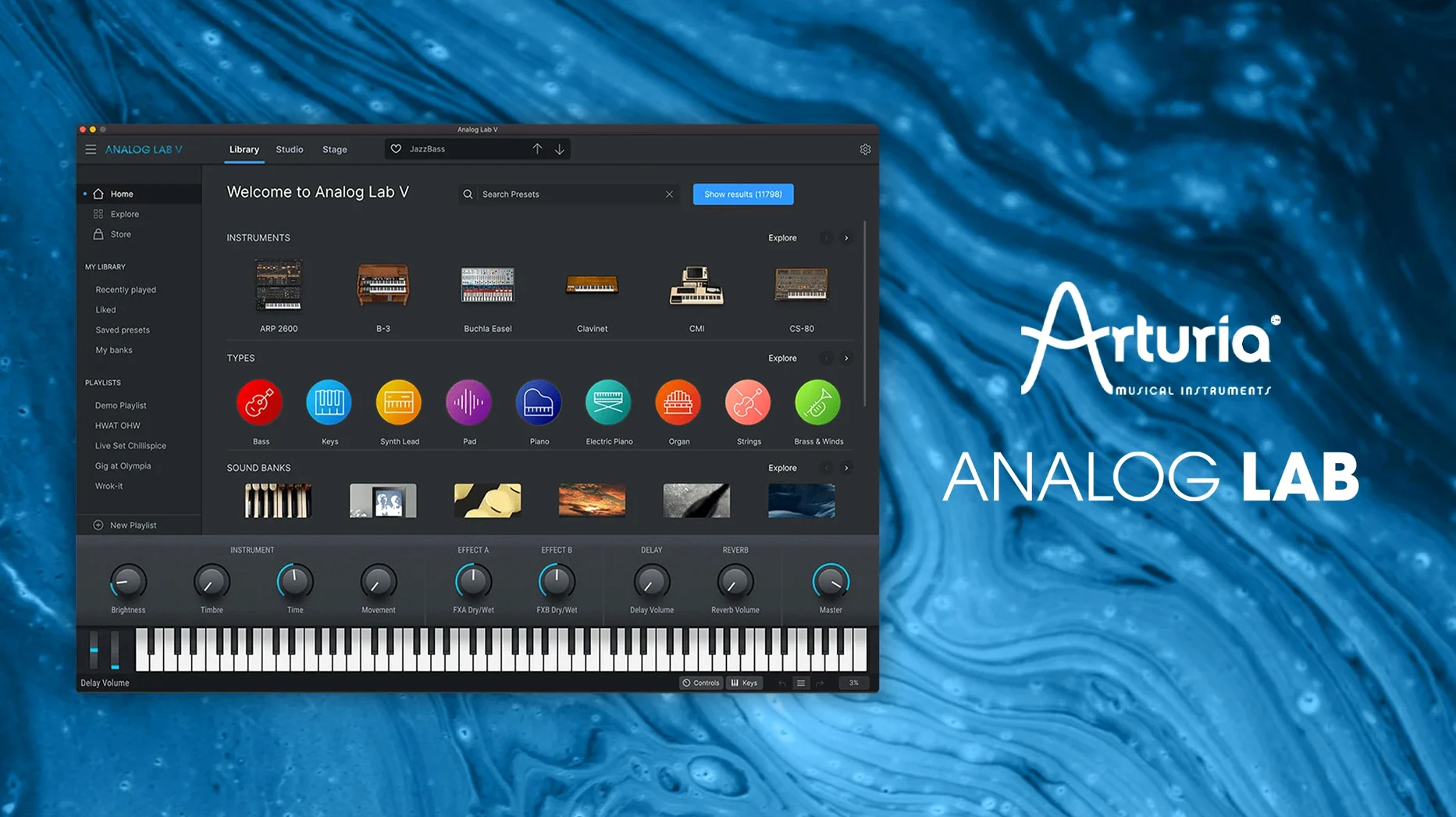
You open a DAW session from two years ago, the tracks loading up with placeholder names where the synth sounds should be. Loading Analog Lab V in place of an older Arturia instrument brings back the exact preset, mapped the same way, no reassignment needed. The patch was part of a collection you had not touched since the original recording. It slots straight in.
Runs standalone, as AU, VST2, VST3, or AAX
- Standalone application for browsing and playing without a DAW
- Audio Units for Logic Pro and other AU hosts
- VST2 and VST3 for Cubase, Ableton Live, Bitwig and most other DAWs
- AAX for Pro Tools
The sound and the scope
Under the browser sits a library drawn from dozens of modelled instruments — subtractive synths, FM engines, string machines, classic electric pianos. The presets are the same ones that ship with the full Arturia instruments, grouped by type, character and instrument origin. Because Analog Lab V reads the same patch format, a project referencing an Arturia preset will recall it correctly whether the full instrument is installed or not. Editing is deliberately constrained — a handful of macro controls and effects per patch — keeping the focus on finding a sound and moving on.
Near-instant preset switching on Apple Silicon
Analog Lab V loads quickly on Apple Silicon Macs. The standalone application appears within a couple of seconds; the plugin initialises in a DAW without the long scanning pauses that some sample-based instruments impose. Preset switching is near-instant for most patches, though a small number of complex layered sounds — particularly those with heavy reverb or delay tails — take an extra half-second to settle. On Intel machines the same behaviour holds, with loading times about twenty percent longer on older quad-core i5s.
CPU use stays modest during playback. A single instance playing a four-note chord with a typical pad preset sits around three to five percent on an M1 core. Dense arrangements with eight or ten instances push overall CPU load toward twenty-five percent, still leaving headroom for effects and mixing. RAM consumption per instance hovers around 120 to 180 megabytes, depending on the patch. The plugin does not stream samples from disk in the background, so disk activity is negligible once loaded — useful on laptops where battery life matters.
Stability has been solid through the 5.x releases. Crashes are rare during normal browsing and playing. The one recurring instability involves rapidly cycling through presets while the DAW transport is running; on some systems, particularly in Ableton Live under heavy session load, this can trigger a brief audio dropout or, infrequently, a plugin disconnection. Slowing down preset changes to one every second or stopping playback before browsing avoids the issue entirely. Arturia's crash recovery on relaunch is reliable — the plugin reopens with the last-used patch intact.
Auditioning a lead that cuts without dominating
You start with an empty eight-bar loop in Logic Pro — drums, a bassline placeholder, a simple chord sketch from a piano patch. The arrangement needs a lead that cuts through but does not dominate. You open Analog Lab V on a new instrument track.
The browser fills the left half of the window. You type saw lead into the search field and tap Return. Forty-three results appear, grouped under the Styles column. You click through six of them, playing short phrases from a MIDI keyboard as the loop runs. Each preset loads in under a second. The third one — a brassy, slightly detuned Juno-style patch — fits the register but sounds too wide. You open the Filter panel in the browser sidebar and narrow the search to monophonic lead sounds with low resonance. Twelve patches remain.
You settle on a patch named something like Razor Saw Lead. The macro controls appear across the top of the instrument pane: Brightness, Timbre, Time, Movement, and four effect sends. You pull Brightness down to around ten o'clock to soften the attack, then increase Movement slightly to add a subtle chorus wobble. The four macro sliders below — two assignable, two fixed — give quick access to filter cutoff and reverb mix without opening a deeper editor. The sound slots into the arrangement on the first pass.
Thirty minutes later the track needs a pad. You open a second instance on a new track, type evolving strings, and browse by instrument type — filtering to only show patches sourced from the Solina and CS-80 models. You find a slowly swelling ensemble patch, assign it, and adjust the Time macro to lengthen the attack. Both instances run together without crackling or timing drift. By the time you close the session, Analog Lab V has delivered the two sounds you needed with perhaps three minutes of actual tweaking per patch.
Fast browsing for producers facing deadlines
Producers working to deadlines get the clearest advantage. The browser is fast and the constraint of macro-only editing pushes decisions forward rather than sideways into endless parameter adjustment. Someone scoring a short film or finishing a pop track can audition thirty presets in five minutes and commit to one without the temptation to redesign the underlying synthesis engine.
Live performers form a second natural audience. The standalone application and the plugin both respond to program change messages, so a setlist can call up patches in sequence from a controller keyboard. The macro controls map cleanly to MIDI CCs — Brightness on CC 74, Timbre on CC 71 by default — giving hands-on shaping without touching a mouse. Because the plugin does not stream samples, patch changes during a live set are silent and immediate rather than accompanied by the loading hiccups that plague large sample libraries.
Sound designers who already own V Collection instruments use Analog Lab V as a fast front-end. They build patches in the full instruments, save them, and later recall them through the Analog Lab browser when speed matters. The same patch appears in both places, so the workflow splits neatly into a design phase and a selection phase. Beginners and hobbyists who do not yet know synthesis get a curated path into Arturia's sound palette without facing the intimidating front panels of a modular emulation or an FM matrix. The macro controls let them shape the sound with predictable outcomes — Brightness always affects the filter, Time always adjusts envelope stages — building intuition for later when they move to the full instruments.
Fix a missing plugin by resetting the AU cache
The plugin occasionally fails to appear in a DAW after installation. On macOS, this usually means the Audio Unit cache needs resetting. Quit the DAW, open Terminal, and run killall -9 AudioComponentRegistrar, then reopen the host. The plugin should appear after a fresh scan. If not, check that the component file sits in /Library/Audio/Plug-Ins/Components — the installer places it there by default, but custom locations sometimes confuse hosts that scan only system paths.
Presets can sound different between Analog Lab V and the full instruments. The macro controls in Analog Lab use a simplified mapping that occasionally sets an internal parameter — filter envelope depth, for instance — to a different default than the full instrument's preset expects. The result is a slightly brighter or duller version of the same patch. Opening the full instrument, if licensed, reveals the exact mapping and lets you save a corrected version that translates back to Analog Lab correctly. Without the full instrument, the workaround is a small adjustment to the Brightness macro to compensate.
MIDI controllers sometimes lose their mapping after a system restart. Analog Lab V stores controller assignments per patch type rather than globally, so a mapping created for a pad preset disappears when switching to a lead. The fix is to save a user preset with the mapping baked in, or to use the standalone application's MIDI Learn function — right-click any macro, choose Learn, move the controller knob — and then save the configuration as a template that loads with the application.
Occasional audio glitches with Bluetooth headphones or interfaces arise from sample rate mismatches. Analog Lab V runs at the host's sample rate, and some Bluetooth codecs force a switch to 48 kHz while the project expects 44.1 kHz. Setting the audio interface explicitly to the project rate in Audio MIDI Setup before opening the DAW prevents the mismatch.
Full offline use after one-time activation
One question comes up repeatedly: whether Analog Lab V works without an internet connection. It does, fully. The entire preset library lives on disk after installation — around two gigabytes — and no online authentication is needed after the initial setup. People who work in studios without internet access, or who perform live in venues with unreliable Wi-Fi, can count on it opening every time without phoning home.
Another common concern is whether installing Analog Lab V alongside V Collection instruments creates conflicts. The two coexist without issue. The plugin and the full instruments share the same preset format and the same resource folder, but they appear as separate entries in the DAW's plugin list. Projects saved with one will open with the other if the preset name exists in both libraries. Users often install Analog Lab V even when they own the full collection, simply because the browser and macro layout are faster for auditioning sounds.
People also ask if the plugin works with older projects that used Analog Lab 4. The answer is yes, with a small caveat. Analog Lab V reads all version 4 presets and the browser structure is compatible, so a project referencing an old patch opens with the sound intact. The macro assignments changed slightly between versions — the Time macro in particular behaves differently on some legacy patches — so a quick listen to confirm the balance is sensible. No manual reassignment is needed.
Finally, some prospective users wonder about the install process itself. It follows the standard macOS pattern: a disk image with an installer package that places the plugin components in the system Audio Plug-Ins folders and the standalone application in the Applications directory. The preset data lands in a shared Arturia folder that other Arturia products also use, so subsequent installations of V Collection instruments do not duplicate the library. The whole process takes about five minutes on a modern Mac with an SSD, and the uninstaller — included in the same folder — removes all components cleanly without leaving preference files scattered across the Library.