Aspecten
 Download (615 MB)
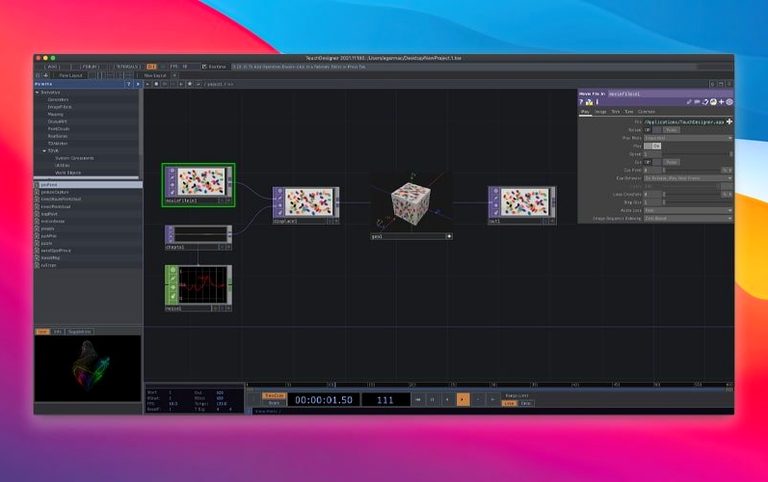
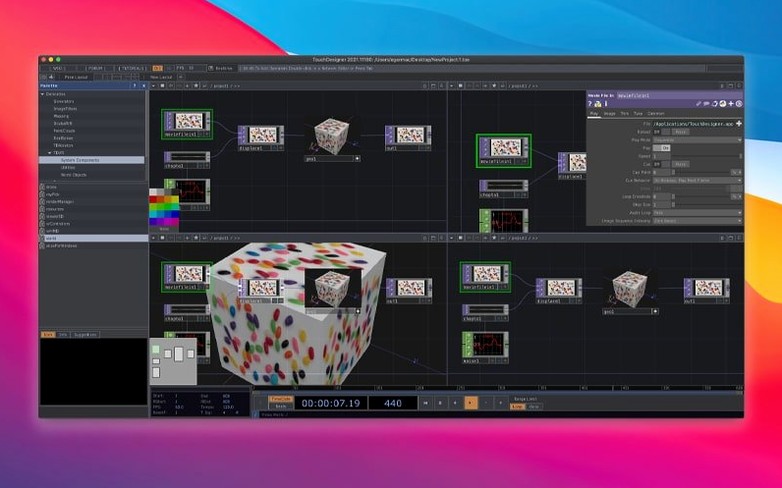
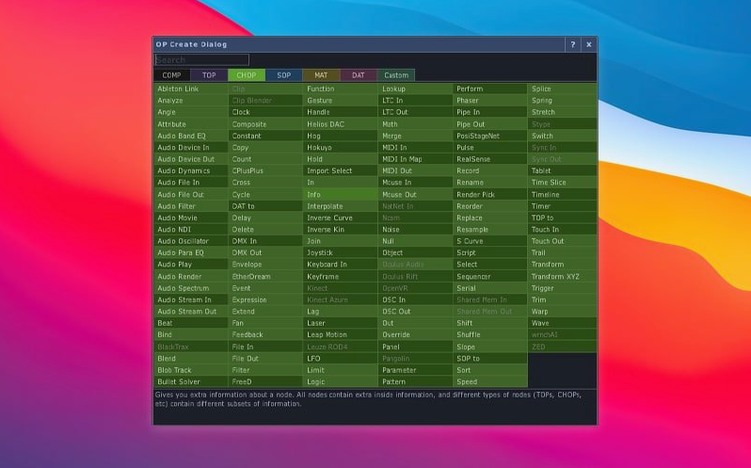
Point Operators, new in the 2025 release, run directly on the GPU to generate and reshape 3D point clouds. That geometry can feed a renderer, drive a lighting rig or become part of a live composite — all within the same workspace where it arrived.
Visual programming — Operators are connected by wires in a node graph. The flow is literal: what you see is the signal path.
Real-time 3D — The renderer and compositor run live, not as a pre-render. A change upstream is visible immediately.
Show control — The environment talks to lighting desks, audio systems and input devices. It can sit between a sensor and a projector.
VR tools — Built-in, not bolted on. A scene can be viewed or built from inside a headset.
Extension — The node set can be customised for a production's particular needs, which matters when a standard TOP won't do.
On a Mac, TouchDesigner sits alongside tools like Resolume or MadMapper, but its node graph is closer in spirit to a modular synthesiser. It can receive data from the Orbbec SDK (now at 1.10.16, with Intel Mac support) or a Kinect Azure, process it, and hand the result to something else. The 2025 update also brought native 3D texture and 2D array support to most TOPs, so image processing and geometry work share a more common vocabulary.
Holding 60 fps with a few hundred operators on Intel silicon
A node graph that redraws itself sixty times a second is only as useful as its frame-to-frame consistency. In practice, TouchDesigner 2025.31550 on an Intel Mac holds steady under moderate loads — a few hundred operators, two or three outputs, some MIDI coming in — without dropping frames or spiking the CPU unpredictably. The application threads well. When a TOP chain gets dense or a GLSL shader turns expensive, the GPU takes the hit first, which is where you want it.
Memory behaviour is straightforward: the project file and the live set share the same RAM pool, so a 3 GB point cloud sits in memory whether the timeline is running or paused. This matters on machines with 8 GB or 16 GB of RAM, where a large Particle SOP feeding a POP chain can push swap usage within minutes. Closing and reopening the project resets the footprint, as does deleting heavy operators and saving under a new filename. The app itself adds roughly 400 MB before any project loads, which is modest for the kind of work it does.
Disk I/O is mostly a factor during recording. Writing 4K ProRes from a Movie File Out TOP at 60 fps asks a lot of the storage bus. On an internal SSD, this is rarely a problem. External spinning drives can lag, causing the write buffer to fill and the frame rate to dip. The workaround — splitting the record chain so that capture and encoding happen in separate processes — is well supported inside the node graph.
Stability is production-grade in the sense that crashes are infrequent during a rehearsed set. They happen more often during patch editing, especially when dragging complex networks or reconnecting operators while the timeline runs. The autosave function (on by default, configurable in Preferences) catches most of these moments. A crash on exit is also a known quirk on some macOS configurations; it leaves no corrupted files, and the next launch is clean.
Gatekeeper blocks the first launch without a developer signature
A handful of friction points come up often enough to be worth naming. They are not bugs in the strict sense — more like places where the system's assumptions meet a user's expectations at an angle.
Gatekeeper blocks the first launch. The disk image mounts without trouble, but macOS refuses to open the app because it is not notarised. The install notes describe the fix: launch Open Gatekeeper friendly from the image, press Enter when Terminal asks, then drag the app to Applications. Once the quarantine flag is cleared, subsequent launches work normally. If a macOS update resets the flag, repeating the same two steps resolves it.
No audio output on first run. TouchDesigner does not claim the system audio device until an Audio Device Out CHOP is added and pointed at a valid output. New users sometimes open a tutorial file, see meters moving, and hear nothing. The check is threefold: an Audio Device Out CHOP exists, its Device parameter is set to Built-in Output (or the interface in use), and the volume slider inside the CHOP is above zero.
Node graph turns sluggish with many viewers open. Each floating viewer pane redraws independently. Eight open viewers mean eight render passes per frame, even if six of them show the same TOP. Closing unused panes or routing previews through a single Panel COMP restores interactive speed.
Orbbec or Kinect device not recognised. The 2025 upgrade to Orbbec SDK 1.10.16 added Intel Mac support, but the device still needs a direct USB connection — no hubs, no front-panel ports on a Mac Pro that route through an internal hub. Plugging directly into a rear motherboard port usually clears the detection issue. For Kinect Azure, the wrapper at version 1.10.3 expects the device's firmware to match; a mismatch shows as a timeout in the operator's Info CHOP.
POPs chain returns empty geometry. Point Operators run on the GPU and expect data in a specific layout. Dropping a POP after a SOP that outputs polygons rather than points yields nothing visible. Inserting a Convert SOP set to "Points" between the SOP and the POP chain bridges the two worlds.
Point Operators finally give GLSL-free point cloud manipulation
The 2025 release (build 31550) touched three areas that shift how a working day feels.
Point Operators. Before POPs, manipulating large point clouds meant either writing GLSL inside a GLSL TOP or pushing data through Python — both workable, neither immediate. POPs put point generation, noise displacement, and filtering directly into the node palette as first-class operators. A point cloud can be born from a Noise POP, displaced by a Turbulence POP, and coloured by a Lookup POP without touching a line of code. The GPU does the heavy lifting, so a million points deform at interactive rates on mid-range Intel graphics. The practical effect is that spatial experiments that once took an afternoon now take twenty minutes, and the result is easier to tweak during a rehearsal.
3D textures and 2D arrays in TOPs. This is less visible in the palette but more pervasive in the network. A TOP that samples a texture can now address a volume — three spatial dimensions instead of a flat image — which means volumetric effects, depth-based lookups and multi-layer compositing happen inside a single operator rather than across a tangle of workarounds. 2D array support brings a similar simplification: a sequence of images can be treated as a stack and indexed in one step. The day-to-day impact is a cleaner graph. Fewer nodes, fewer wires, fewer places for a misconnection to hide.
Orbbec and Kinect Azure updates. The SDK bumps are modest on paper — 1.10.16 for Orbbec, 1.10.3 for the Kinect Azure wrapper — but the Intel Mac support for Orbbec is new. A depth camera that was effectively Windows-only on this hardware now drops into a macOS project with a single Device CHOPS. For small studios running older Intel machines as media servers, this unlocks a sensor pipeline that was previously gated by the operating system.
Connecting outward through protocols, not platform conventions
TouchDesigner does not try to be a good macOS citizen in the Apple design sense — no sandboxing, no iCloud integration, no Share menu — but it connects outward through protocols rather than platform conventions. The result is a tool that integrates broadly with other software while staying loosely coupled to the operating system itself.
Syphon and Spout. On macOS, Syphon is the standard way to stream frames between applications without going through the file system. A Syphon Out TOP makes any texture available to MadMapper, Resolume, VDMX or a custom Processing sketch at full frame rate with negligible latency. The reverse path — Syphon In TOP — pulls live feeds from the same set of tools. In a typical installation, MadMapper handles the projection warping while TouchDesigner generates the content; Syphon carries the pixels between them.
Ableton Link. Tempo synchronisation across devices and applications works through the Ableton Link CHOP. A laptop running TouchDesigner, a tablet running an MPC app and a hardware synth all lock to the same beat grid without MIDI cables. The CHOP exports phase, beat and tempo as channels that can drive any parameter in the network.
MIDI and OSC. The MIDI In and MIDI Out CHOPs talk to any class-compliant controller connected via USB. OSC In and OSC Out DATs handle network messages with the same flexibility. A common pattern: a lighting console sends OSC cues, TouchDesigner interprets them and triggers video clips while returning status messages the console can display on its screen.
Python and scripting. The environment embeds a Python 3.11 interpreter. Any parameter, any operator, and any timeline can be read or written from a Script CHOP, a Script DAT, or the built-in textport. Extensions written as Python modules live in the project folder and load on startup. This is also where the touchdesigner pro download community often shares toolkits — custom palettes of operators that fill gaps in the standard library.
macOS features. TouchDesigner respects Spaces and full-screen mode but does not use native tabs or split view. It registers file types for .toe and .tox files so double-clicking a project opens it directly. Spotlight does not index inside project files, but the Find dialog inside the application covers operators, parameters and text inside DATs. Handoff and Continuity are not supported; the environment is self-contained by design.
Projection-mapped scrim responds to actors' positions on stage
Consider a lighting designer preparing a theatre piece that opens in three weeks. The set includes a scrim that catches projections from two angles, and the director wants the projected textures to respond to the actors' positions on stage.
She places an Orbbec depth camera at the front of the stage, connected via USB to an Intel Mac Mini running TouchDesigner 2025.31550. The Device CHOP pulls a point cloud of the stage volume at 30 fps. A Crop POP isolates the area where actors move; a Transform POP aligns the coordinate space with the projector's frustum. The cleaned cloud feeds two parallel chains: one drives a particle system that trails behind each detected body, the other modulates a noise texture whose scale increases when someone moves upstage.
The resulting textures stream via Syphon to QLab, which handles the playback timeline and crossfades between scenes. During tech rehearsal, the director asks for the particles to linger longer. The designer opens the Particle POP on her laptop, increases the Life parameter from 2.0 to 4.0 seconds, and the change is visible before she finishes typing. No export, no re-render, no file exchange — just a parameter edit on a live network.
The project file weighs under 2 MB. The depth camera, the node graph and the playback system form a single closed circuit. If a touchdesigner torrent or community touchdesigner crack brings someone to the tool for the first time, it is this kind of immediacy — edit something and see it change, right now, on the surface that matters — that tends to hold their attention. The environment rewards experimentation because the feedback loop is measured in milliseconds, not minutes.