Aspecten
 Download (540 MB)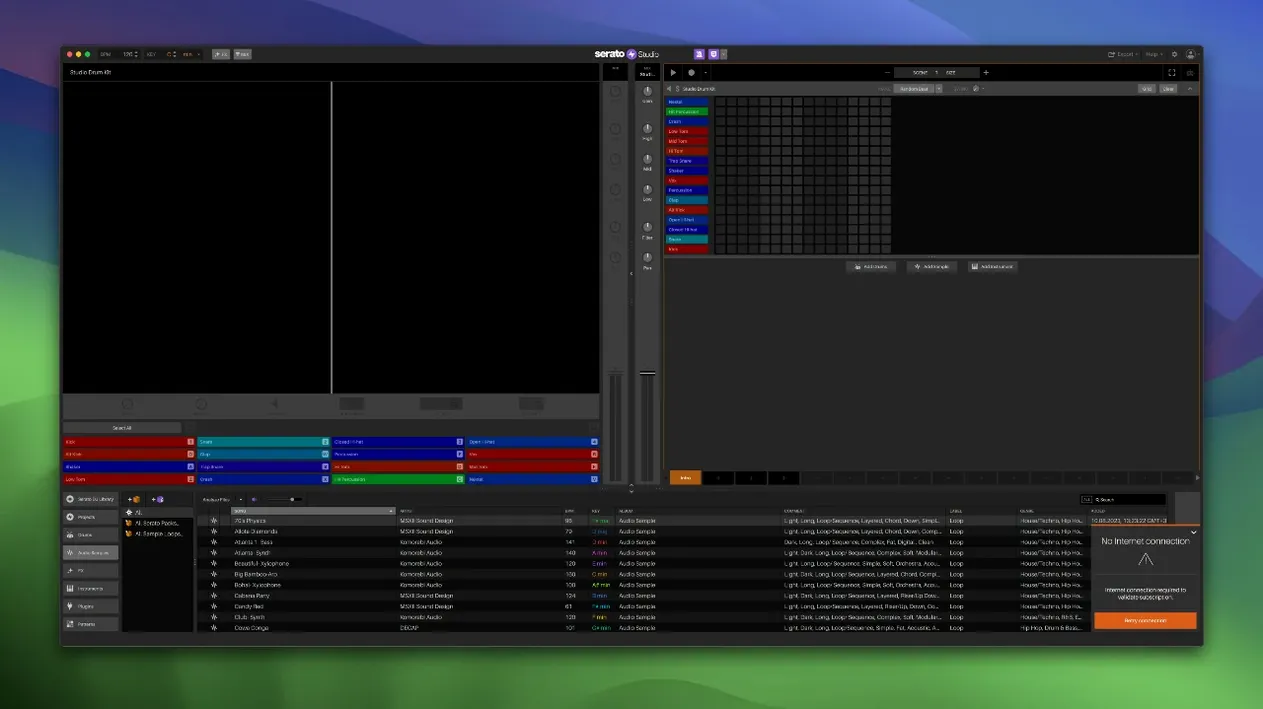
Auto Chord mode can sketch a progression in the project key before you place a single drum hit. That is where a session often begins — not with a blank grid, but with a harmonic suggestion you reshape or discard.
The browser pulls in your existing Serato DJ library, so crates of tagged tracks sit ready to chop. Built-in drum kits, instruments and loops cover the basics, while VST and AU plugin support lets the sound palette expand when needed. The workflow is built around speed: drag a sample, trigger scenes from DJ hardware, record automation passes for a filter sweep.
Good for:
- Producers who already organise music inside Serato DJ and want that library available for beat-making
- Sketching ideas quickly with Auto Chord, built-in sounds and scene-based arranging
- Hardware users — version 2.5.0 adds native control for the AlphaTheta SLAB alongside existing DJ controller support
Keep in mind:
- The core sound library requires a separate download; the installer package ships without it
- Automation for stem levels and stem on/off in Sample Decks is new, so older projects may need updating to use it
Comparisons with other Mac beat-making tools
Serato Studio sits between DJ software and a full DAW, and that position becomes clearer next to Ableton Live, Logic Pro and Akai MPC Beats. None of these is a direct replacement for the others, but the differences explain which workflow each one rewards.
Ableton Live also pairs a session view with clip launching and hardware control. Live goes much further as a production environment — deeper audio routing, more mature automation, a larger ecosystem of instruments and effects. Serato Studio answers with a shorter path from crate to pattern. A DJ who already tags and organises tracks in Serato DJ will find that context preserved; Live expects you to rebuild it.
Logic Pro offers a complete studio toolkit on the Mac, with scoring, advanced mixing and a vast bundled sound library. The trade-off is setup. A first beat in Logic involves track creation, instrument selection and a fair amount of window management. Serato Studio reduces that to a few clicks, with colour-coded waveforms and a mixer channel that mirror DJ hardware conventions rather than console conventions.
Akai MPC Beats is the closest in spirit. Both centre on pads, samples and beat-making. The MPC lineage leans into finger drumming and standalone hardware integration; Serato Studio leans into DJ library integration and scene-based arranging. If your samples live in a Serato crate, that tips the balance quickly.
The interface stays responsive with multiple decks and VSTs
In daily use the application feels light for a music production tool. A session with a handful of Sample Decks, a drum kit and two VST instruments runs without obvious interface lag on Apple Silicon. The colour-coded waveforms redraw promptly when stems levels change, and scene switching stays immediate even with automation recorded across four stem lanes.
Memory use is moderate. Large Serato libraries take a moment to index on first launch, but browsing stays responsive afterwards. Stem processing puts the most demand on the system; adjusting individual acapella, melody, bassline and drum levels during playback is smooth on recent hardware, though older Intel machines may show a short pause when enabling or disabling Stems on a deck.
Stability has been calm across long sessions. The new patch installer and the separate core pack download are the only rough edges — a first install without the core pack leaves the browser looking emptier than expected. Once both are in place, the application runs as a stable daily tool.
Rate tracks during gigs, then drag them straight into a project
DJs who produce are the natural fit. The shared Serato library means a crate built for a club set becomes source material the next morning. Track Rating and Favorite Crates from version 2.5.0 make that handover faster: rate tracks while DJing, then filter the same ratings inside Serato Studio.
Sketch artists benefit from Auto Chord and ready-made drum patterns. A progression can be generated in the project key, auditioned through built-in instruments, and replaced without touching a MIDI editor. The Feel control adds enough human timing variation to make a static chord pad sound played rather than programmed.
Hardware DJs gain a production tool that speaks their language. Native AlphaTheta SLAB control joins existing DJ controller support, so pads, faders and encoders already mapped for performance can drive scene triggering and automation. That continuity shortens the distance between a live set and a finished beat.
Users who need deep mixing, scoring or complex multi-track editing will eventually want a fuller DAW. Serato Studio does not replace that, but it also does not ask you to learn a second system for the first 80 percent of an idea.
Monday morning starts with a crate of four-star club tracks
You open the app after a weekend of DJing. A crate called Sunday warm-up holds twelve tracks you rated four stars or higher. You filter by that rating in the library, drag a vocal loop into the first Sample Deck, and set the project tempo to match the source track. The waveform aligns with the BPM grid on the first try.
- You click Auto Chord and let the project key suggest a minor progression. It lands close to what you heard in your head, so you keep two bars and change the third by ear.
- You drop a drum kit onto a pad track and cycle through ready-made patterns until a half-time groove fits the vocal. The pattern locks to the project BPM.
- You load a bass patch from the built-in instruments and play a short line on the AlphaTheta SLAB pads. One-touch key switching keeps the line in key when you move up a fourth.
- You split the vocal into stems and lower the melody stem by a few dB, leaving the acapella and bassline forward. You record automation on the Stems On/Off button to drop the drums out for one bar.
- You arrange the idea in Scene View: intro, drop, breakdown. The scene triggers feel like cue points, not arrangement markers.
- You export stems for a rough mix. The acapella comes out clean enough to send to a collaborator that evening.
The whole session takes under an hour. The result is not a finished track, but it is a complete arrangement sketch with the right key, tempo and structure — and every sound in it came from material you already owned. Search terms like Serato Studio torrent or Serato Mac torrent often lead people to the disk image and patch installer; the setup is straightforward once both pieces are in place.