Aspecten
 Download (60 MB)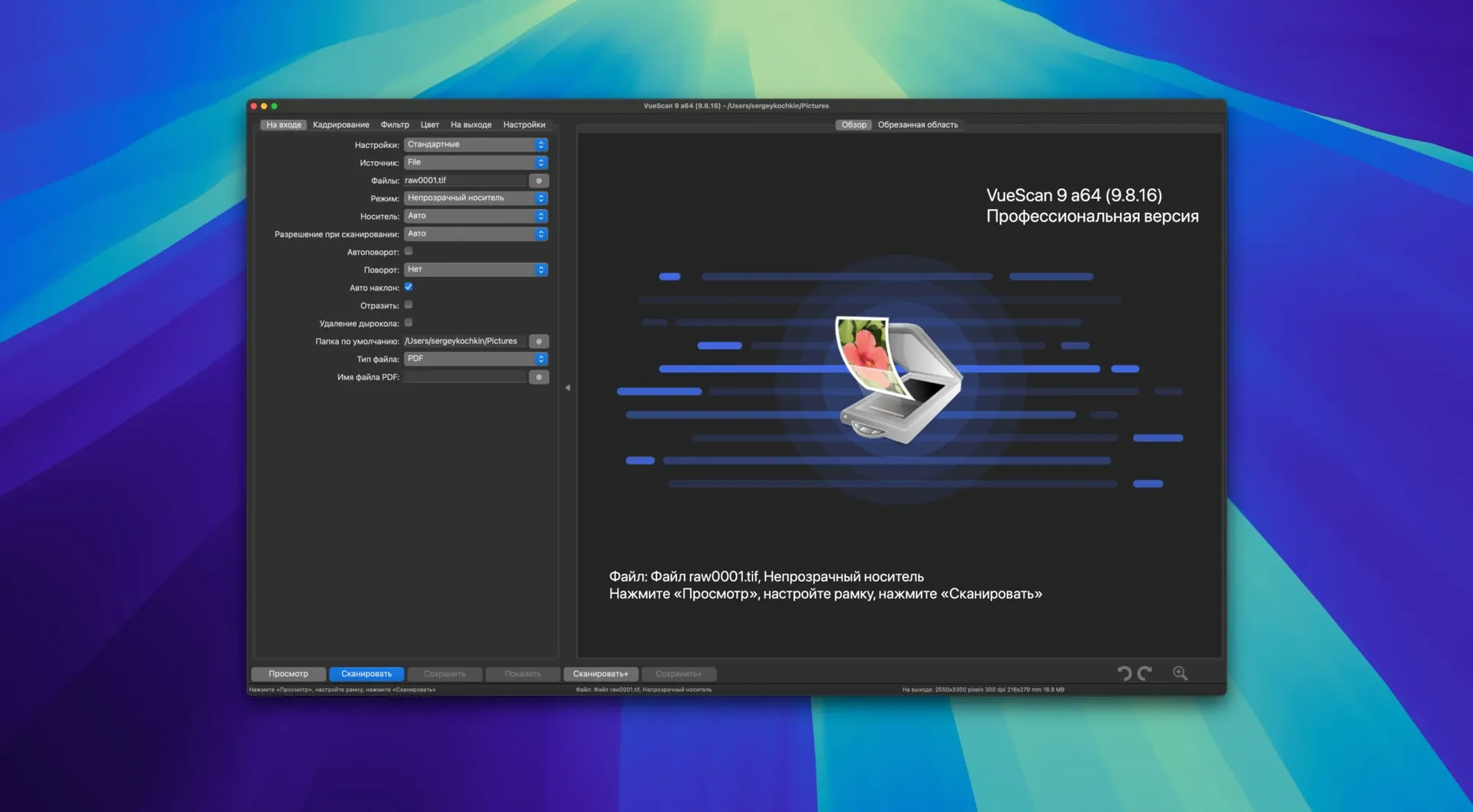
VueScan is a scanner driver that replaces manufacturer software, adding consistent controls and support for over 6,000 scanner models on macOS. It runs the scanner at its internal colour depth and provides manual access to settings that are often hidden or absent in factory applications. The current version, 9.8.57, expands batch processing to colour correction and resolution enhancement, and extends hardware compatibility further.
- Independent per‑channel tonal control. Dynamic range and tonal response can be adjusted separately for the red, green and blue channels. This allows precise correction of colour casts without relying on a single global slider.
- Infrared scratch and dust removal. Scanners equipped with an infrared channel can detect surface defects. VueScan uses that data to subtract dust and scratches from the final image during the scan, rather than afterwards.
- Reusable settings profiles. A complete set of scan parameters — resolution, colour adjustments, filter settings — can be saved to a file. Loading that file restores an identical setup, useful when scanning similar batches over time.
- Batch processing for colour and resolution. Version 9.8.57 added batch support for the colourise and super‑resolution functions. A folder of images can be processed in one pass with consistent settings.
- Flexible file naming. Incremental file names now support variable step sizes, such as
file001+2.jpg. This keeps multi‑page scans neatly ordered without manual renaming.
VueScan also includes grain reduction, unsharp masking and colour cast removal filters that work at scan time. The combination of raw scanner access and batch‑aware post‑processing makes it a practical tool for maintaining older hardware alongside newer models, without switching interface conventions each time the scanner changes.
How VueScan fits with other apps and macOS
VueScan does not try to replace image editors or DAM software — it hands off a finished file and steps aside. The output TIFF, JPEG, PDF, or raw data files drop into whatever folder pattern you have set, ready for Lightroom, Photoshop, Capture One, or Apple Preview. Because the application writes standard file formats rather than proprietary containers, no import plugin is needed. A raw scan saved as a 48-bit TIFF retains the full colour depth that the scanner delivered, and an editor that handles deep colour can pick it up without remapping.
On the macOS side, VueScan behaves like a plain document-based application. It respects the system dark mode setting, responds to standard keyboard shortcuts for copy and paste, and keeps its configuration files in the user’s Library folder. The application can be added to Login Items if a scanner station is dedicated to a single workflow. Finder tags applied to output folders are preserved, and file naming substitutions introduced in version 9.8.57 — including date and time tokens — mean files sort predictably in the Finder without renaming scripts. For users who lean on Automator or Shortcuts, the predictable file paths and increment patterns make it straightforward to build watch-folder actions that trigger after a batch finishes.
Scanners that have lost manufacturer driver support under recent macOS releases often reappear through VueScan’s own USB communication layer. The 9.8.57 release specifically improved USB scanner support on macOS, which matters for older film scanners and flatbed models that rely on kernel extensions no longer present in the system. When the scanner works again, so does the entire chain: scan, save, open in an editor, share.
Talking directly to the scanner, not the dead driver
Does VueScan replace the manufacturer’s driver entirely, or does it sit on top of it? For most supported scanners, VueScan communicates with the hardware directly, bypassing the manufacturer driver. This is why scanners that no longer have working macOS drivers can still function. For a small subset of models, it can also work through the manufacturer’s own driver if preferred, but the direct approach is the default and the reason many older devices regain full feature access.
Will the infrared dust removal work with my scanner? Only if the scanner hardware includes an infrared channel. VueScan cannot add an IR pass to a device that lacks one. Flatbed scanners and dedicated film scanners that originally advertised Digital ICE or similar hardware-based defect removal typically have the necessary channel. The function appears in the filter tab as an option, and if the scanner does not support it, the control is greyed out.
Can I use it alongside the manufacturer’s own scanning application? Yes. VueScan does not uninstall or disable other scanning software. The two can coexist on the same Mac, though only one can access the scanner at a time. Switching between them is a matter of quitting one application before opening the other.
What does raw scanner data mean in practice? Saving a raw file captures exactly what the scanner sensor delivered before any colour correction, sharpening, or tone curve is applied. That file can be reopened in VueScan later and processed with different settings — effectively re-scanning without the scanner being connected. It is a safeguard for archival projects where the physical original may not be available for a second pass.
Locking exposure across a whole roll of film
Photographers working with film negatives and slides are the most obvious beneficiaries. VueScan’s per-channel tone curve control and infrared cleaning turn a basic film scanner into a precise digitisation tool. The ability to lock exposure and colour balance across a batch of frames keeps a roll of film consistent from first frame to last, which is harder to achieve when scanning frame by frame with sliders that reset between passes.
Archivists and librarians scanning documents, prints, or fragile materials benefit from the raw save feature and reusable profiles. A profile built for a specific paper type — say, yellowed newsprint with a known colour cast — can be recalled months later and applied to a new batch from the same collection. Because VueScan keeps the scanner’s internal colour depth intact, the archival master file holds more tonal information than a default driver setting might deliver.
Office environments with mixed scanner fleets gain consistency. A reception desk with an Epson flatbed, a back-office HP document feeder, and a portable Canon unit can present staff with the same VueScan interface on every machine. Training time shrinks, and saved profiles ensure invoices, forms, and ID documents are captured with the same resolution and file format regardless of which scanner was nearest.
Owners of older scanners that lost manufacturer support after a macOS upgrade form a quieter but significant group. Rather than replacing functioning hardware, they install VueScan and carry on. The 9.8.57 USB improvements directly serve this group, as do the regular additions of newly supported models — seven Epson and eleven Brother scanners joined the list in this release alone.
Taming inconsistent colour from 1970s negatives
Consider someone digitising a family archive of several hundred colour negatives spanning the 1970s and 1980s. The film strips vary in brand, exposure quality, and storage condition. The archivist loads the first strip into a Nikon film scanner that has not had an official macOS driver for years. VueScan recognises it immediately.
They set the media type to colour negative, lock the exposure on a frame that contains a reasonable range of highlights and shadows, and adjust the red-channel curve slightly to compensate for the orange mask typical of that film stock. The infrared channel is active, catching dust specks and fine scratches before they reach the file. A profile is saved as “Kodak Gold 200 — Nikon LS-50” so it can be reused when the next strip of the same film appears. The batch of 36 frames runs unattended, writing 48-bit TIFF files with incrementing names into a folder tagged by year. A second pass later that evening applies the grain reduction filter to a subset of underexposed frames, using the new batch colourise support to correct a slight green shift across the entire set without reopening each file individually. The archivist closes the laptop knowing the scanner raw data for the trickiest frames is saved too, available for reprocessing if a better colour profile turns up later.