Aspecten
 Download (9 MB)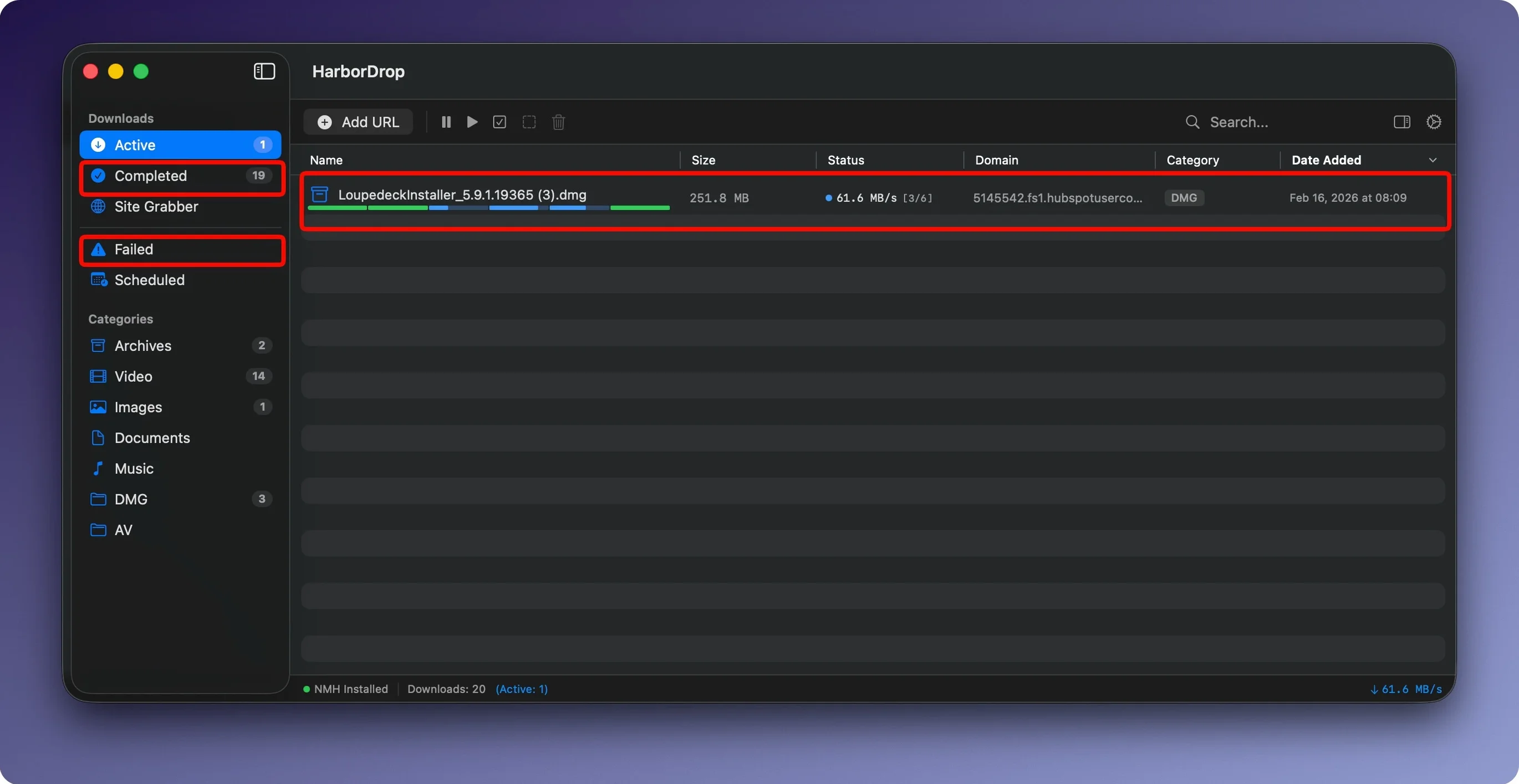
HarborDrop is a macOS download manager that brings segmented downloading, browser integration and file sorting into one lightweight app.
A straightforward download list and browser link catching
The main window stays out of the way, showing active and completed downloads in a straightforward list. You set a download folder, then let it catch links from your browser. The extension sends media links and file links directly, so you do not have to copy URLs by hand. After a download finishes, HarborDrop can open the enclosing folder in Finder, which keeps the step of locating a file out of your workflow.
Parallel segments and automatic sorting by domain or type
Where HarborDrop really fits into a Mac setup is in how it handles multiple downloads. It splits files into configurable segments for parallel downloading and can sort completed files automatically by site domain or file type. That second part means you can have it drop a PDF from one site into a work folder and a video from another onto an external drive, without setting up a separate Hazel rule or folder action. It also downloads non-DRM video from supported sites and handles m3u8 playlists, so it can serve as a straightforward video grabber alongside your regular browser. Browser support covers Brave, Edge and Chromium-based Arc through its extensions, so it slots into whatever browser you already use rather than asking you to switch.
Compared with other Mac download managers
Folx and Neat Download Manager sit in a similar space, but they approach the job from different angles. Folx leans into a full-downloader-plus-torrent-client model, which can feel heavy if you only want a focused HTTP downloader. HarborDrop stays lighter by skipping torrent support entirely and concentrating on segmented downloads, video capture and post-download scripting.
Neat Download Manager is closer in spirit — it also splits downloads into segments and offers a browser extension for link interception. Where HarborDrop pulls ahead is in automation. Neat DM gives you a clean download list and good multi-threading, but it does not match the automatic sorting by domain or file type, nor the option to run AppleScript, Shell or JavaScript after a download completes. For someone who wants downloads to end up in the right folder without manual sorting, that difference matters in daily use.
Against a heavyweight like JDownloader, HarborDrop trades raw site-plugin breadth for a more Mac-native feel. JDownloader covers an enormous range of hosts, but its interface feels ported and can be sluggish on Apple Silicon. HarborDrop starts faster, respects the macOS look, and stays responsive. The trade-off is a narrower set of supported streaming sites, though for common video sources it handles m3u8 and HLS without fuss.
Bumping the segment count for a faster wired line
A few defaults work better after a small tweak. The first stop is the Segments setting. The default of six parallel parts suits most home connections, but on a fast wired line bumping it to eight or ten can shave seconds off large files. On a slower or metered connection, dropping to four keeps overhead low and avoids saturating the link.
Next is the Sorting rules panel. Even one rule — say, sending every .dmg to a dedicated Disk Images folder — removes a surprising amount of Finder hunting later. Adding a domain-based rule for a work portal or a media site pays off within a day. The Post-download action section is also worth a visit; a simple Shell script that runs trash on the original archive after extraction, for example, keeps the download folder tidy without external tools.
In the browser extension, the default is to intercept all file links. If that gets noisy on image-heavy pages, switching the extension to media-only mode from its toolbar popover quiets the prompts without disabling capture of video and audio links.
60 MB of RAM at idle on an M2 MacBook Air
On a MacBook Air with an M2 chip, HarborDrop idles at around 60 MB of RAM with no active downloads, rising to roughly 110 MB during a six-segment transfer of a 2 GB file. CPU use stays low; the segmented writing rarely pushes past 4–5%, which keeps the machine cool and the fans off during long queues. The app has not beachballed in testing, even when a dozen files queued up with post-download scripts firing one after another.
Download speeds depend on the server as much as the segment count, but from fast CDNs HarborDrop regularly saturates a 300 Mbps connection. It handles network drops gracefully — pausing and resuming a partially downloaded file picks up cleanly, with no corruption noticed across several interrupted ISO transfers. Stability under macOS 14 and 15 has been uneventful in a good way: no crashes, no odd Extension warnings, no background processes left behind after quitting.
Double-click a completed download to reveal it in Finder
A few touches are easy to overlook. Double-clicking any completed download in the list opens its enclosing folder in Finder, which is faster than right-clicking or hunting through the menu bar. The Site Grabber, tucked behind a toolbar button, accepts a crawl depth from 1 to 3; setting depth to 1 on a page of lecture slides grabs all linked PDFs without wandering off into unrelated pages.
The download list supports drag-and-drop reordering, so you can pull an urgent file to the top mid-queue without cancelling and re-adding it. If you hold Option while clicking the pause button, HarborDrop pauses all active downloads at once — handy when you need to free the connection for a video call. The AppleScript hook is particularly flexible: a short script that renames a finished download based on its source domain and date takes under a minute to write and turns HarborDrop into a self-organising download bin. For anyone who has tried harbor drop mac alternatives and found the scripting angle missing, these small hooks make the app feel more deeply macOS-native than its peers.