Aspecten
 Download (100 MB)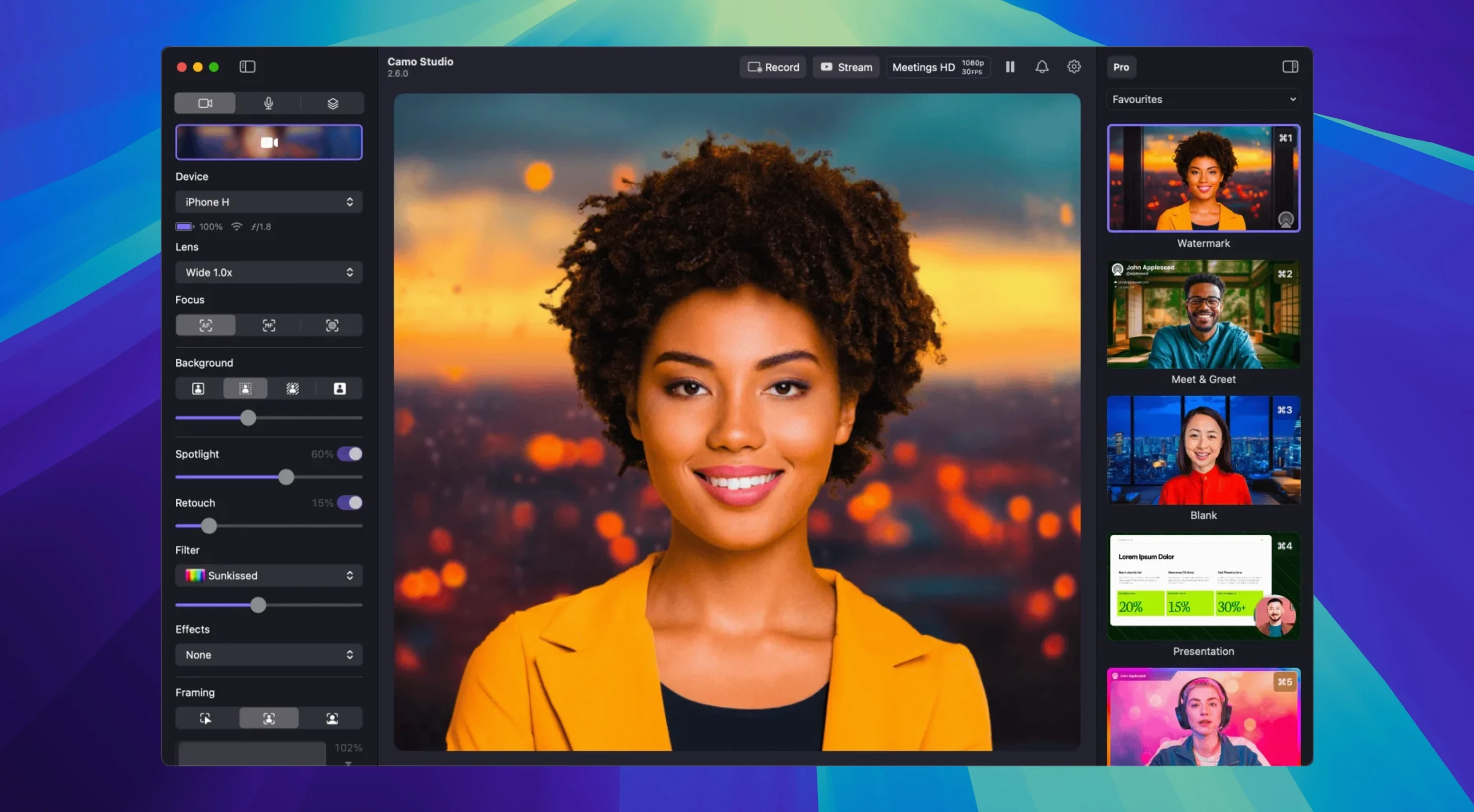
Frame rates reach 60 FPS at up to 4K UHD, with all the heavy video processing staying on the connected phone rather than the Mac. That means the computer stays responsive even while the feed looks sharp.
What the feature set covers
- Automatic framing keeps a subject centred in shot, moving the crop as the person shifts.
- Isolated recordings let you capture separate audio and video tracks for cleaner post-production.
- Dual-format streaming and recording sends a feed out live while saving a higher-quality copy locally.
- Audio noise reduction cleans up background hum before it reaches a call or a recording.
- AI agent control hands camera adjustments to scripts and automation tools, added in version 2.9.0.
Compatibility and processing approach
The app runs natively on both Apple Silicon and Intel 64-bit Macs, requiring macOS 12.3 or newer. Because video processing is offloaded to the phone, the Mac itself handles little more than the interface and stream routing. The current macOS build, 2.9.0.25534, presents everything in English and sits alongside other tools in the Camo family.
Appears as a camera in Zoom, OBS, and Safari with no extra plug-ins
Camo Studio shows up as a standard camera source in any app that picks up a webcam feed — Zoom, Teams, OBS, QuickTime, Safari, you name it. There is no fiddly plug-in per application. Once the phone is connected and Camo is running, macOS treats the feed like any other video input. That means the same LUT, framing and exposure settings you dial in once apply everywhere.
On the audio side it is similarly straightforward. The phone’s microphone appears as an input device in macOS Sound preferences, so you can route it into a call, a recording app or a streaming tool independently of the video. The noise reduction added in 2.9.0 processes on the phone before the signal ever reaches the Mac, which keeps latency low and avoids loading the computer’s own audio processors.
For streamers and presenters who work with OBS or Ecamm Live, Camo’s scene layers and overlays can either replace or complement what those apps do. Some people use Camo purely for the polished camera feed and leave all the scene building to OBS. Others build titles, web overlays and logos inside Camo and send a finished composite downstream. The dual-format streaming feature makes the latter practical — you push a compressed stream to your platform while saving a clean, high-bitrate recording locally for editing later.
Shortcuts and Automator workflows can talk to Camo via the AI agent control introduced in 2.9.0, which opens up scripted camera switching. A presenter could trigger a specific zoom level and filter when joining a scheduled meeting, or a streamer could tie a scene change to a hotkey that also adjusts exposure.
Apple Silicon CPU sits at a few percent during 1080p60
Because the phone handles all the video encoding, the Mac side of Camo is light. On an Apple Silicon machine the app itself rarely pushes CPU usage above a few percent during a 1080p60 feed. Memory use hovers in the 150–250 MB range depending on how many overlays and filters are active. The real processing cost sits on the phone, where the Camo companion app runs the camera pipeline. An iPhone 12 or newer can sustain 1080p60 for hours without overheating, though 4K at 60 FPS on a warm day will eventually trigger thermal throttling on the phone. A small desk fan aimed at the device solves that in practice.
Wired connections over USB are more stable than Wi‑Fi, as expected. The USB option also keeps the phone charged. Over Wi‑Fi, occasional frame drops appear when the network is busy, and the camera preview shows a brief stutter before recovering. For recording or live streaming where a dropped frame matters, the cable is the safer bet.
Stability over long sessions is solid. Leaving Camo running for a full workday with Zoom calls interspersed rarely causes a crash. The app recovers cleanly if the phone disconnects: it shows a placeholder screen in the camera feed and picks up again within seconds once the connection is restored, without needing to restart the call or the streaming software.
Expecting the phone to work without the Mac companion app
The most common stumble is thinking the phone does everything by itself. Camo Studio on the Mac and the Camo companion app on the phone are a pair; leaving the companion app in the background or not granting it camera permission means a black screen on the Mac side with no obvious error message.
Another early mistake is connecting over Wi‑Fi before plugging in at least once. The first pairing works best over USB, because the phone needs to trust the Mac and the companion app needs to confirm the link. People who try Wi‑Fi first often sit through a long, unsuccessful search for devices and assume the app is broken.
Background replacement trips people up when the lighting is uneven. The virtual green screen works best with a plain, evenly lit background and no strong backlight. Sitting with a window directly behind you produces a flickering edge around the subject that no amount of tweaking the tolerance slider will fully fix. Moving the desk or closing a curtain usually solves it.
Some newcomers also overlook that the phone’s own camera settings in the companion app are separate from the Camo Studio controls on the Mac. Adjusting exposure on the Mac does nothing if the phone app still has auto-exposure locked in a different state. Checking both ends of the connection saves a lot of head-scratching.
Taking a call pauses the camera feed but doesn't block it
One question that comes up often is whether the phone can still be used as a phone while Camo is running. The answer is yes — calls and notifications still come through, though taking a call pauses the camera feed. The video resumes once the call ends.
People also want to know if this replaces a dedicated webcam entirely. For most indoor scenarios the answer is yes, and the image quality from a recent iPhone or Android flagship outclasses most USB webcams by a wide margin. The limits appear in very low light, where a phone sensor still outperforms a webcam but dedicated cameras with larger sensors pull ahead, and in multi-camera setups where a single phone can only provide one angle. Some streamers pair Camo with a second USB camera and switch between them in OBS.
The question of whether older phones work comes up frequently. An iPhone 8 or a mid-range Android from 2019 can run the companion app, but 4K and 60 FPS options may be unavailable, and the phone will run warmer. For 1080p30 video calls they are perfectly usable. Checking the Camo compatibility list for the specific phone model clears up which resolutions and frame rates are supported.
The final common question is about safety. The companion app connects locally over USB or Wi‑Fi; no feed goes through an external server, and the Mac processes the signal as a local video source. That architecture means the app does not introduce an extra network hop that could leak video.