Aspecten
 Download (259 MB)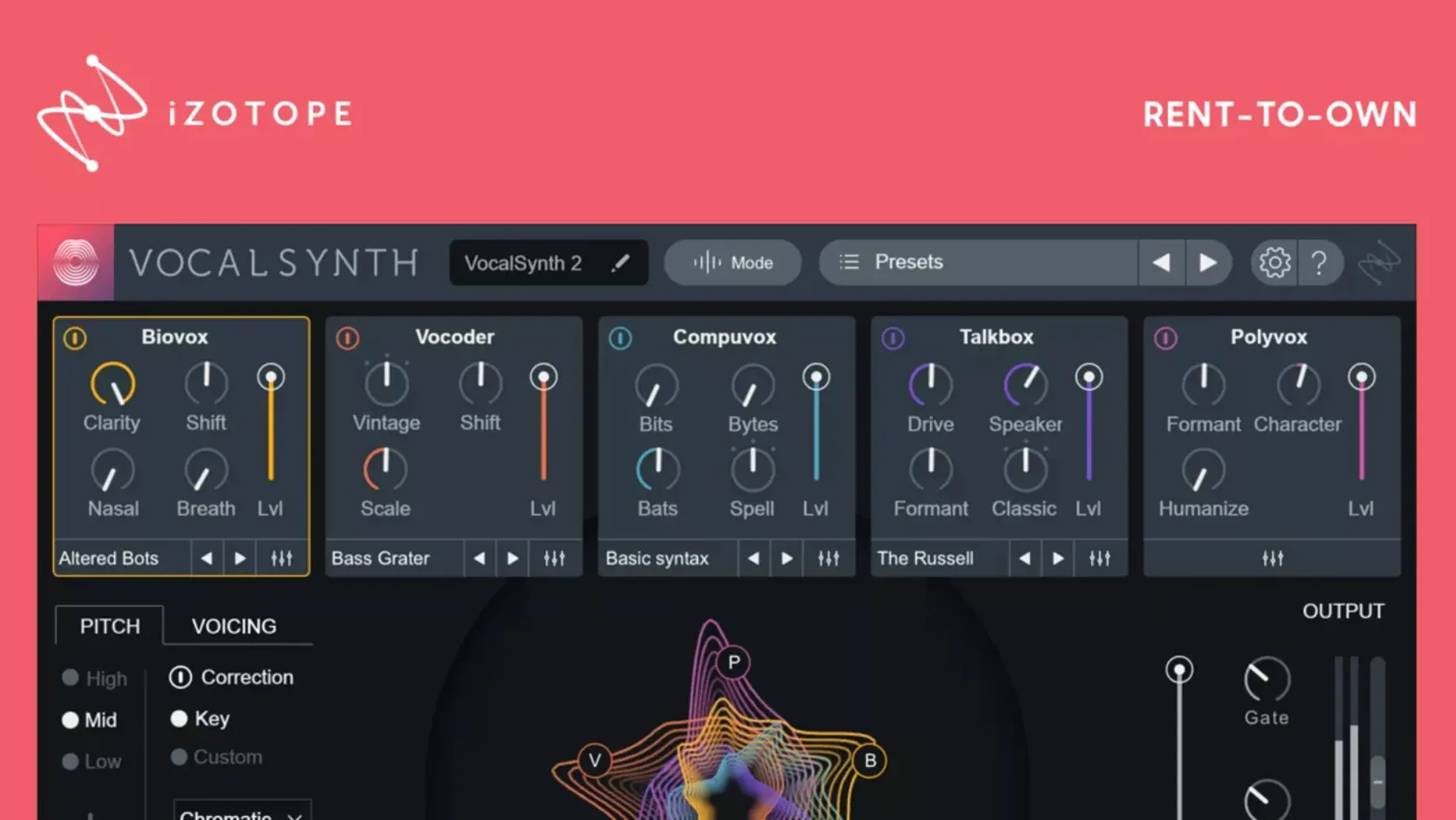
Version 2.6.1 resolved an authorisation hiccup that appeared for some users moving up from 2.5.0. Beyond that, VocalSynth 2 remains a plug-in built around five mixable creative modules for shaping vocal tracks.
Formats and hosts — AU, VST2, VST3 and AAX on macOS. It runs natively on both Apple Silicon and Intel 64-bit architectures.
Processing modes — Auto, MIDI and Sidechain. These govern how the plug-in responds: Auto follows the incoming signal, MIDI lets you control pitch through a controller, and Sidechain uses a separate audio source to drive the vocoder-inspired effects and signal modulation.
Sound structure — Five modules stacked and blended. The effect set reads like stompboxes for the voice, with Biovox, Vocoder, Polyvox, Compuvox and Talkbox each offering a distinct method of synthesis and filtering. They interact with other iZotope plug-ins in the ecosystem—Neutron, Ozone and Tonal Balance Control can all sit alongside it in a chain.
Fitting VocalSynth 2 into a larger setup
VocalSynth 2 is not an island. It works best when it can talk to the rest of an iZotope chain. Drop it before Neutron on a vocal bus and Neutron’s Masking feature can read the spectral output, helping you carve space for the synthesised layer against other midrange elements. After VocalSynth, an instance of Ozone can apply limiting or stereo widening that reacts to the processed tone rather than the dry vocal. Tonal Balance Control, meanwhile, sees the combined signal and flags if the added harmonics push the high-mids too far forward.
Outside the iZotope family, the plug-in cooperates with any DAW that hosts AU, VST2, VST3 or AAX. Sidechain mode deserves special mention here: route a drum loop or a guitar part into the sidechain input and VocalSynth 2 treats that audio as the carrier while the vocal acts as the modulator. The result is a rhythmic, gated texture that stays locked to the external source—useful for tightening a chorus against a busy arrangement without drawing automation curves by hand.
On macOS, the plug-in also responds to system-wide MIDI routing through the IAC driver, so you can send pitch and chord data from a MIDI track or an external sequencer without needing the plug-in on the same channel strip. Auto mode, by contrast, needs no routing at all: it follows the vocal pitch and dynamics directly, which makes it the quickest way to blend a module underneath the original performance.
Thickening a thin verse vocal with a first module
A producer opens a project with a lead vocal that feels thin in the verses. The DAW runs on an Apple Silicon Mac, and VocalSynth 2 loads in VST3 format on an insert slot. The first move is to set the processing mode to Auto—no MIDI controller connected, no sidechain source ready. The dry vocal plays through while the producer pulls up the Biovox module and drags the mix slider to about 30%. Immediately the voice gains a throaty, vowel-filtered weight that fills the lower mids without sounding like a separate double-track.
A second instance of VocalSynth 2 goes onto a send. This time the mode switches to MIDI. A simple three-note chord progression plays from a muted software instrument track, and the plug-in’s Polyvox module interprets those pitches as harmonised vocal layers. The producer sets the module to a interval of a fifth and a octave, keeps the mix wet on the send, and automates the send level so the harmony only appears on the last word of each line.
With the verse now carrying weight and the phrase endings lifting, attention moves to the chorus. A third instance—Sidechain mode—takes a shaker loop as the carrier. Compuvox, with its bit-crushed, glitchy character, processes the vocal in short bursts. The producer nudges the attack time up so the effect breathes with the shaker rhythm rather than stuttering on every transient. By the end of the session, three instances of the same plug-in serve three distinct roles: thickening, harmonising and glitching, none of them stepping on the dry lead.
Calibrate input level before the modules react
The default state of VocalSynth 2 is a flat, neutral starting point. A few tweaks right after loading make a noticeable difference to how the modules respond.
- Input level calibration. The plug-in’s internal processing reacts to signal strength, and a vocal recorded too quietly can make the vocoder and talkbox modules sound thin. Boost or trim the input gain so the spectral display shows a healthy waveform without constant red peaks.
- Global pitch range. Found in the settings panel, this controls how wide a pitch bend the MIDI and Auto modes can track. Narrow it down to a octave if the vocal stays within a limited range; the tracking becomes tighter and wobbles less on slides.
- Oversampling. Off by default to save CPU, but engaging it on a final render pass smooths the high-frequency artifacts that Biovox and Compuvox can introduce. Switch it on when bouncing, leave it off while tracking.
- Module order. The five modules process in series by default, but dragging them left or right changes the signal path. Placing Vocoder before Biovox gives a different vowel emphasis than the reverse. Experiment once, then save a user preset with your preferred chain.
Avoid washing out the texture with too many modules
The most common stumble is running all five modules at once with each mix knob near 50%. The result is a washy, indistinct smear where no single texture reads clearly. A better habit is to start with one module at full mix, shape it until it sounds distinct, then fade it back to blend. Add a second module only once the first has a defined role.
Another frequent misstep is ignoring the sidechain filtering options. When Sidechain mode is active, the plug-in offers high-pass and low-pass controls on the sidechain input. Leaving them wide open means every snare hit or cymbal crash in a drum loop triggers the effect across the full frequency range. Narrowing the band to the midrange—where the vocal sits—keeps the triggering cleaner and stops low-end thumps from causing unwanted modulation.
Beginners also tend to overlook the value of the spectral display. It shows vowel formants in real time, and watching it while adjusting the Biovox or Talkbox parameters reveals exactly how the filters shift the resonant peaks. Guessing by ear alone works eventually; using the visual feedback cuts the guesswork in half.
Finally, some users treat MIDI mode as a simple harmoniser. It can do that, but the real flexibility comes from sending chords with varying velocities and timing offsets. A softly played chord triggers less aggressive synthesis than a hard-struck one, and notes slightly staggered create a cascading effect that a block chord never produces. The plug-in reads the full MIDI performance, not just the note numbers.
Those looking for a vocal synth 2 free download or a vocalsynth 2 free download will find the plug-in widely discussed in production forums. Some searches lead toward a vocalsynth 2 crack mac or an iZotope VocalSynth 2 crack, and a VocalSynth 2 torrent surfaces occasionally. The version floating around in those circles often lacks the Apple Silicon native support that arrived in 2.5.0, and the authorisation fix from 2.6.1 is absent. Running an older build means missing the spectral display improvements, so check for the 2.6.1 component to ensure smooth behaviour under macOS Monterey and later.