Aspecten
 Download (262 MB)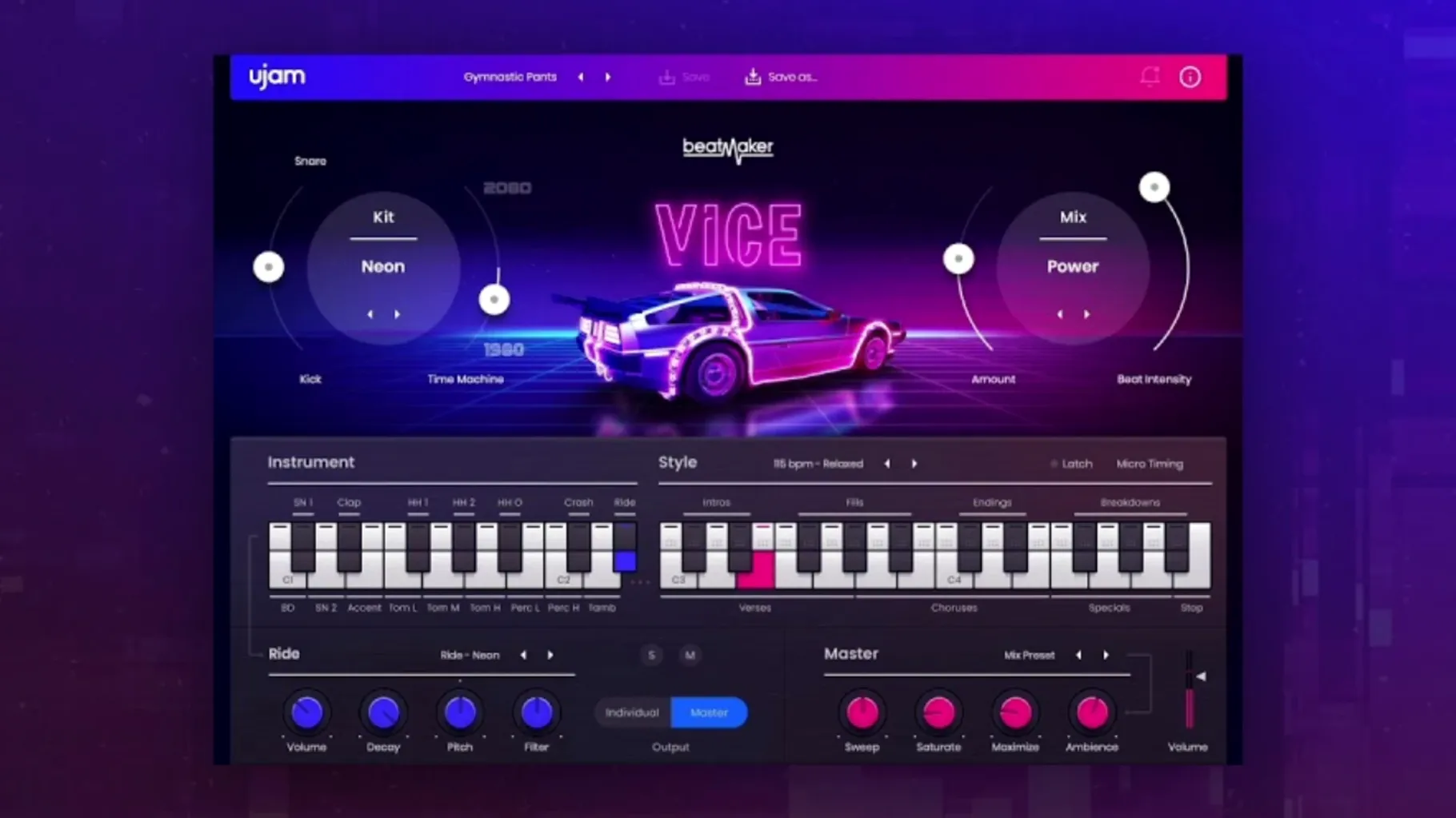
Beatmaker VICE tends to sit in the hands of producers building retro-electronic and synthwave arrangements. It supplies a focused set of 1980s drum machine sounds, processed with modern clarity, so the drum track sits in a mix without extra treatment. In a session, it often lives on a dedicated drum bus or directly on an instrument track, feeding a sidechain compressor on the bass or pad group.
Patterns on a resizable instrument track
- Instrument track: Place VICE on its own track and program patterns internally or drag MIDI into the DAW for detailed editing. The resizable interface helps when the plug-in shares screen space with a mixer or arrangement view.
- Drum bus routing: Route the output to a drum bus for group processing. The built-in Time Machine control adds lo-fi grit or tightens the room feel before signals hit any bus compressors.
- Quick layering: Use MIDI drag and drop to layer VICE patterns with other Beatmaker-series plug-ins or sample libraries, building hybrid kits without leaving the timeline.
Time Machine and sound shaping
The Time Machine special control is a single-parameter effect that shifts the kit character between tightly gated 1980s snap and more open, ambient treatments. It acts before the individual mix controls, so adjustments ripple through the whole kit—useful when a track needs to move from a dry verse into a washed-out chorus without changing the pattern.
DAW-only operation, no standalone mode
One of the first things people ask is whether VICE works as a standalone application. It does not — it runs inside a DAW via VST, AU or AAX. That means you need a host such as Logic Pro, Ableton Live or Cubase already set up. The plug-in appears in the instrument list after installation, alongside any other Beatmaker titles you may have.
Another common question concerns disk space and content location. The 0.96 GB footprint covers the plug-in and all factory content. The sound library is installed once and shared across supported formats, so you do not multiply that figure for each plug-in type. On first launch, the UJAM App handles authorisation and keeps the installation tidy.
People also wonder about pattern editing outside the plug-in. The MIDI drag-and-drop feature lets you pull any pattern onto a DAW track as a MIDI clip. From there you can edit note positions, velocities and lengths directly, then route the MIDI back to VICE or to another drum instrument. It is a straightforward way to build variations without programming everything from a blank piano roll.
A few producers search for a ujam torrent or ujam mac torrent before trying the plug-in, usually to gauge whether the 1980s palette fits their projects. The pattern library and kit list are visible in the interface, so it is easy to browse what is included before committing time to a full session. The same curiosity sometimes leads to a ujam kaya torrent search when people explore the wider Beatmaker series.
Synthwave kits shaped from Linn, Roland, Simmons, Korg
Producers working in synthwave and retrowave genres tend to extract the most from VICE. The kits draw from a narrow window of drum machine history — Linn, Roland, Simmons, Korg — and the sound is already shaped for those styles. Rather than spending time sourcing samples and treating them, a producer can load a kit, pick a pattern and have a rhythm section that references the period convincingly.
Media composers also find it practical. When a brief calls for an upbeat 1980s cue with punchy snares and gated reverb, VICE supplies the palette without pulling focus from arrangement deadlines. The 460 patterns cover enough ground that backing a chase sequence or a training montage becomes a matter of selection rather than construction.
Bedroom beatmakers who grew up on 1980s pop get a lot out of it too. The interface does not present an array of synthesis parameters; it presents drum sounds and ready-made patterns. That lowers the barrier between an idea and a drum track. Someone sketching a demo on a Saturday afternoon can drop in VICE, audition a few styles and keep moving.
Users who already own other Beatmaker titles benefit from consistency. The plug-in shares the same host architecture, so loading VICE alongside, say, KAYA or DOPE feels familiar. Patterns drag across instances in the same way, and the resizable interface adapts to whatever screen arrangement you prefer.
Near-instant kit loading on Apple silicon
Loading a kit is near-instant on Apple silicon — a click and the sounds are ready. On Intel machines the wait is still under two seconds, even with a busy session open. The plug-in does not stream large sample pools from disk after loading, so once a kit is in memory, pattern switching and kit changes happen without hesitation.
CPU consumption stays low in typical use. A single instance playing a pattern barely registers on the performance meter in Logic Pro or Ableton Live. Running four or five instances with different kits, each on its own track, remains comfortable on a modern Mac. The processing behind Time Machine and the internal mix controls is efficient and does not spike when you turn the knob quickly.
Memory use aligns with the stated 8 GB requirement, though in practice the plug-in occupies a modest slice of that. Sessions with multiple instances, large sample libraries and convolution reverbs running alongside VICE benefit from 16 GB or more, but the plug-in itself is not the component that pushes a system over the edge.
Stability across DAWs has been uneventful in testing. VICE 2.4.0 loads reliably in Logic Pro, Ableton Live, Cubase and Studio One on both Intel and Apple silicon Macs running macOS Monterey through Sequoia. No crashes during pattern auditioning, MIDI drag-and-drop or session recall. The resizable interface redraws cleanly when moving between a laptop screen and an external monitor.
Building a synthwave verse from scratch
Here is a workflow for producing a tight verse drum track, start to finish, using VICE inside Logic Pro.
- Create a software instrument track and insert Beatmaker VICE as the instrument. The interface opens at its default size; drag the corner to suit your screen.
- Select the “LinnDrum” kit from the kit browser. It loads with a crisp, compressed character that suits synthwave verses where the kick and snare need to punch through a thick pad.
- Browse the Style menu and choose “80s Pop.” From the pattern list, pick a verse-length pattern — something with a steady kick on quarters, a snare on two and four, and closed hi-hats on eighths.
- Adjust the Time Machine control counter-clockwise to tighten the ambience. The snare becomes drier and the hi-hats pull closer to the centre, leaving space for a wide stereo pad later.
- Drag the pattern into the arrangement by clicking the MIDI drag icon and dropping it onto the VICE track at bar 1. The pattern appears as a MIDI region spanning the correct number of bars.
- Edit the MIDI region to remove the last snare hit of every fourth bar, creating a small fill gap. Add two extra kick hits on the final beat of bar 8 to signal a transition into the pre-chorus.
- Duplicate the region across the verse length — typically 16 bars. The variations you introduced keep the repetition from feeling static.
- Route the VICE track output to a drum bus with a gentle SSL-style compressor, knocking off 2–3 dB on snare hits. This glues the kit together without softening the transient snap VICE already provides.
From here, the verse drum track is solid. The same kit can carry into the chorus with a denser pattern and a slightly more open Time Machine setting, but that is a separate step. The point is that building something usable took less than five minutes, and nothing needed external sample hunting or corrective EQ.