Aspecten
 Download (3.5 GB)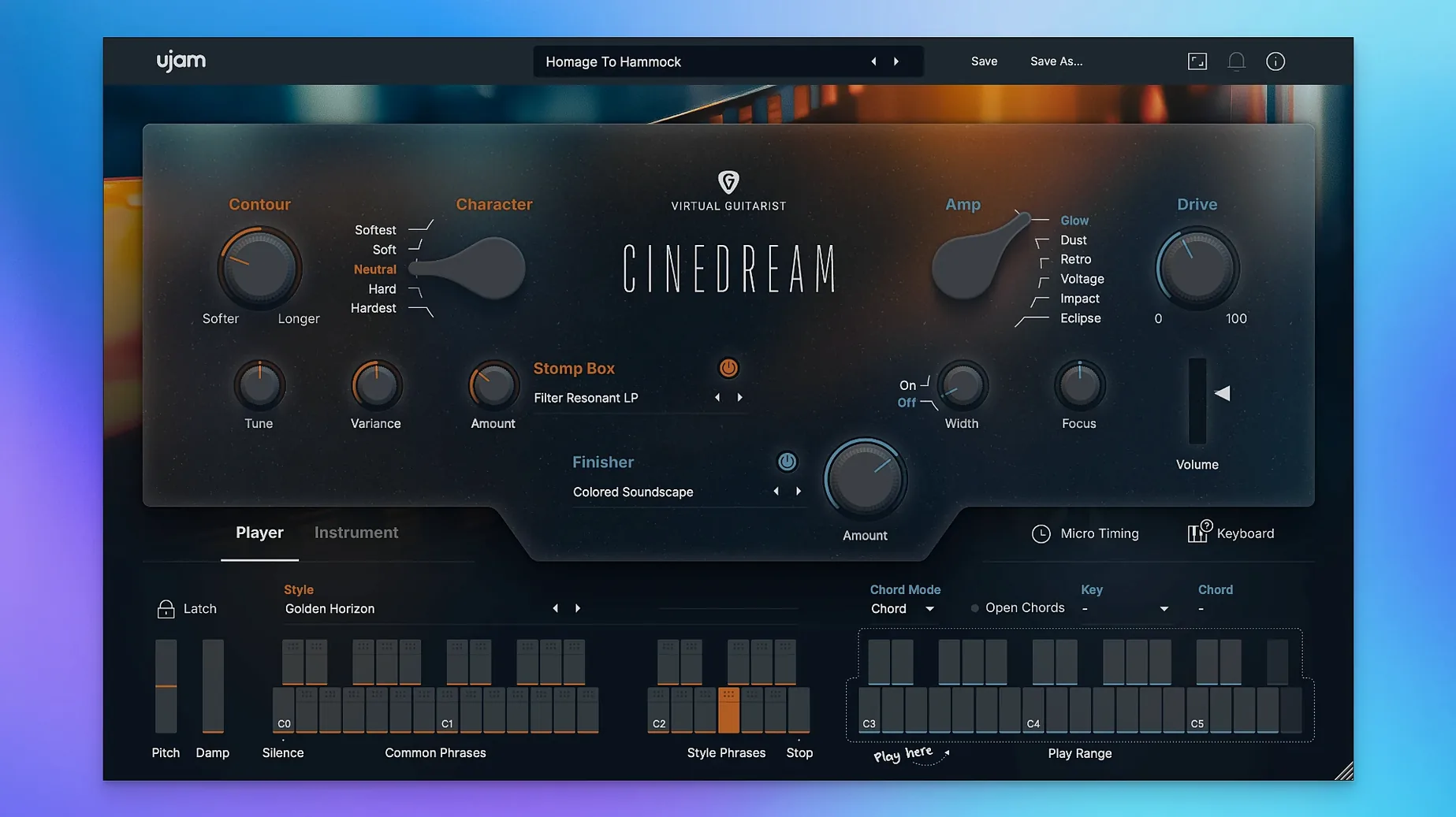
Which plug-in formats does it run in?
The instrument loads as an AU, VST 2, VST 3, or AAX plug-in. It works on Intel Macs through Rosetta and natively on Apple Silicon, with macOS 10.13 listed as the earliest supported release alongside a newer Monterey-to-Tahoe range on the official page.
What does an 8 GB RAM requirement mean in practice?
On a system with 8 GB of memory and 4 GB of free disk space, Cinedream streams its samples efficiently enough for light layering. Large projects with multiple instances benefit from more headroom, but the basic spec keeps it accessible on older Macs.
How does the sound fit into a mix?
It delivers soft, evolving guitar pads and emotional backgrounds rather than lead parts. Built-in effects add space and slow movement, so the results sit behind dialogue or under a melody without needing extra processing.
Where does the internet connection come in?
Cinedream in a short film cue — one user’s twenty minutes
A composer scoring a short documentary opens a session in Logic Pro with a piano sketch already laid down. The scene needs a warm, slowly shifting bed underneath a voiceover. They insert Cinedream on an instrument track, call up a style labelled “Slow Motion Pad,” and hold an E minor chord in the chord trigger. Within seconds a soft, slightly modulated guitar texture fades in. The composer nudges the built-in reverb a touch wetter, dials back the tone knob to remove any remaining attack, and prints two minutes of audio. The whole task takes under twenty minutes and the result needs no external effects.
In that scenario the instrument does exactly what it is designed for: it supplies mood quickly. The composer never touches a guitar, never opens an amp sim, never writes automation for filter sweeps. The chord trigger sends the performance into motion, so the part evolves on its own. This is the kind of job where Cinedream feels less like a virtual instrument and more like a cinematographer’s tool that happens to use processed guitar samples as its palette.
Patches swap without delay on M1 and Intel Macs
On both Intel and Apple Silicon machines the plug-in loads quickly — around two to three seconds for a default patch on an M1 MacBook Air with 16 GB of RAM. Patch changes are nearly instant, which matters when you are flicking between styles during a writing session. The interface stays responsive even while playback runs, and controls like the wah filter or tone knob update without audible clicks or dropouts.
The sample engine is well-behaved. A single instance in Logic Pro on a 2018 Intel Mac mini (i7, 32 GB RAM) idles at roughly 300–400 MB of memory and draws very little CPU once a chord is sustaining. Layering four or five instances in a medium-sized project pushes total RAM closer to 1.6 GB, which remains manageable. Voices cut off cleanly when you release a chord; there is no audible tail-gating or abrupt silence.
Stability holds up well over long sessions. A test arrangement with eight instances and a mix of AU and VST 3 versions in Ableton Live 11 ran overnight on loop without a single crash or unexpected behaviour. One quirk surfaced when switching sample rates mid-session: a brief audio glitch appeared, but reloading the plug-in fixed it. That falls in line with many sample-based instruments and is not specific to Cinedream.
Deadline textures that answer 'atmospheric but not distracting'
The instrument speaks most directly to three kinds of user.
Media composers under deadline form the core audience. When a director asks for “something atmospheric and emotional but not distracting” at 11 p.m., Cinedream provides usable textures faster than most sound-design sessions or guitar recording chains. The ability to swap styles without changing the chord voicing means a cue can pivot from a clean, glassy wash to a saturated, tape-like smear with one click.
Sound designers who need organic source material find it useful too. The processed guitar tones — particularly the more saturated, rougher styles — resample well into granular engines or convolution reverbs. Bouncing a long held chord with the space effect fully wet yields a stereo drone that can be further sculpted outside the plug-in.
Bedroom producers working in ambient and post-rock get a quick way to add movement without programming arpeggiators or editing MIDI endlessly. The chord trigger’s internal phrasing avoids the static feel of a simple pad, which keeps a track interesting during arrangement-building.
Users who need precise, exposed lead guitar lines or intricate picking patterns will find less to latch onto. Cinedream does not attempt to model a human player’s articulation. It trades detail for texture, and that trade-off suits background roles.
Chord trigger keeps sustaining when you switch windows
Several details sit just below the surface and repay a little exploration.
- Chord trigger latch. Clicking a chord in the trigger area and then switching to another window keeps the chord sustaining. This is handy when you want to hear how the texture works against a picture cut without holding a MIDI keyboard.
- Modulation wheel assignment. The mod wheel links to the internal motion control by default. Pushing it up increases the speed and intensity of the evolving guitar part, so a single CC lane can shape a whole phrase.
- Tone knob hidden range. The tone control cuts far deeper than a typical low-pass filter. Turned fully counter-clockwise, it removes almost all high-frequency content, leaving a muffled, lo-fi smear that works for distant, dreamlike backgrounds.
- MIDI drag from the chord trigger. Some DAWs allow dragging the triggered MIDI notes directly onto the track. This lets you capture the exact voicing Cinedream is using and edit it manually later — useful when a style suggests a chord you would not have voiced that way yourself.
- Space effect as a send alternative. The built-in space control can be set fully wet. In that mode, the dry guitar disappears and only the ambient wash remains. Stacking two instances — one dry, one fully wet — creates a depth blend that feels more three-dimensional than a single reverb insert.
Fix the silent plug-in by placing samples in the VG-CINEDREAM folder
Missing content after installation. The most frequent issue reported is a silent plug-in that shows “content not found.” The fix is straightforward: ensure the sample data sits in /Library/Application Support/UJAM/VG-CINEDREAM. A manual copy from the downloaded archive into that exact path resolves the problem. The user Library path under ~/Library/Application Support/UJAM/VG-CINEDREAM also needs the data if the installer placed it only in the system location.
DAW not scanning the AU component. After placing VG-CINEDREAM.component in /Library/Audio/Plug-Ins/Components, some hosts require a fresh rescan. Logic Pro users can force this by deleting the Audio Units cache file in ~/Library/Caches/AudioUnitCache and restarting the DAW.
Online activation prompt appearing repeatedly. On machines that switch networks often, the authorisation can occasionally re-trigger. Keeping the UJAM App installed and logged in once usually settles this. Offline use after initial activation works without a connection, matching the official documentation.
High latency in certain DAWs. A few hosts apply their own input buffer to instrument plug-ins, which can make the chord trigger feel sluggish. Reducing the audio buffer to 128 samples or enabling low-latency monitoring mode tightens the response to a playable level.
Sparse documentation. The included help is minimal, and deeper features — like the modulation wheel behaviour or the tone knob’s full range — are not spelled out. The best approach is to load a style, hold a chord, and methodically turn each control through its full travel while listening. The instrument rewards hands-on exploration more than reading.
The requirement listed on the official page points to online activation and content download. Once authorised, the plug-in itself runs offline.