Aspecten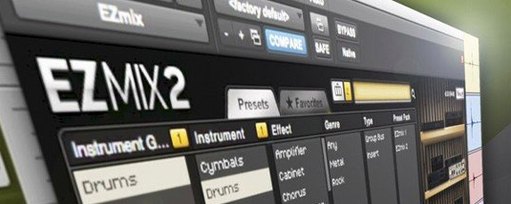
 Download (977 MB)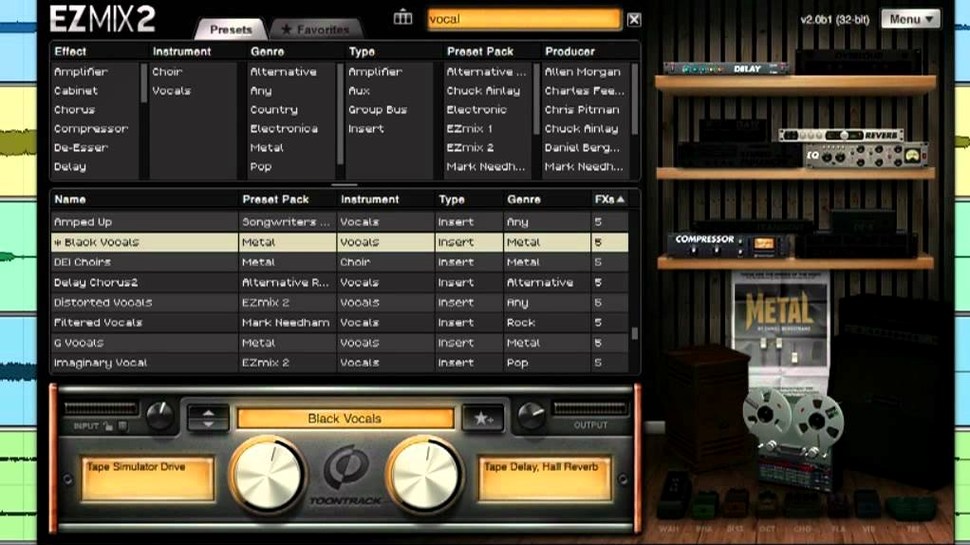
The EZmix Bundle runs on Intel and Apple Silicon Macs from macOS 10.13 onward. In a session it acts as a channel strip problem-solver: you insert it on a track or a bus, call up a preset, and the processing chain reshapes the audio without opening a single fader or dial. The presets cover drums, vocals, guitar, bass and keyboards, with newer content built around mastering effects, reverb algorithms and amp and cabinet simulation. Where it sits depends on the job.
- Individual tracks — inserted directly on a vocal or guitar track to apply a complete preset chain, from compression to ambience, in one slot.
- Drum bus — placed across grouped drum channels, pulling a kit together with parallel-style processing inside a single preset.
- Master bus — mastering-oriented presets sit here for quick tonal shaping and loudness without a separate mastering chain.
- Guitar D.I. tracks — amp and cabinet simulation presets turn a clean direct signal into a finished tone early in the signal flow.
- Effect return channels — reverb-heavy presets work as send effects for adding a consistent space across multiple sources.
EZmix 2 content remains available inside the bundle, so older presets sit alongside the version 3.2.2 material. That version also ensures compatibility with any EZmix pack released from the fourth quarter of 2025 onward.
Where you place it and what the preset expects
Most problems with EZmix come down to where the plugin is placed and what the preset expects to receive. A vocal preset placed on a drum bus rarely sounds broken — it just sounds wrong, because the chain was tuned for a different source. The fix is usually to try the same preset on the track type it was designed for before chasing settings.
- Preset list looks empty after updating — after a version change, a rescan of the plugin folder from inside the DAW usually restores missing content. On macOS, restarting the host after the scan clears most stale cache entries.
- Guitar presets sound thin on a clean D.I. — amp and cabinet presets expect an instrument-level signal. If the input is a line-level take with low gain, the amp simulation has little to work with. Raising the input at the audio interface or recording with more preamp gain gives the preset a fuller signal to shape.
- Latency on the master bus — some mastering chains add noticeable lookahead or linear-phase processing. On a mix in progress this can feel sluggish. Moving the preset to a bus that is not being monitored live, or freezing tracks first, keeps the session responsive.
- Preset level changes between songs — a chain that works on one mix can sit too loud or too quiet on another. Trim the output level per song rather than editing preset internals; it keeps comparisons consistent while you switch material.
- Standalone host does not see the audio interface — the independent host for guitar practice needs an available input device selected in its audio settings. If another application has exclusive control of the interface, close that first, then reopen the host.
Version 3.2.2 is required for packs released from Q4 2025 onward. If a new preset pack installs but its entries do not appear, checking that the running plugin reports 3.2.2 in its about panel is the quickest confirmation that content and host match.
One-knob polish, modular racks or amp-flavoured strips
Alongside EZmix, three other approaches keep showing up in the same conversations: Waves OneKnob for single-control effects, IK Multimedia MixBox for modular chains, and Nembrini Audio for amp simulation inside a channel strip. Each handles a different slice of the same workflow.
Waves OneKnob is simpler. It gives a single macro per plugin — brighter, fatter, louder — where EZmix gives a finished preset with many stages behind one panel. OneKnob suits a producer who wants one change at a time. EZmix suits someone who wants a vocal chain or a mastering chain already assembled and ready to audition.
MixBox is the modular counterpoint. It offers racks of individual effects that can be reordered and swapped, which means more control and more decisions. EZmix presets are closed chains; you pick the result, not the routing. For fast sessions the closed chain wins. For building a signature chain from parts, MixBox is closer to a traditional channel strip.
Nembrini Audio covers guitar and bass amp modelling in detail, with amplifier-specific controls and cabinet choices. EZmix handles amps as a category inside a broader mixing toolkit. A guitarist who only needs amp tones may prefer Nembrini; an engineer who mixes drums, vocals and guitars in the same evening gets more from one EZmix instance per track.
The bundle occupies a middle ground: more finished than individual plugins, less open than a modular rack, and broad enough to cover a full mix rather than one instrument family.
A working scenario: home studio, one evening
A songwriter with a modest home setup records three vocal takes, a direct electric guitar, a software piano and a programmed drum part over a quiet week. On Friday evening everything needs to sit together well enough to send to a collaborator.
The drums go to a bus with a drum-preset chain, giving punch and controlled low end without separate compression and EQ moves. The guitar D.I. gets an amp and cabinet preset, turning the dry take into a usable clean tone with some room. Each vocal take receives a vocal preset — compression, presence and a touch of reverb in one insert. The piano stays largely dry, with a reverb-based preset on a send so the space matches the vocal ambience.
No automation, no manual routing beyond the bus and the send, and no third-party effects beyond the bundle. The whole pass takes under an hour. The result is a balanced rough mix that sounds intentional rather than patched together, which is exactly what a one-evening pass should deliver.
Browsing presets during playback stays responsive
Preset loading is quick, and switching between chains while a track plays back is smooth enough to audition several options in a short time. The plugin does not rebuild its interface per preset, so browsing feels responsive even on older Intel machines running macOS 10.13.
CPU use varies with the chain. Simple EQ and compression presets stay light, while mastering chains with linear-phase stages and longer reverbs draw more. On an Apple Silicon Mac, multiple instances rarely cause trouble in a typical pop or rock session. On an older Intel Mac, the same session may benefit from freezing tracks that carry heavier mastering or reverb presets.
Memory use is modest and stable across long sessions. No gradual slowdowns or interface redraw issues surfaced during extended use. The standalone host for guitar practice stays responsive while switching amp presets, which matters when the plugin and the host are running side by side.
Stability is uneventful in daily work. The plugin loads without fuss in hosts that meet the macOS requirement, and preset changes during playback do not produce clicks or dropouts. The main operational habit is simple: match the preset to the source, then adjust the output if the chain changes the level. That keeps a session moving without interrupting the listening flow.