Aspecten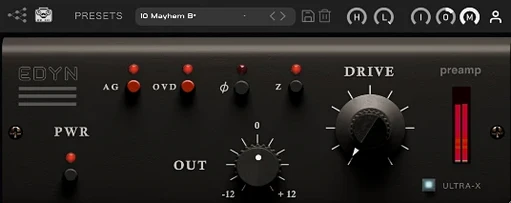
 Download (198 MB)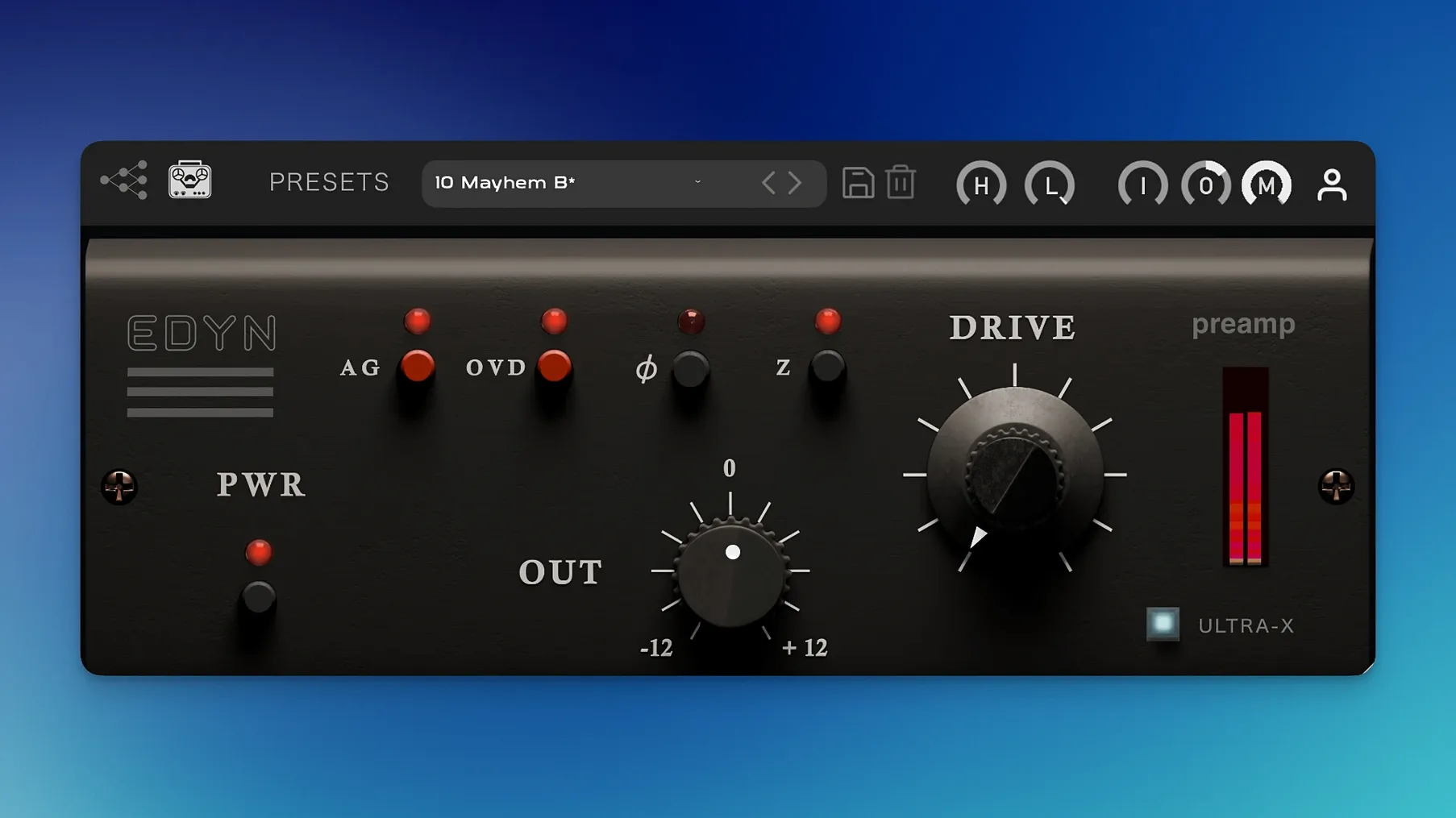
EDYN is a plugin emulation of a vintage American console preamp, modelled directly on the Electrodyne 1204 channel strip from the 1960s and 1970s.
| Detail | Note |
|---|---|
| Modelled on | Electrodyne 1204 console |
| Core engine | NM2 ENGINE technology |
| Plugin formats | VST3, AU, AAX |
| Architecture | Apple Silicon and Intel 64-bit |
| macOS minimum | 10.14 |
Working with EDYN centres on a few straightforward controls. An Input knob pushes signal into the modelled analogue circuitry, thickening the low-mids the harder it is driven. The OVD overdrive mode, when engaged, tilts the saturation into more obvious harmonic distortion, useful for adding grit to a drum bus or a vocal that needs to cut. Output level then compensates for the gain staging so the following insert receives a sensible level. High-pass and low-pass filters sit at the edges of the frequency spectrum, letting you tighten the low end before the signal hits the saturation stage or tame top-end fizz after it. A phase inversion switch sits discreetly to the side, handy when processing multi-miked sources in parallel. On Apple Silicon systems, version 1.0.2 brings a lighter CPU load, which makes placing an instance across several tracks more practical without the session grinding down.
For a mix engineer working through a dense rock session, EDYN tends to find its place on two sources in particular: the snare top and the lead vocal. Take a session where the drums were tracked cleanly but sound a little polite against the guitars. Inserting EDYN on the snare channel with the input impedance set to 50 ohms and the Drive knob pushed until the needle starts to react gives the transient a sharper edge while the body of the drum thickens. The Mix control then pulls a portion of the unprocessed signal back in, so the attack stays natural rather than becoming a wall of saturation. On the vocal, the same instance settings rarely work. A gentler approach — 200 ohms, Drive engaged only slightly, and the high-pass filter set around 80 Hz — removes low rumble before the preamp stage and lets the midrange character do the work. The result is a vocal that sits forward in the mix without sounding artificially bright.
50-ohm input impedance adds snap and upper-midrange edge
Three settings shape how EDYN behaves more than any others. The first is the input impedance switch. At 50 ohms the preamp loads the source more aggressively; transients become snappier and the upper midrange gains a slight edge. This setting suits drums, percussion, and anything that needs to push through a busy arrangement. At 200 ohms the response relaxes. The low end feels rounder and the top end softer, a better match for vocals, acoustic guitars, and bass parts where body matters more than attack.
The second is the Mix control. EDYN's saturation can quickly become the dominant character of a track; a setting between 40 and 70 percent wet keeps the processed tone present while the original signal holds the dynamics together. This is particularly useful on a drum bus, where full wet processing can smear the decay of cymbals and room mics.
The third is automatic gain compensation. With it enabled, the Output knob adjusts itself as Drive and Input levels change, keeping the perceived loudness roughly constant. This makes A/B comparisons honest — without it, a louder processed signal will almost always sound better simply because it is louder. Turn the compensation on while dialling in the Drive, then switch it off if you want to ride the Output manually for level-matching into the next insert.
Low-end mud on the mix bus from preamp density
One recurring issue is a build-up of low-frequency mud when EDYN is placed on a full mix bus. The preamp model adds low-end density as the Input is driven, and on material that already has substantial sub content this can get out of hand quickly. The fix is to place the high-pass filter early in the chain — that is, engage it before increasing Drive — and set it between 30 and 60 Hz depending on the program material. This removes the frequencies the preamp would otherwise exaggerate before they reach the saturation stage.
Another snag appears when multiple instances run in Logic Pro on older sessions. Version 1.0.2 addressed crashes with several EDYN instances active, but if a project still behaves erratically, check that the session is running at a sample rate the system handles comfortably and that no other plugin is fighting for the same CPU core on a single track. Spreading EDYN across different tracks rather than stacking it repeatedly on one channel also helps.
Offline rendering on the master output has caused a few confusing moments — the mix plays back fine in real time but bounces with the saturation missing or slightly different. The 1.0.2 update fixed this, so if the behaviour appears, confirming the installed version is the first step. In Pro Tools, automation parameters now follow the host properly; older sessions where automation was written before the update may need the automation lanes re-enabled once after opening.
A workflow for thickening a drum bus
A practical use for EDYN is gluing a drum bus together without resorting to a compressor. Start with all drum tracks routed to a stereo bus, and insert EDYN as the first plugin on that bus. Set the input impedance to 50 ohms for a tighter transient response. Engage the high-pass filter at 40 Hz to keep sub-bass clutter out of the preamp stage. Bring the Input knob up until the Drive begins to colour the signal — on most rock or pop material this is around 12 to 2 o'clock, though the exact position depends on how hot the drum tracks were recorded.
Set the Mix control to roughly 60 percent wet. This retains the natural dynamics of the drum performance while the saturated signal adds density underneath. Switch on automatic gain compensation and compare the processed bus with the bypassed version. If the cymbals begin to sound congested, back the Drive off slightly or lower the Mix rather than reaching for the low-pass filter first; taming the saturation itself often fixes the problem without dulling the overheads.
Finally, adjust the Output level so the drum bus feeds the next stage at the same level as before. The phase inversion switch can stay off for this task, but if the drum bus is running parallel to an unprocessed duplicate, engage it and listen for any cancellation in the low frequencies. The result should be a drum sound that feels denser and more present, with a slight forward push in the midrange that helps the kit hold its own against guitars and synths.