Aspecten
 Download (1.4 GB)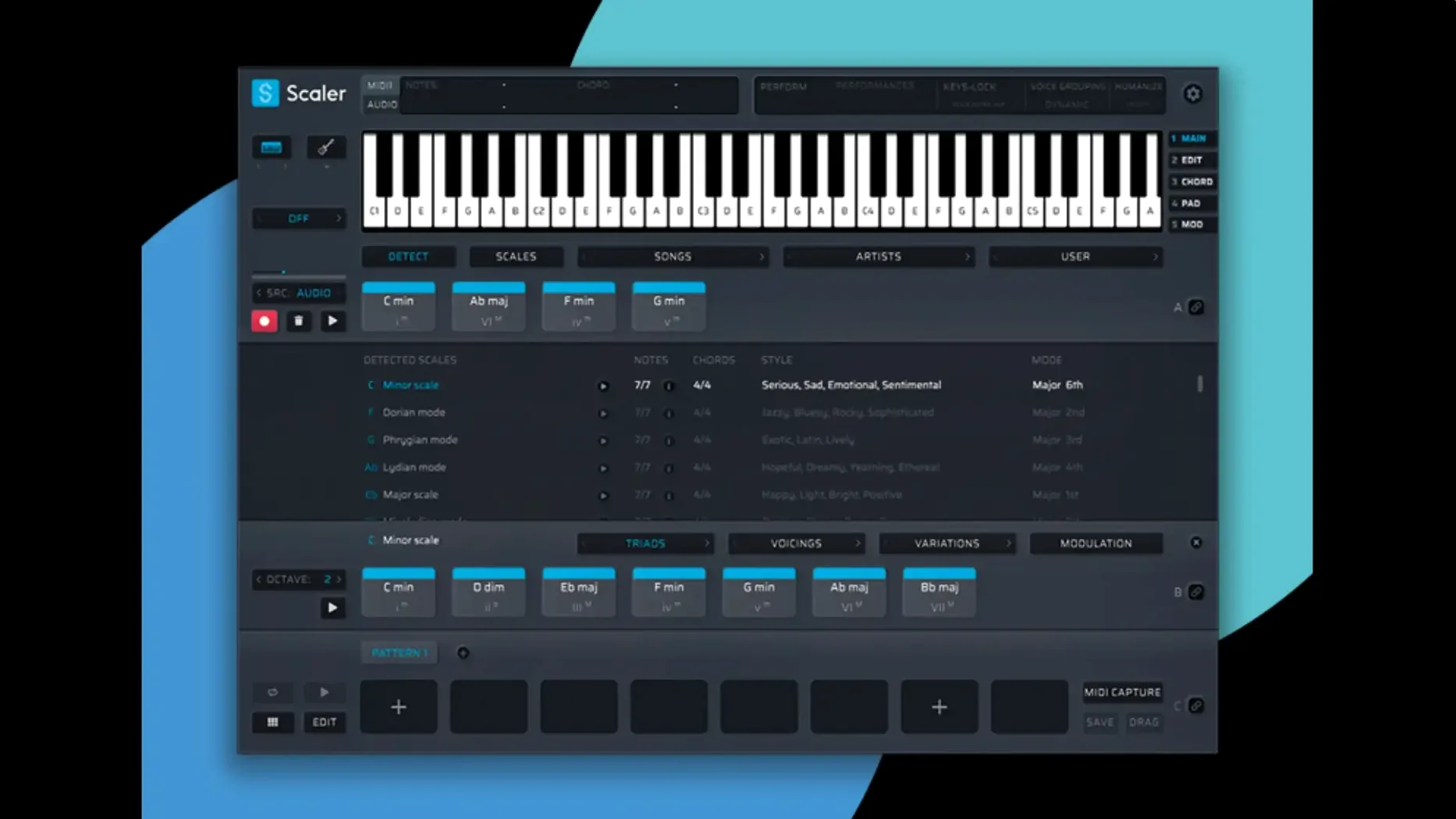
Version 3.3.2 tightens up the MIDI side of Scaler 3 in two practical ways: exported MIDI sequences no longer carry empty space at the start, and the MIDI Editor no longer drops notes or misdraws chord positions.
Which plugin formats does Scaler 3 use?
Scaler 3 runs as a VST or AU plugin, which covers most DAWs on macOS. It also works as a host itself, loading VST and AU plugins onto chord and MIDI sections for further processing.
macOS 10.15 and Apple Silicon support out of the box
The plugin needs macOS 10.15 or later and a 64-bit system. Both Intel and Apple Silicon Macs are supported, so no separate build is needed.
How does Scaler 3 fit into a composition workflow?
The Multi-Lane Timeline holds chord, melody, bass and phrase tracks in one view. From there you can generate melodies, bass lines and arpeggios in any key, drawing on a preset library grouped by artists and genres.
No separate Intel and Apple Silicon builds needed
Load a known chord progression to explore artist and genre suggestions
Start with a project you already know. Load a chord progression you have used before and let Scaler 3 suggest alternatives from the artist and genre presets. This gives you a feel for how the suggestions branch without the pressure of a blank timeline. The Multi-Lane Timeline works best once you have a chord lane in place; adding a melody lane early lets you test how generated lines sit against your own changes.
If you work mainly in a DAW, open the plugin inside a session rather than in standalone mode for the first few sessions. The standalone app is useful for sketching when the DAW is not open, but the plugin route reveals how MIDI routing, Multi-Bind and host sync behave with your particular setup. Keep the Scaler 3 window open on a second screen if you have one; the timeline view benefits from width.
Record your MIDI output early. Scaler 3 routes its generated notes to a DAW track, and capturing those performances as MIDI clips while you experiment means you can edit them later with your usual tools. The automatic export cropping added in version 3.3.2 saves you from trimming silence at the start of exported sequences, but recording live still gives you the most natural phrasing.
Match your sample rate first to prevent timing drift
Head to the audio and MIDI preferences and set your sample rate to match your project before doing anything else. A mismatch here causes timing drift, and it is easy to overlook when you are focused on harmony.
Next, disable key-lock if you prefer to move chord shapes freely. By default Scaler 3 keeps everything within the selected key, which is helpful when you are learning, but it can mask interesting chromatic moves. Turning it off early in a session lets you hear what the plugin filters out.
Check the Multi-Bind behaviour. This feature links tracks so that a change to the chord lane ripples through melody and bass lanes automatically. The default binding strength works for quick drafts, but tightening it for bass lines and loosening it for melodies gives you more control. Set these per project as soon as you have more than one lane active.
Finally, set the MIDI export length to match your clip boundaries rather than leaving it on the global default. With the 3.3.2 fix for empty space at the start of exported sequences, setting a clean endpoint removes the last common headache when moving material between Scaler 3 and a DAW arrangement.
All presets and suggestions work offline with no phoning home
One question that comes up often is whether Scaler 3 works without an internet connection. It does. The preset library, artist packs and genre suggestions are all stored locally once installed. The plugin does not phone home during use, and you can compose entirely offline.
Another common concern is whether Scaler 3 replaces knowing music theory. It does not, and it is not meant to. What it does is show you the map while you drive. You still decide which chords land where, how long they hold, and what the melody does. The suggestions speed up the search for harmonic colour, but the taste remains yours.
People also ask about CPU load. Scaler 3 is not a lightweight MIDI utility; it is a full workstation, and the plugin hosting feature adds overhead. On Apple Silicon Macs it runs smoothly, but on older Intel machines with many lanes and hosted plugins active, you may need to freeze tracks earlier than you would with a simpler MIDI plugin. The standalone app can ease this by offloading composition duties before you move MIDI into the DAW.
A fourth question is whether the plugin can export audio. It cannot. Scaler 3 deals in MIDI, not rendered audio. If you host a soft synth inside Scaler 3, the audio comes from that synth, but the export itself is always MIDI data. For audio stems you route the MIDI to a DAW track and record or bounce there.
Some users look for a Scaler 3 torrent or Scaler 3 crack before they try the plugin, and the current build is straightforward to install: mount the disk image and run the standard installer. The plugin sits in your usual VST and AU folders, and the standalone app appears in Applications. There is no extra licensing layer to configure after installation.
How Scaler 3 fits with other apps and macOS features
With Logic Pro, Scaler 3 works as an AU MIDI effect placed before your instrument. This keeps the signal path clean: Scaler 3 generates the notes, the instrument plays them. In Ableton Live, loading the VST3 version on a MIDI track and routing its output to another MIDI track lets you capture the generated material in real time. Bitwig users can do the same with the note receiver device, which pairs naturally with Scaler 3's Multi-Bind output.
On macOS, the standalone app integrates with the Audio MIDI Setup utility. If you have multiple MIDI controllers connected, Scaler 3 sees the ports you have configured there. The app also respects the system-wide dark mode setting, so it follows your Mac's appearance preference without a separate toggle inside the plugin.
Scaler 3's plugin hosting feature means you can load a favourite soft synth directly on a chord lane and hear the progression without leaving the window. This is useful when you are sketching ideas away from the DAW. The hosted plugin's state saves with the Scaler 3 project, so recalling a sketch later brings the sound back intact.
Drag and drop works between Scaler 3 and most DAWs. You can drag a chord from the suggestion panel straight into an arrangement, and with the 3.3.2 MIDI export improvements the dropped clip starts cleanly at the grid. The plugin also sends MIDI over IAC Driver if you set that up in Audio MIDI Setup, letting you route Scaler 3's output to other MIDI applications running on the same Mac.
For those exploring a scaler 3 free download, the plugin fits into an existing setup without demanding a particular DAW or workflow. It coexists with hardware sequencers too: sending MIDI out of Scaler 3 over a physical port lets you drive external synths, and the chord and arpeggio generation remains just as responsive as when working entirely in the box. The Multi-Lane Timeline becomes a hardware control surface in that scenario, feeding chord, bass and melody lines to separate MIDI channels on your outboard gear.
Beyond the export cropping, 3.3.2 fixes MIDI Editor display problems that could cause missing notes, incorrect chord representations and blank space before chords.