Aspecten
 Download (39 MB)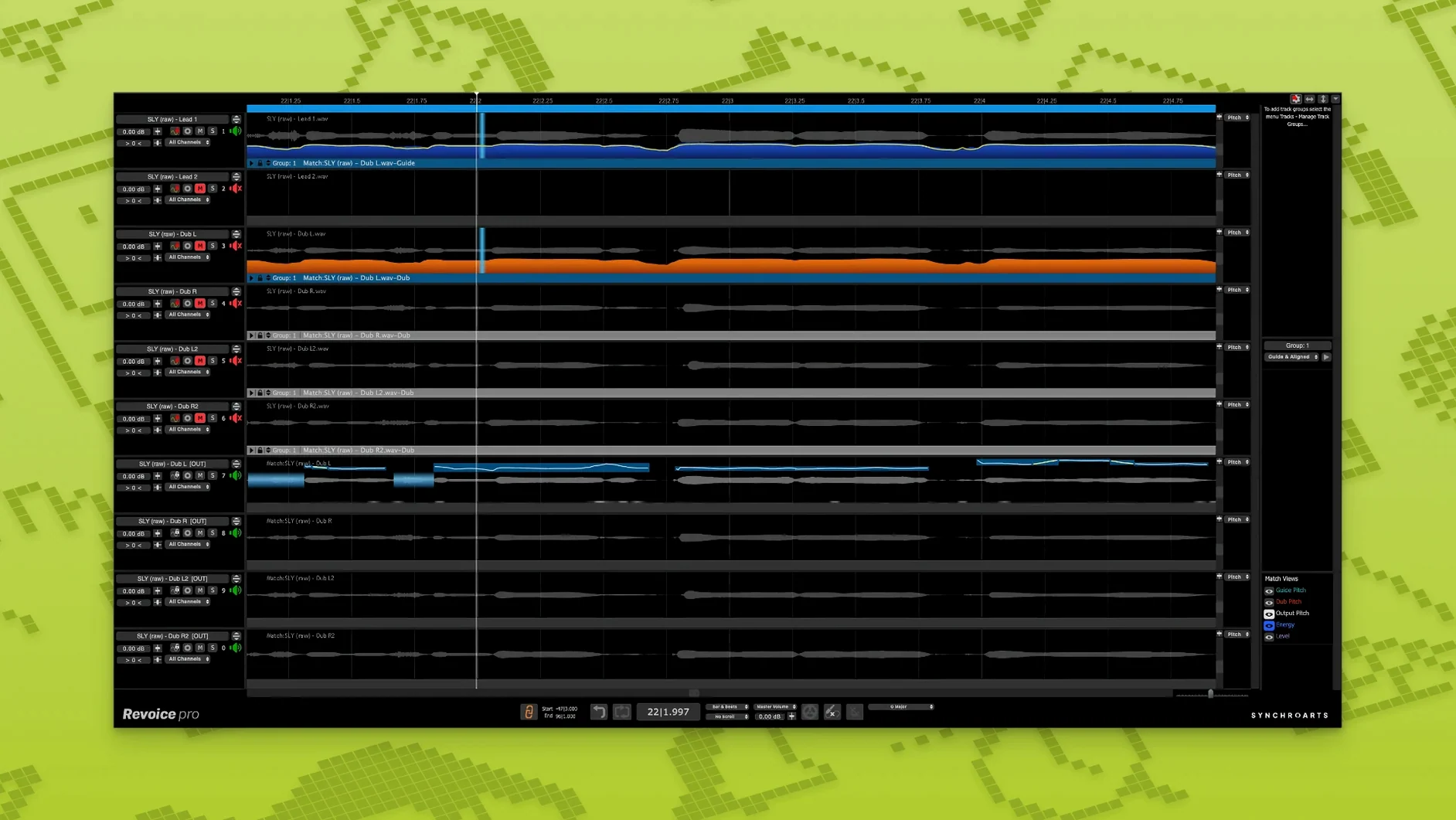
You’ve comped a lead vocal from a dozen takes and the timing is good, but the double you tracked a week later drifts by a few milliseconds in the bridge. The syllables land late and the stereo image softens every time it happens. That kind of small misalignment is where a tool like Revoice Pro earns its place.
Tools beyond the surface
- SmartAlign — synchronises two tracks even when the takes start or end at different positions on the timeline. It stretches and shifts audio without leaving obvious artifacts, so a double that begins half a beat late still locks to the guide.
- SmartPitch — matches the pitch contour of a double or harmony to the lead, preserving natural drift while correcting notes that stray too far. The result sits tighter in a mix without sounding tuned.
- Shaper Tool — a manual pitch-adjustment tool for drawing in corrections where automatic processing would be too heavy-handed. Useful for single-syllable fixes or smoothing a vibrato tail.
Plug-in format, not a standalone tuner
Revoice Pro works as an AU, VST3 or AAX 64-bit plug-in on macOS 10.14 and later, with native support for both ARM and x86 systems. The interface is English only. It’s not a general-purpose tuner — it’s built for vocal stacks, ADR alignment and tight doubling workflows where timing and pitch need to work together across multiple tracks.
Aligning a stacked vocal from scratch
Suppose you have a lead vocal already comped and a stack of three doubles that were tracked in a different session. The doubles feel right emotionally but the consonants hit late and the pitch wavers in the second verse.
Start by dragging the lead into the session as the guide track. Add the first double to a new lane. Open SmartAlign and let it analyse both signals — Revoice Pro reads the guide, maps the transient points, then stretches the double to match. Sibilants that landed a few ticks behind now line up without smearing. The process takes under ten seconds for a three-minute verse.
Switch to SmartPitch for the same double. Reduce the correction amount to around 70% so the natural drift stays intact but the notes that clearly miss the target get pulled back. Listen through the second verse — the slightly flat phrase on “waiting” now sits inside the chord without calling attention to itself.
Repeat SmartAlign on the remaining two doubles, then group all four tracks. Play the stack back in solo. The image is narrower and the words feel like one performance with several voices, not four performances that happen to sing the same line.
Shorten the analysis buffer for faster phrase editing
- Set a short buffer for analysis. The default processing length works for full songs, but when you’re auditioning edits on a single phrase, a smaller selection speeds up the feedback loop. Highlight only the section you’re fixing before opening a tool.
- Name your guide tracks clearly. Revoice Pro references the guide by its track name in the plug-in window. A label like “Lead Verse 2” saves time when you’re switching between five similar takes.
- Test SmartAlign on a simple phrase first. Pick a section where the double is consistently late, not one with overlapping breaths or ad-libs. That gives you a clean baseline for what the algorithm expects and what it produces.
- Keep the Shaper Tool for last. SmartAlign and SmartPitch handle the broad corrections. Shaper is surgical — dip in only when a single syllable still pokes out after the automatic passes.
- Print aligned tracks before heavy mixing. Revoice Pro processes in near real-time, but large sessions with many plug-ins can slow things down. Commit the aligned doubles to new audio files early so your mix session stays responsive.
Dense vocal stacks become manageable
Producers who build dense vocal arrangements get the most out of Revoice Pro. A track with a lead, two doubles, and a low octave harmony becomes manageable instead of maddening — the software treats each part as a variation on the guide rather than an independent puzzle.
Post-production engineers working with dialogue also find a strong fit. ADR recorded in a booth rarely lines up with location audio, and stretching words to match lip movements without altering the timbre is something Revoice Pro handles well. The same SmartAlign engine that tightens a vocal double can pull an ADR line into sync with the original on-set recording.
Vocal editors who already work quickly in a DAW but lose time nudging waveforms will notice the difference. Instead of slicing at every transient, you define the guide once and let the software do the micro-editing. The hours saved on a twelve-song album add up fast.
Solo singer-songwriters with simpler arrangements may find the tool excessive — a DAW’s built-in flex time and pitch correction often cover the same ground for a single vocal track. Revoice Pro earns its keep when the session has four or more vocal parts that need to breathe together.
Pitch correction follows a guide track’s contour
Does Revoice Pro replace a tuner like Auto-Tune or Melodyne? Not exactly. SmartPitch corrects pitch by following the guide track’s contour, so it works best when you have a reference to match. For standalone pitch correction on a single track — moving individual notes up or down without a guide — a dedicated tuner still has its place. Many engineers run SmartPitch on doubles and harmonies while keeping a separate pitch tool on the lead.
Will it work on instruments, or just vocals? The algorithms are tuned for voice and monophonic sources. A saxophone or a cello line can be aligned and pitch-matched the same way a vocal can, but polyphonic material like a piano or a full mix will confuse the analysis. Stick to single-note instruments if you’re using it outside of vocals.
How heavy is the processing load? On Apple Silicon Macs, the native ARM version runs efficiently — a session with eight aligned tracks might add 15–20% CPU load on a recent M-series chip. Intel machines handle smaller stacks without issue, but older quad-core processors may struggle with more than four or five real-time instances. Printing tracks early avoids the bottleneck. Users searching for a Revoice Pro Mac torrent or Revoice Pro Mac crack can check that the build includes native ARM support so the app runs well in plug-in hosts.
Can I use it without a DAW? Revoice Pro runs as a plug-in and as a standalone application. The standalone mode lets you load audio files directly, process them, and export the results — useful for preparing tracks before a session or fixing a double without opening a full project. Some users looking up revoice pro rutracker might be after the standalone installer specifically, though the plug-in versions cover most daily workflows.