Aspecten
 Download (170 MB)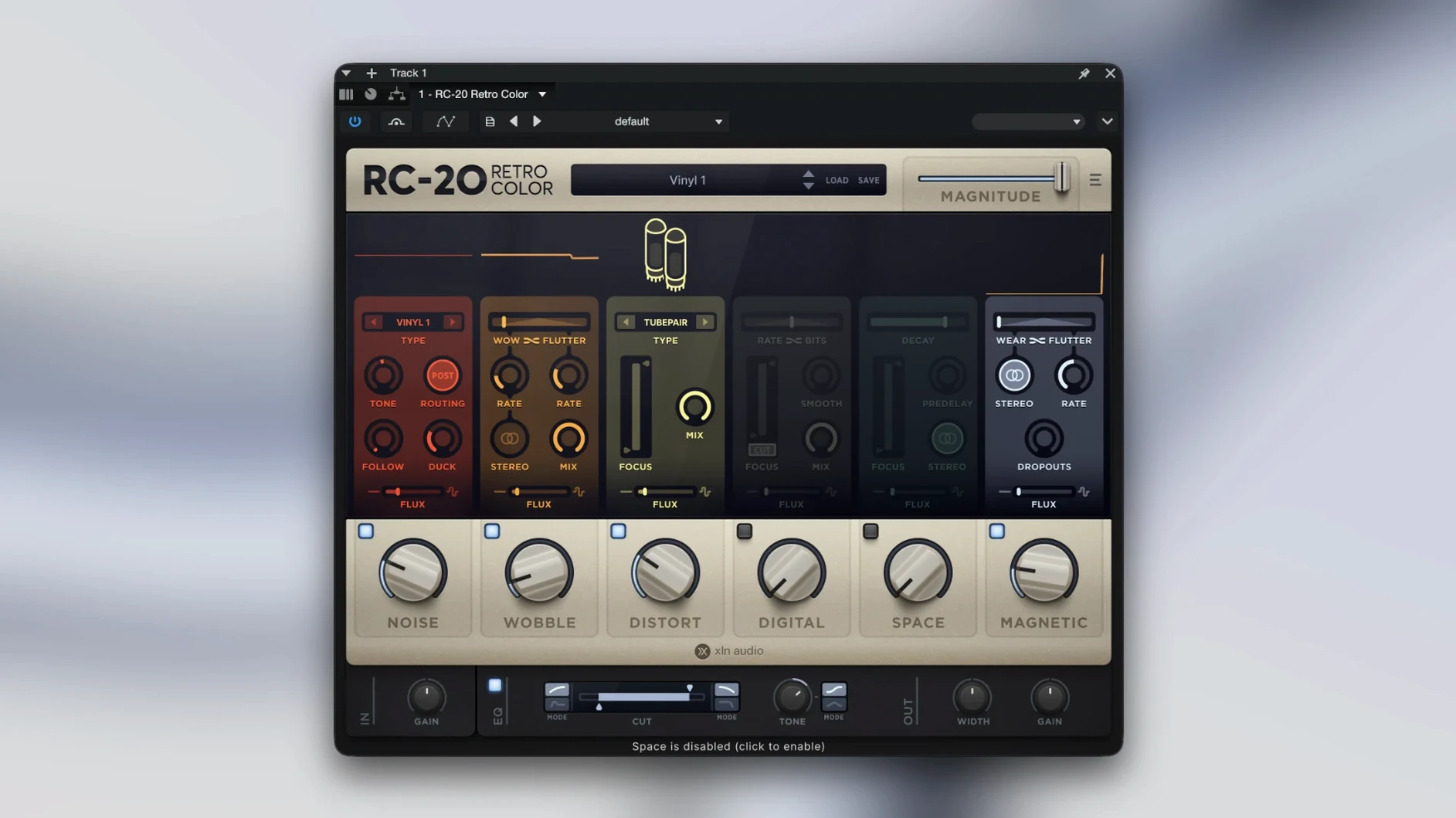
Producers working in lo-fi, hip-hop, ambient and electronic music reach for RC-20 when a track needs grit rather than gloss. Its six modules let you simulate the imperfections of old hardware, degraded tape and dusty vinyl through a straightforward set of controls.
Noise — Layered hiss, crackle and hum with per-type level, tone and ducking. The four noise types range from electrical hum to vinyl surface texture, each with independent volume so you can blend them into a composite bed of grime.
Wobble — Pitch and amplitude modulation that mimics worn-out tape transport. Rate and depth controls determine how seasick the signal becomes; stereo spread pushes the instability wider.
Distort — Saturation and colouring across six models from subtle tape warmth to crushed bit reduction. Drive, tone and a wet/dry mix keep it controlled, or not.
Digital — Bit-depth and sample-rate reduction with a dryness slider. Useful for crunchy top-end or hollowed-out midrange that reads as early sampler.
Space — A reverb module voiced for character rather than realism. Type, length and width controls let you park a sound in a small tiled room or a metallic wash.
Magnetic — Emulates tape head wear, dropouts and low-end thickness. Flux and headroom parameters push the signal into softened, compressed territory.
How RC-20 compares with similar Mac plugins
Several other effects plugins explore the lo-fi and tape degradation space on macOS. D16 Group's Decimort 2 focuses tightly on bit-crushing and sample-rate reduction with an analogue-modelled anti-aliasing filter. It does one narrow thing well — RC-20's Digital module sits in similar territory — but Decimort lacks the noise layering, wobble and magnetic saturation that make RC-20 a broader textural toolbox. Someone who only wants crunchy early-sampler timbres might lean toward Decimort. Anyone building a complete degraded-environment soundscape from one plugin window will find RC-20 more practical.
Baby Audio's TAIP concentrates on a single tape machine emulation with drive, wear and noise parameters. The sound is rich and the interface handsome, but the scope is narrower: no wobble modulation, no bit-depth control, no reverb. RC-20's Magnetic module covers similar tape colour, yet TAIP's algorithms respond differently to transients and low end. Some mix engineers keep both — TAIP for smooth bus glue, RC-20 for spot effects and full-spectrum degradation.
iZotope's Vinyl has been a free lo-fi staple for years. It simulates record wear, dust and turntable rumble with a few mechanical parameters. Vinyl's simplicity makes it fast, but its feature set overlaps only the Noise and Wobble modules in RC-20, without the distortion flavours, reverb or digital degradation. RC-20's six-module architecture, combined with the Flux engine for introducing slow randomness across parameters, amounts to a more complete tool for producers who treat texture as a core production element rather than a quick sprinkle.
Bypass all but one module at first
A clean start helps. Open the plugin on a track you know well — a dry vocal, a piano line, a drum loop — and bypass every module except one. Work through Noise alone, then Wobble alone, then Distort and so on. This builds a mental map of what each section contributes before you layer them. The presets are worth saving as user starting points once you adjust them: right-click a preset name to store your version without overwriting the factory list.
Watch the output level. Stacking Noise hum, Magnetic saturation and Distort drive can push gain well past unity. The wet/dry mix per module and the overall output knob are your anchors for keeping the treated signal at a workable level before it hits the next insert. On bass-heavy material, pull back the Magnetic module's headroom parameter early — it folds transients in a way that sounds pleasing at first but can eat the fundamental if overdone.
For anyone looking to try the plugin before committing, a web search for rc-20 free download or rc 20 retro color crack yields various third-party sources. Exercise the usual caution with downloaded files from unofficial channels, particularly on newer macOS versions that enforce stricter code-signing checks.
Runs in any VST, AU or AAX host on macOS 10.13+
RC-20 runs in any DAW that hosts VST, AU or AAX plugins on macOS 10.13 and later, with native ARM support for Apple Silicon Macs. Logic Pro users load it as an Audio Unit on audio and instrument tracks; the plugin appears in the effects slot menu under XLN Audio. In Ableton Live, dropping RC-20 onto a Drum Rack return or a grouped instrument bus lets you apply unified texture to multiple drum hits while keeping individual processing chains clean.
It pairs naturally with tape-emulation plugins placed earlier in the chain. A Studer-style tape sim feeding into RC-20's Magnetic module creates a cascaded tape degradation that neither plugin achieves alone. The Flux engine also works well with parameter automation from a MIDI controller — map wobble depth or noise level to a rotary encoder and ride the texture during a mix pass. macOS's Audio MIDI Setup recognises class-compliant controllers without extra drivers, so the mapping is straightforward inside any DAW's MIDI learn system.
For sound designers working outside a DAW, RC-20 can load in AU Lab or inside a host like Plogue Bidule for standalone effect processing. The plugin's preset format is self-contained, making it easy to copy a .fxp file between Macs or back up an entire texture library alongside project files. Some users searching for RC-20 crack or RC-20 Retro Color crack do so to test the plugin inside older macOS environments; version 1.5.1 remains compatible back to High Sierra, which covers a wide range of studio setups still in daily use.
Griming up a hi-hat bus for a dusty beat
A producer opens a beat in Logic Pro on a Mac Studio. The hi-hat group sounds clean — too clean for the track's dusty, sampled-from-vinyl aesthetic. RC-20 goes onto the hi-hat bus as the first insert.
She bypasses all modules, then enables Noise alone. The four noise types are auditioned quickly: vinyl surface texture with a touch of electrical hum, tone rolled off slightly to keep the hiss from fighting the vocal. Ducking is set to -6 dB so the noise bed dips when the hats hit, keeping the pattern legible.
Next, Wobble comes in at a low rate with depth around 15%. The stereo spread is pushed to 40%, giving the hats a slight left-right drift that mimics an unstable tape machine. The effect is subtle — noticeable only when bypassed and compared.
Distort is dialled to the "Warm" model with drive at 9 o'clock and wet/dry at 30%. The high end softens without obvious saturation. Digital is left off; the hats don't need bit-crushing for this track. Space adds a small room at 12% wet, just enough to push the hi-hats slightly behind the kick and snare. Magnetic is enabled last, with Flux at a low setting so the tape head wear simulation shifts slowly across the loop. The bottom end thickens slightly even on the hi-hat group, adding a cohesive glue.
She saves the preset as "Dusty Hat Bus" and closes the window. The whole process took under two minutes. Later, during arrangement, the Flux engine means the hi-hat texture never repeats exactly the same way twice across the three-minute runtime — a small detail that rewards close listening.
Every module can be bypassed independently. The included presets cover immediate starting points, though the modules encourage dialling things in by ear.