Aspecten
 Download (73 MB)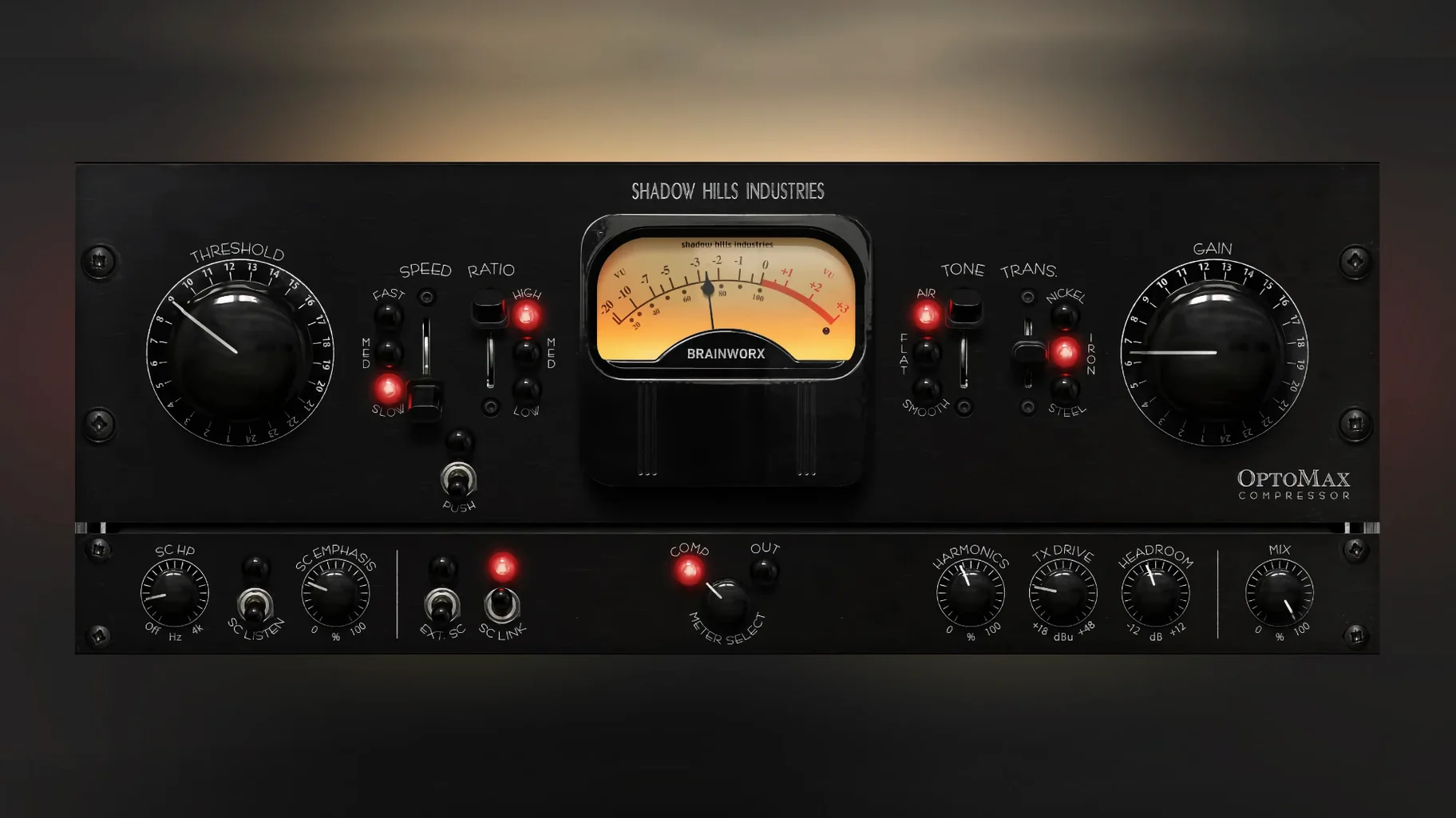
Version 1.0.0 lands as the initial release, bringing the optical section of the Shadow Hills Mastering Compressor into a dedicated plug-in. Instead of modelling the full hardware, Brainworx has isolated the electro-optical stage and given it its own interface, with a few added controls the original never had.
Typical jobs and session placement
- Individual tracks: vocals and bass benefit most from the natural envelope. Slow response settings level a performance without clamping down on the initial transient.
- Instrument buses: drum bus or acoustic guitar groups gain glue and a slight softening of sharp peaks. Medium response often sits right here.
- Full mix: the Optomax can handle gentle programme compression across a stereo mix, preserving dynamic shape while pulling up quieter detail.
What the Shine and Softness modes add
The high-frequency modes push the plug-in beyond a straight hardware copy. Shine lifts top-end presence during compression, useful when a bus feels a touch dull after levelling. Softness rolls off some of the bite, rounding out brittle cymbals or an overly bright vocal take. Switching between slow, medium and fast response changes how quickly the optical circuit reacts, so the same ratio setting behaves differently depending on the timing choice.
Fast response shrinking a vocal
One recurring pattern is setting the response to fast and then puzzling over why a vocal sounds small. The optical circuit needs a bit of time to recover naturally. Fast response on a lead vocal tends to shave off the body of each phrase rather than just taming peaks. Slow or medium almost always suits sustained sources better; fast works for transient-heavy material where you want a quick grab and release.
Another common slip is running the Mix control fully wet while stacking heavy compression further down the chain. Optomax already does the heavy lifting with its optical curve, so blending in some dry signal with the parallel mix often keeps the performance intact while still evening out level jumps. Beginners sometimes treat the parallel control as a wet/dry fade on a reverb, dialling it to extremes instead of using small adjustments between 40 and 70 percent.
Ignoring the sidechain filter is another early mistake. The default setting lets through the full frequency range, which means low-end energy from a kick or bass can trigger compression across the whole mix. On a full programme or a drum bus, rolling off the sidechain below 80 or 100 Hz stops the compressor from pumping with every kick hit. The filter is tucked away but it changes behaviour more than the ratio knob does in many situations.
Finally, some users swap transformer types mid-session without resetting gain staging. Nickel, iron, and steel each saturate at different points and with different harmonic profiles. Switching from nickel to steel can add a few decibels of perceived loudness, which tricks the ear into thinking the compression itself has changed. Matching output level before judging the transformer choice saves a lot of second-guessing.
Taming a brittle indie-rock vocal from verse to chorus
Let us walk through a vocal chain on a dense indie-rock mix. The lead vocal track is already edited and roughly gain-staged. The performance runs from hushed verses to belted choruses, and the singer has a slightly brittle tone around 4 kHz.
Step one: insert and initial setup. Optomax drops onto the vocal track as the first insert, before any equaliser. Ratio stays at the default 2:1. Response is set to slow, because the vocal needs evenness across phrases rather than transient clamping. The Mix control begins at 100 percent for now, to hear exactly what the compressor is doing.
Step two: dialling threshold and make-up gain. Threshold comes down until the gain reduction meter shows 3 to 5 dB of movement on the loudest phrases. The optical action is smooth enough that 6 dB of reduction on a chorus still sounds natural, so the meter can kiss 6 dB without worry. Make-up gain lifts the output until the compressed signal matches the bypassed level by ear, then a quick A/B confirms the dynamics feel controlled rather than flattened.
Step three: taming the top end. The 4 kHz edge is still present. Switching on Softness mode at a moderate setting rounds off the sibilance and upper-mid bite without darkening the whole vocal. The change is subtle; bypassing Softness makes the untreated signal sound noticeably sharper. For this session Shine stays off, but on a different day when the vocal feels a little recessed it would be the first thing to try.
Step four: transformer and sidechain refinement. Nickel is the starting point, giving a gentle touch of harmonic weight. A quick toggle to iron adds more midrange density, which works well for the choruses, so iron stays. The sidechain filter is engaged with a cut around 90 Hz, stopping any low-mid rumble from the proximity effect from gripping the compressor unnecessarily. The Mix control is pulled back to roughly 60 percent, letting the dry vocal transients poke through and preserving the singer's natural phrasing.
Step five: living with it. The track plays through twice. The verses hold their intimacy, the choruses sit without jumping out, and the Softness mode keeps the top end civilised. No further tweaks needed. Optomax stays on the insert and the session rolls on to guitars.
Skipping the neutral default for quicker evaluation
Out of the box, Optomax loads with a neutral configuration that rarely suits a source without adjustment. A few early changes make evaluating the plug-in quicker.
- Response speed. The default medium response is a fair starting point, but slow often reveals the optical character more clearly. For tracking comparisons, switch between slow and medium first, leaving fast for specific transient-control tasks.
- Transformer type. Nickel is the default and the most transparent. If the source feels weightless or thin, iron adds density without obvious colouration. Steel is the most assertive; try it on a drum bus or a bass DI where some grit is welcome.
- Sidechain filter. Enable it early. Even a modest low-cut at 60 or 80 Hz prevents sub-bass material from dominating the compression response, especially on full mixes and drum groups.
- Mix control. Starting at 100 percent wet helps learn what the compressor is doing, but pulling it back to 60–80 percent often yields a more musical result. The control is not a gimmick; it genuinely preserves the attack that optical compression can soften.
Optical flavour against the UAD LA-2A staple
Optomax sits in a field with several optical compressor emulations, but its heritage gives it a distinct flavour. Three useful comparisons come to mind.
UAD LA-2A. Universal Audio's take on the classic electro-optical leveller is a studio staple. The LA-2A has a fixed programme-dependent response with no ratio or attack controls, which makes it faster to set up but less flexible. Optomax offers switchable response times, three transformers, and the high-frequency modes. Where the LA-2A excels at instant vocal smoothing with almost no decisions, Optomax rewards a more deliberate approach and covers more ground across buses and full mixes. The Shine and Softness modes have no equivalent on the LA-2A, giving Optomax an edge when the top end needs attention during compression rather than afterwards with a separate EQ.
Klanghelm MJUC. MJUC's model 2 is a variable-tube compressor that, while not strictly optical, occupies a similar territory of smooth, musical levelling. MJUC offers three distinct compressor models in one plug-in and a famously low CPU hit. Optomax feels more focused: it does one circuit, modelled after one specific hardware section, and pushes that further with the transformer and high-frequency options. MJUC is broader; Optomax is deeper. Someone who wants to move quickly between different compressor topographies might prefer MJUC, while someone who knows they want the Shadow Hills optical sound specifically will find Optomax more faithful to that goal.
IK Multimedia T-RackS Opto Compressor. IK's opto model is part of a larger suite and leans toward a cleaner, more generic optical response. It does not model a specific hardware unit, which means it lacks the transformer saturation and the nuanced response curves of the Shadow Hills section. Optomax has more character and more controls that affect the tone, not just the dynamics. Where IK's opto works as a utility compressor across many sources, Optomax brings a recognisable sonic signature that pairs well with material that can