Aspecten
 Download (179 MB)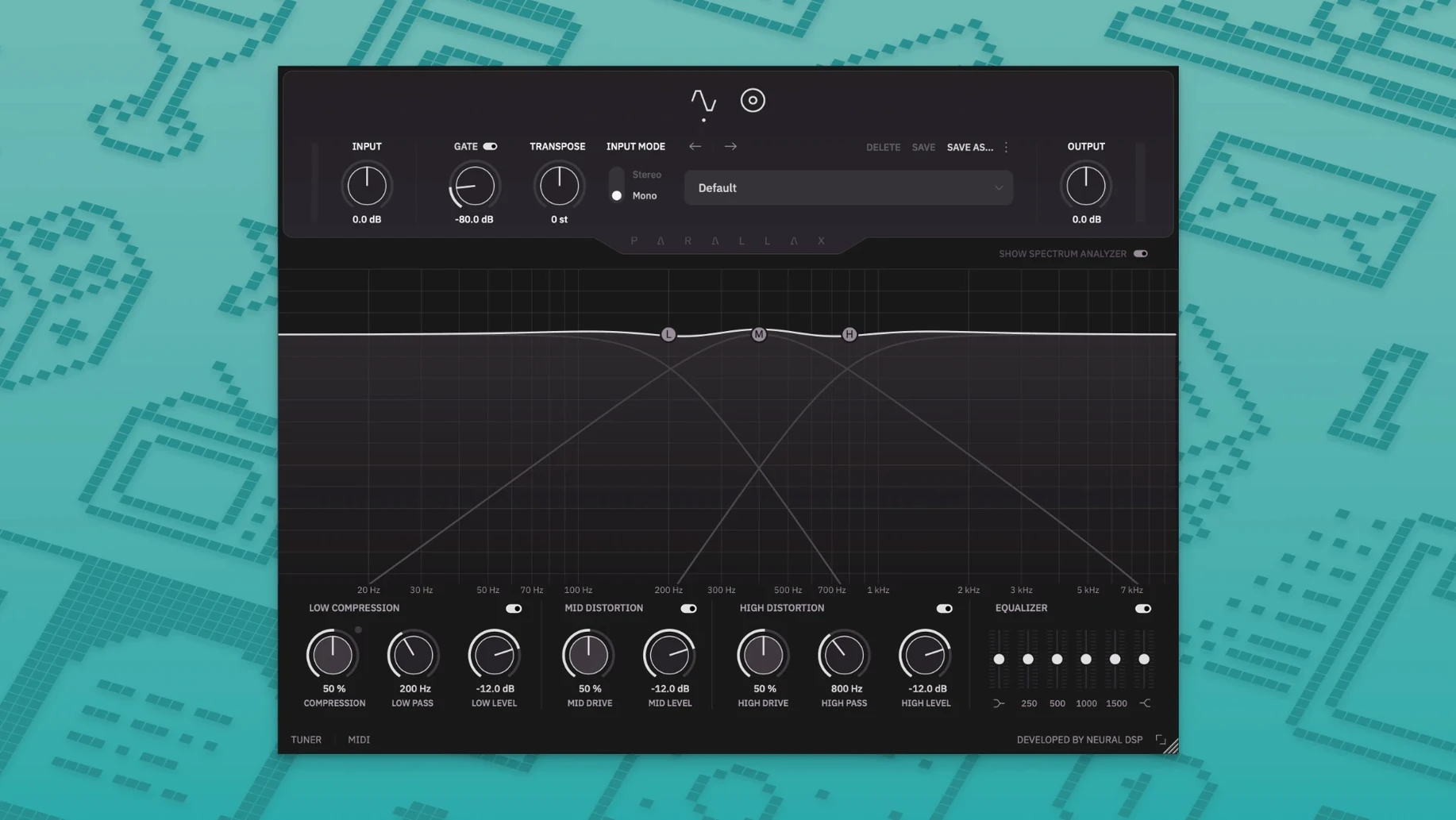
Three parallel signal paths sit at the core of Parallax X. A clean low end, a tube-modelled midrange, and a treble fuzz circuit each get their own processing lane before summing at the output. That architecture makes it straightforward to place on a DI bass track where note definition and low-end weight need separate treatment, without routing to multiple aux channels.
On tracks and buses
Inserted directly on a bass track, the low-frequency compressor keeps the fundamental even while the mid-range distortion adds finger or pick articulation. The six-band graphic equaliser can shape the blended signal further, and the transpose control lets you shift pitch within an octave without leaving the insert. On a bass bus, the cabinet section with six virtual microphones works as a shared room tone across several layered bass parts, while the spectrum analyser gives a visual check on what each path contributes. The standalone mode also allows use outside a DAW for practice or sound design, with the live tuner and metronome available alongside the processing.
Adding grit to a DI without thinning the subs
One common scenario involves a clean DI recording that needs grit without losing sub weight. Engaging the treble distortion pushes edge into the upper harmonics while the parallel low band stays untouched. Another use is re-amping a synth bass line through the mid and treble paths to introduce tube-like saturation, then printing the result for a project stem. Because the installer keeps the legacy Parallax version intact, sessions built with the original plugin continue to open without migration.
Tuner stays live alongside the metronome
Several touches sit just outside the main workflow but reward a closer look. The live tuner, for instance, remains active in standalone mode even while the metronome runs, so you can check tuning between phrases during a practice session without switching windows. The metronome itself offers time-signature and accent controls, plus a note-length setting that turns the click into a subdivided rhythmic guide — useful when working on syncopated lines where a plain quarter-note pulse feels too sparse.
Double-clicking any knob returns it to its default value, a small gesture that speeds up auditioning. The spectrum analyser updates in real time across all three bands, and hovering over its display reveals the exact frequency and amplitude at the cursor position. On the transpose control, holding Shift while dragging snaps to semitone increments, avoiding accidental microtonal offsets when you only want a quick drop-D simulation. The installer also preserves legacy presets by copying them into the Parallax X user folder during setup, so no manual migration is needed the first time you open the plugin.
Dialing the compressor threshold down for hot signals
Out of the box, the low-frequency compressor applies a moderate ratio and a fixed threshold. On a bass with an active preamp or a hotter DI signal, the threshold often sits too high to engage consistently. Lowering it by a few dB and tightening the release time lets the compressor grab transients more audibly, which keeps the fundamental locked in place before the mid and treble paths add their character. The compression gain reduction meter, tucked beside the low-band controls, gives a clear readout of how much work the stage is doing.
Another setting to revisit early is the cabinet section's microphone blend. The default mic position leans toward a balanced room tone, but switching to the rear-facing virtual mic and blending it at around 30% introduces a darker, more diffused character that suits fingerstyle passages. Because the cabinet only processes the mid and high bands, the low end stays direct and unaffected — you can make radical cabinet changes without thinning the sub frequencies.
The graphic equaliser defaults flat, and many presets leave it that way. Engaging it after dialling in the distortion paths often reveals a buildup around 400–500 Hz that muddies note separation. A narrow cut of 2–3 dB in that region, paired with a slight boost at 1.6 kHz, brings the mid-range distortion forward without pushing the overall level. Saving that as a user preset means it loads as a starting point for most DI tracks.
AU, VST3, and AAX formats on Apple Silicon
Parallax X integrates with macOS in several ways that ease daily use. The AU and VST3 versions appear directly in Logic Pro and other hosts that support those formats, while the AAX version loads in Pro Tools on Apple Silicon without Rosetta. The standalone app respects the system audio device selected in Audio MIDI Setup, so switching between an interface for recording and built-in output for practice requires no internal reconfiguration — the plugin follows the macOS routing.
On the export side, the transpose control makes it practical to pitch a bass part down for a quick reference mix without altering the original audio file. When working with a drummer who uses a sample-based instrument, the metronome's accent and subdivision settings can be set to mirror the kick-and-snare pattern, giving a more musical click than a generic DAW metronome. The standalone mode also works well alongside screen recording tools for creating lesson content; the spectrum analyser gives students a visual of where each band contributes, and the live tuner stays visible on screen throughout.
For those exploring bass processing outside their usual chain, the plugin's parallel architecture means it stacks sensibly before an amp simulator rather than after — the clean low end passes through unchanged, while the mid and treble distortion feeds the amp's input stage with a shaped signal. Some users combine it with cabinet impulse response loaders placed afterward, bypassing the internal cabinet section entirely for more flexible routing. The installer's approach of keeping the original Parallax version intact also means sessions shared between collaborators on different machines remain compatible, provided one person has not yet updated.
A single-plugin chain for home-recorded DI bass
Bass players who record DI at home and want a single-plugin solution for tone-shaping tend to settle into Parallax X quickly. The three-band parallel design removes the need for duplicate tracks and auxiliary sends, which keeps session templates lean. Those who work in project studios where bass is tracked clean and processed later benefit from the visual feedback of the spectrum analyser and the predictable behaviour of the low-frequency compressor — both make it simpler to match tones across different songs on an album.
Mix engineers handling dense arrangements will find the mid-range distortion particularly useful for carving out note definition without fighting the kick drum. Because the low band stays clean, the sub frequencies remain phase-coherent, which matters when a track is later summed to mono for club systems or broadcast. Live performers who run a laptop on stage can use the standalone mode for a consistent front-of-house signal, with the tuner and metronome covering essentials that would otherwise require separate apps. Anyone who has previously relied on the original Parallax will notice the added transpose and metronome features immediately, while the revamped interface makes the signal flow easier to follow at a glance.