Aspecten
 Download (745 MB)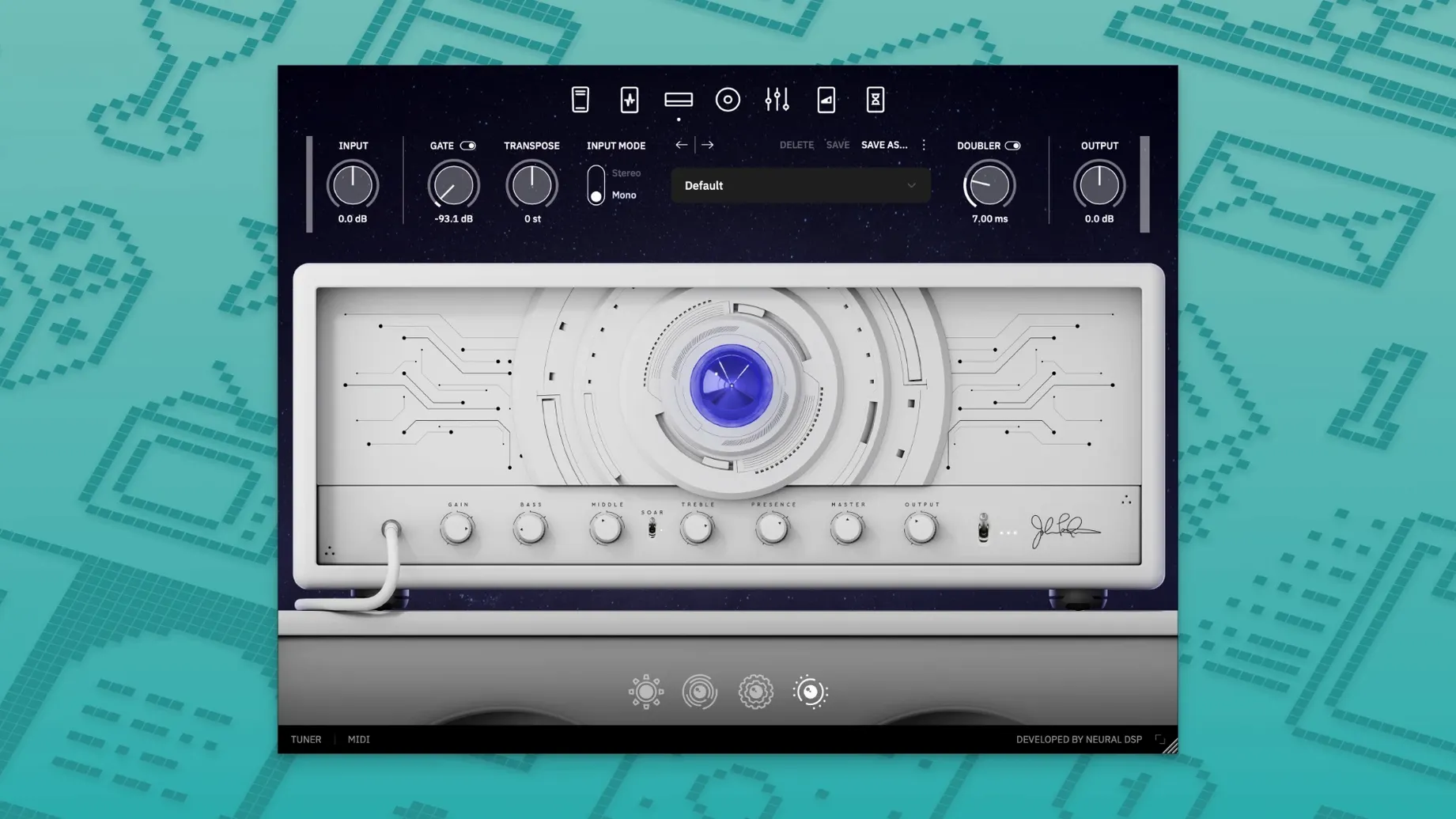
One installer, a 64-bit Audio Unit, VST3 and AAX bundle, and a single overarching sound. That is the Archetype Petrucci. The plugin opens with a signal chain already voiced for the controlled, articulate response John Petrucci dials in on stage and in the studio. You are not handed a blank rack; you are handed a considered starting point.
Dialling a rhythm tone from the default preset
Most sessions begin with the default preset loaded. The transposer block sits first in the chain, letting you shift pitch down in semitone steps without touching the guitar tuning. A compressor follows — simple threshold and ratio controls, useful for evening out palm-muted chugs before the signal hits the amplifier stage. The amp section itself does not present a model name. It offers gain, bass, middle, treble and presence, reacting with the tight, controlled character Neural DSP describes. Moving to the cabinet section, a multi-mic setup with adjustable positions and a room-sound blend lets you place the tone in a physical space without loading a separate IR loader. The workflow is linear: left to right, block by block, with no hidden menus.
Placing the part in a mix
After the cabinet, the chain moves to post-effects that shape how the tone sits in a full arrangement. A graphic EQ with sliders at fixed frequency bands sits next to a delay and a reverb. The delay offers tap tempo and note-value subdivisions; the reverb stays short and room-like by default, matching the plugin’s overall restrained character. A second compressor at the end of the chain acts as a mastering-style glue, catching peaks without adding obvious pumping. When I tracked a doubled rhythm part, the stock settings required only small EQ cuts in the low mids to sit against bass guitar and kick drum. The tweaks took seconds, not minutes, because the starting point was already close.
Tracking a lead part from scratch
A lead tone that cuts without piercing takes a slightly different path through the same blocks. Load an empty preset slot and the chain appears in its default state — transposer, compressor, amp, cabinet, then the post-effects row. The transposer can stay off for a standard-tuned lead, so skip past it. The first compressor works well set with a moderate ratio around 4:1 and a threshold that catches only the loudest pick attacks, leaving softer legato phrases untouched. The amp section is where the sound tilts forward. Gain set somewhere between noon and three o’clock, presence nudged up two notches, and the mid control pushed past the centre line — these three moves bring out note definition without adding fizz. The cabinet block follows with a single dynamic mic placed slightly off-axis, which trims the top-end harshness before it ever reaches the EQ.
After the cabinet, the graphic EQ does real work. A narrow cut around 400 Hz removes the nasal congestion that often plagues neck-pickup leads, while a gentle boost at 1.6 kHz and again at 3.2 kHz places the part where the ear naturally follows a melody. The delay block, set to a dotted-eighth subdivision with a single repeat and the mix kept low, adds dimension without clutter. The reverb stays near its default — a short decay that suggests space more than it announces it. At the end of the chain, the second compressor catches transient spikes so the lead sits level in the mix without the player having to ride the volume knob. The whole chain takes under five minutes to build from the ground up, and saving it as a user preset means the next session starts from that same spot.
Alongside other high-gain Mac amp plugins
Three other amp-sim plugins for macOS occupy a similar space. STL Tones’ ToneHub offers a broader collection of artist packs but leans on a preset-browsing workflow — scrolling through profiles rather than dialling from a set signal chain. The Archetype Petrucci keeps the amplifier model and effects fixed in sequence, which rewards the player who wants to turn knobs rather than audition snapshots. When I need a different flavour entirely, ToneHub provides it; when I want a familiar tool that responds predictably to small adjustments, the Neural DSP approach feels faster.
ML Sound Lab’s Amped Roots focuses on a specific amplifier archetype with fewer blocks and no transposer or post-compressor. That simplicity suits quick demo tracking, but the Petrucci plugin’s extra blocks — the dual compressors, the graphic EQ, the transposer — make it a more complete recording tool without requiring third-party inserts. The trade-off is a slightly heavier interface and a longer initial chain, though the linear layout keeps it from feeling cluttered.
Plugin Alliance’s brainworx RockRack offers multiple amplifier models inside one plugin with a modular routing system. It is more flexible, but the flexibility comes with decision overhead. The Archetype Petrucci removes that overhead. You do not choose an amplifier model; you work the one that is there. For a session where the goal is getting a part down rather than exploring topology, the constraint is an asset.
Opens as fast as a stock Logic compressor
After installing the plugin — opening the disk image and running the standard installer, which places the Audio Unit, VST3 and AAX files in their expected locations — a few small habits make the first days smoother. First, open the standalone application rather than the DAW. The standalone window loads faster and lets you explore every block without a project tempo or a track routing to consider. Set the audio buffer in the standalone’s preferences to 128 samples for a responsive feel while you test the amp and cabinet interaction.
Second, before saving any user presets, spend ten minutes with just the amp and cabinet blocks active. Turn off the compressors, the transposer, the EQ and both time-based effects. This stripped-back state reveals the core voice of the amplifier model — the way the gain structure compresses, where the midrange sits naturally, how the presence control interacts with the cabinet’s high-frequency response. Once that baseline is in your ears, re-engaging the other blocks feels additive rather than corrective.
Third, tag your saved presets with the guitar used. A patch dialled with a bridge humbucker often needs rebalancing for single-coils, and a note in the preset name — “LP bridge” or “Strat neck” — saves time when returning to a session days later. The plugin does not embed instrument metadata, so the naming convention fills that gap.
Native Apple Silicon loads without the beachball
On an Apple Silicon Mac, the plugin loads as a native process. Opening an instance in Logic Pro takes roughly the same time as loading a stock Logic compressor — no prolonged beachball, no spinner while the graphics initialise. The interface draws block by block left to right, and knob turns are immediate, with no perceptible lag between a mouse drag and the sound change. Resizing the window, which snaps between two or three fixed dimensions, happens without redraw flicker.
CPU use stays moderate for a plugin in this category. A single instance with all blocks active sits around 8–10% on a recent Apple Silicon core at a 128-sample buffer, measured in Logic Pro’s performance meter. Stacking four instances — two rhythm tracks, a lead and a clean — pushes the total load closer to 35%, still leaving headroom for drum virtual instruments and a convolution reverb bus. The transposer block adds roughly 2–3% extra CPU when engaged, a fair cost for avoiding a separate pitch-shifting plugin in the chain.
Stability over sessions lasting three or four hours has been uneventful. No sudden audio dropouts, no parameter values drifting on their own, no crashes when copying an instance from one track to another. The plugin recalls its state correctly when reopening a project, including the transposer pitch setting and the cabinet mic positions. One quirk worth noting: switching sample rates while the plugin is open causes a brief silence of about one second while the audio engine reinitialises, followed by normal operation. Closing and reopening the plugin window avoids even that pause. The memory footprint sits around 400 MB per instance, which is typical for convolution-based cabinet sections and means a session with several instances remains comfortable within 16 GB of system RAM.