Aspecten
 Download (153 MB)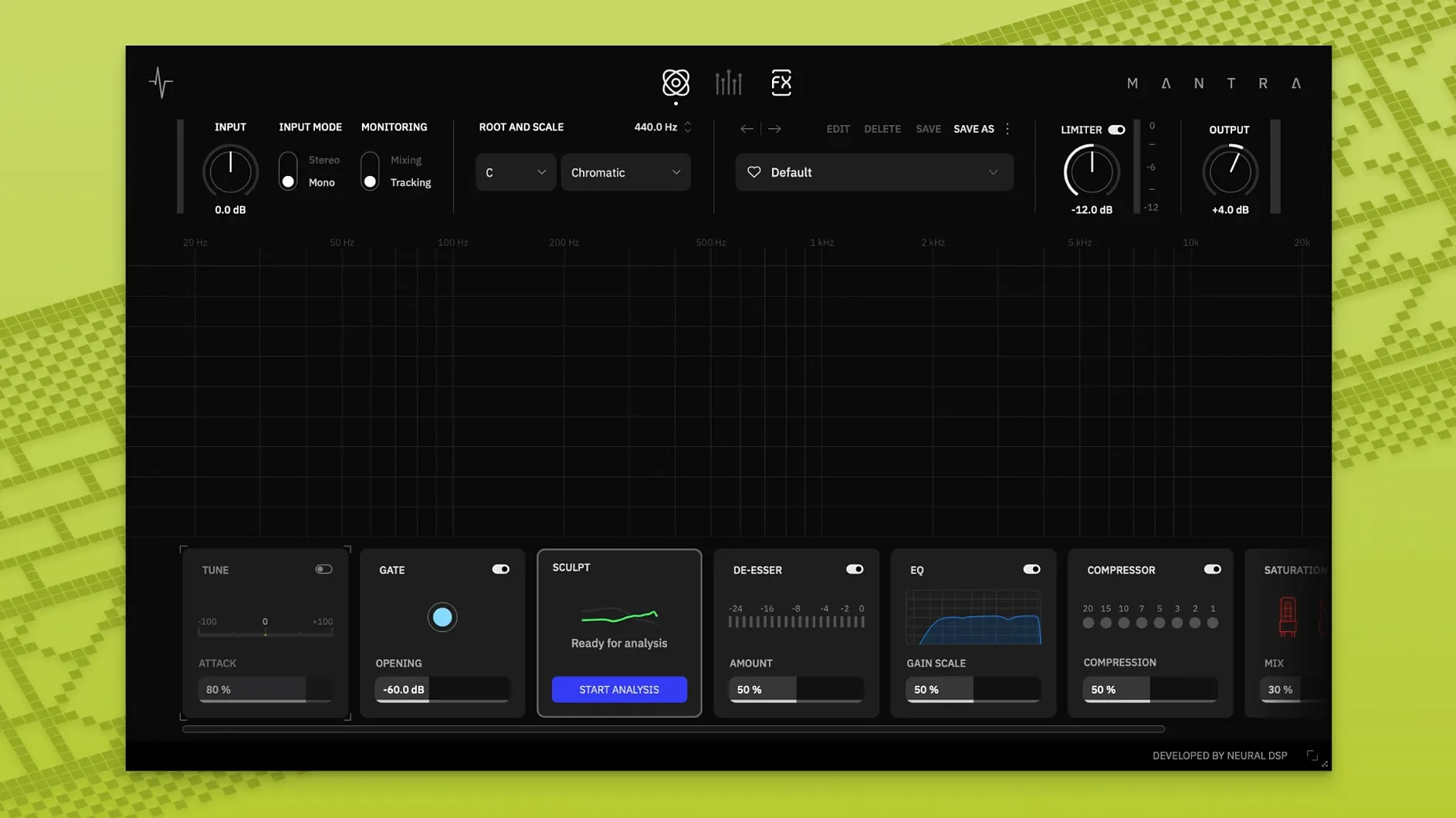
Mantra runs on Intel Macs with a 4th-generation i5 or better, and on any Apple Silicon machine. The developer asks for macOS 10.13 or newer and at least 8 GB of memory. It loads as an AU, VST3 or AAX plug-in; a standalone application is not part of version 1.0.1.
In a session the plug-in sits most naturally on a vocal track that moves from tracking to final polish. Two modes split the work. Recording mode keeps latency low and gives you Sculpt, a module that tidies up the signal and shapes presence as you sing. You hear a controlled, mix-ready vocal in your headphones without building a chain of separate processors.
Switch to mixing mode when the take is done. The same interface opens deeper controls for final-quality processing. One click reveals settings that are hidden during tracking, so the working space stays simple while you record and grows only when you need it. The plug-in is also usable on other instruments, though the workflow clearly centres on voice.
A DI Mute switch for the Harmonies section arrived in version 1.1.0, but the current release notes for 1.0.1 are thin. What ships works: pull up Mantra on a track, record with Sculpt cleaning the input, then flip to mixing mode and shape the finished vocal without leaving the window.
A tracking session from a songwriter’s desk
Someone writing and recording at home tends to move fast. Melody, words, a rough guitar line — the vocal needs to be down before the idea slips. In that situation Mantra lives on a single track, set to recording mode, Sculpt engaged. The singer puts on headphones and hears an already-controlled voice. The noise gate catches room hum between phrases; the de-esser softens sibilance without dulling the top end. By the time the take is done the track already sounds like a rough mix, not raw audio. Later, when the arrangement fills out, flipping to mixing mode lets the same plug-in handle compression, saturation and a touch of doubling from the Harmonies section. No swapping plug-ins, no re-routing. For a songwriter-producer, the gain is simple: the demo sounds closer to finished without extra evening work.
Changes that alter daily use
Version 1.1.0 brought three additions that shift what Mantra can do in ordinary sessions. The standalone application means you can open the plug-in outside a DAW, which suits warm-ups, practice runs or quick vocal checks without launching a full project. The updated Preset Explorer makes browsing and auditioning starting points faster — useful when a voice needs a different character and you want to scroll through options without dragging knobs. The new Tilt EQ control inside Sculpt lets you brighten or darken the cleaned signal with one sweep, so a vocal tracked too dark can gain air before it hits the rest of the chain. The DI Mute switch for Harmonies is a smaller but practical addition: it silences the dry signal in the harmonies output, letting you blend or isolate the generated voices more cleanly. In version 1.0.1 none of these are present, which means the daily workflow stays strictly inside a DAW, with a fixed Sculpt curve and no way to mute the dry DI in the harmonies path.
Let Sculpt clean while you sing for the first hour
After installing, place Mantra on a vocal track and stay in recording mode for the first hour. Let Sculpt do the cleaning while you sing or play back existing takes. The single-knob modules reward restraint early on — push the compressor until the level steadies, then back it off slightly.
A second tip: test the noise gate with silence. Sing a phrase, stop, and listen to what happens between words. Adjust the gate threshold until room tone disappears without cutting off soft consonants. The de-esser works similarly — set it while looping a phrase heavy on ‘s’ and ‘t’ sounds, and stop when the edge softens but the words stay clear.
For existing raw vocals, import a dry track and audition presets in mixing mode. Use the Preset Explorer if your version has it; otherwise, step through the factory list while watching the compressor and saturation modules. Once a preset feels close, open the deep settings and tweak only what the voice actually needs — often that is just the compression ratio or the Sculpt presence curve. Finally, try Mantra on a synth lead or a percussive loop. The gate and saturation modules behave differently on non-vocal sources, and the results can push a track forward in a mix without extra processing.