Aspecten
 Download (742 MB)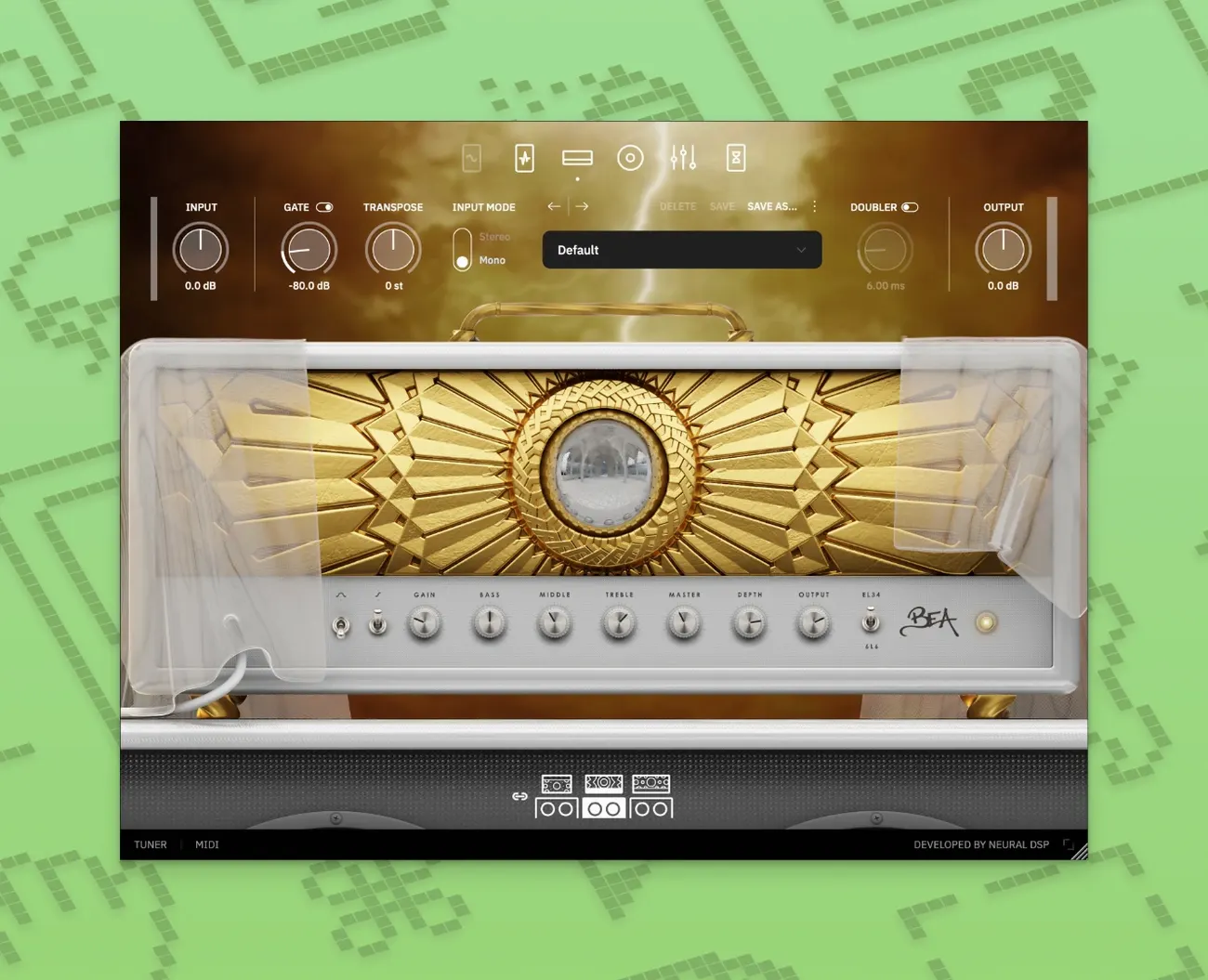
When a guitar rig feels too anchored in tradition to reach pad-like textures and growling lead lines, having a synth voice inside the signal chain removes that gap.
Original amps and effects — every drive, amplifier and modulation block is a ground-up design, not an emulation of existing hardware.
Overlord synthesiser — a monophonic synth that can trigger up to two oscillators simultaneously, layered with or split from the guitar signal.
Format support — runs as VST2, VST3, AU, AAX and a standalone application.
Apple Silicon — the plugin is compiled natively for Apple Silicon processors.
Right-click to reset threshold and other hidden controls
Several workflow details sit just below the surface. The input gate threshold knob, for instance, responds to right-click reset — a tap returns it to the default -40 dB without squinting at the readout. The same behaviour applies to nearly every rotary control in the plugin: right-click or option-click snaps a parameter to its centre or default value.
The tuner, tucked behind a small icon near the input section, mutes the output automatically when opened. This is not labelled anywhere on the front panel. A second click on the same icon closes the tuner and restores signal, which spares you from hunting for a separate mute switch during quick string checks between takes.
Double-clicking any preset name in the browser loads it instantly — no confirm dialogue, no loading bar. The browser also keeps a short history of recently loaded presets, accessible from a dropdown near the preset name. This makes A/B comparisons between two or three tones faster than scrolling through the full list each time.
The Overlord synthesizer section can be toggled on and off with a single button near its header. What is less obvious is that holding Shift while adjusting the oscillator pitch snaps it to semitones rather than continuous fine-tuning. This matters when you want the synth to track a specific interval against the guitar without drifting microtonally.
Audio Unit plug-in and standalone device registration on macOS
The plugin presents itself to the system as a standard Audio Unit, which means it appears in Logic Pro, GarageBand, Ableton Live and any AU host without extra configuration. The standalone application registers itself as an audio device on macOS, so routing its output into another recording app via a virtual audio bus — such as BlackHole or Loopback — requires no intermediate hardware. This is useful for capturing spontaneous practice ideas without opening a full DAW session first.
MIDI learn works with any controller class-compliant on macOS. Right-click a parameter, choose MIDI learn, move a knob or fader on the controller, and the mapping is stored per instance. The plugin remembers these assignments across sessions, stored in a local preferences file rather than inside the preset itself. This means you can map an expression pedal to the Overlord filter cutoff and use the same physical gesture across many presets without re-teaching each one.
On Apple Silicon Macs, the native compilation keeps CPU load modest enough that running multiple instances inside a project alongside other Neural DSP plugins — such as the neural dsp gojira x torrent build or the standard Archetype Gojira — does not immediately choke the audio thread. Buffer sizes of 128 samples remain workable on M1 and M2 machines with four or five plugin instances, provided the Overlord section is not active on every channel simultaneously.
The Quad Cortex integration is straightforward: any preset built in the plugin can be exported as a block and loaded onto the hardware unit via USB. The transfer preserves both the signal chain order and the parameter values, though the Cortex interface reinterprets the layout to fit its footswitch grid. Musicians who rely on a neural dsp mac download for studio work and then recreate tones on the Cortex for live use will find the round-trip predictable.
Preset switching stability and CPU smoothing in the maintenance update
Version 1.0.1 is a maintenance release. The developer notes cite quality-of-life improvements and bug fixes without detailing every line item, but the practical effect is noticeable in two areas.
First, preset loading is more stable when switching rapidly between patches that include the Overlord synth. Earlier behaviour could occasionally leave the synth engine in a silent state after a fast succession of changes; the update addresses that sequence so the oscillators fire reliably on the first note after a preset change.
Second, the plugin window scaling behaves more predictably on high-resolution external displays. On macOS 10.15 and later, dragging the corner of the window now produces smooth increments rather than snapping abruptly between fixed sizes. For users working on a laptop screen alongside a 4K monitor, this removes a small daily irritation — the interface lands at a readable size without manual adjustment each time the display arrangement changes.
The update does not add new amplifiers, effects or synth features. Anyone moving from the initial public build to 1.0.1 will hear the same sound engine. The difference lies in fewer interruptions during a session — less time spent reloading a silent synth patch or resizing a window that has misjudged the screen scaling.
Overlord monosynth chokes on chords if you ignore single-voice tracking
The most common early misstep is treating Overlord as a polyphonic instrument. The manual is clear that the monosynth tracks a single voice at a time, yet new users often play chords into it and wonder why the oscillator pitch wobbles or jumps erratically. The synth follows the loudest or most recent note — not the chord shape — so clean tracking demands single-note lines or careful palm muting of unwanted strings.
Another frequent stumble involves the noise gate placement. The input gate sits before the amp and effects, while the output gate is post-everything. Beginners sometimes crank the input gate to silence background hum and then find their sustain dies abruptly on held notes. A better approach is to set the input gate just high enough to catch idle noise, then shape the tail with the output gate or a volume pedal mapped in the DAW.
Overloading the input gain on the amplifier while the Overlord section is active creates a muddied midrange that masks the synth tone. The two signal paths — guitar through the amp and synth through its own voice — share the output stage. Keeping the amp gain moderate and pushing the synth volume up in the mixer section gives each element its own space. Users coming from a neural dsp torrent of an earlier Archetype plugin sometimes expect the amp to behave identically at high gain settings, but the Rabea X circuits are voiced to leave room for the synth without stacking excessive harmonic density.
Ignoring the cabinet section is another pattern. The plugin defaults to a cabinet and microphone pairing that suits the loaded preset, but switching amplifiers without revisiting the cab choice can leave a fizzy top end or a hollow low-midrange. A quick listen to the raw amp output — toggled with the cabinet bypass — reveals how much heavy lifting the speaker simulation does.
Category-sorted factory presets map the amp range faster than blank patches
Start with the factory presets organised by category rather than building a sound from a blank state. The categories group tones by application — clean, crunch, lead, and synth-layered — which gives a tour of the amplifier range faster than randomly clicking through the list. Note which cabinet and microphone combination a preset you like uses; those pairings are transferable knowledge for your own patches.
Test the Overlord tracking with a clean guitar signal first. Plug directly into your interface, set the input gain so the meter peaks around -12 dB, and load a preset where the synth is prominent. Play single notes on the higher strings around the twelfth fret. If the tracking glitches, lower the guitar volume knob slightly — the pitch detection prefers a clear fundamental over a saturated signal. Once tracking is solid, gradually reintroduce the amplifier gain.
Set aside twenty minutes to map your most-used physical controls. An expression pedal mapped to the Overlord filter cutoff transforms the synth from a static layer into something you can shape mid-phrase. A footswitch mapped to the synth on/off toggle lets you bring the oscillator voice in and out without taking hands off the instrument. These mappings survive plugin updates because they live outside the preset file.
When using the plugin alongside other Neural DSP titles — whether the official builds or a Neural DSP Gojira Mac torrent installation — keep an eye on the cumulative latency in your DAW. Each instance adds a small processing delay. On Intel machines running macOS 10.15, three or more instances at low buffer sizes can push round-trip latency past a comfortable threshold for real-time playing. Freezing or committing one track at a time keeps the monitoring responsive while layering tones.
Finally, explore the standalone application for practice even if you normally work inside a DAW. The standalone mode starts faster, loads a single preset instantly, and uses slightly less system memory than a full project. It is an efficient way to audition new tone ideas or practise along with a backing track playing from another application, with the plugin handling its own audio I/O directly.
Hardware integration — preset blocks transfer directly to Quad Cortex and Quad Cortex mini.