Aspecten
 Download (1.6 GB)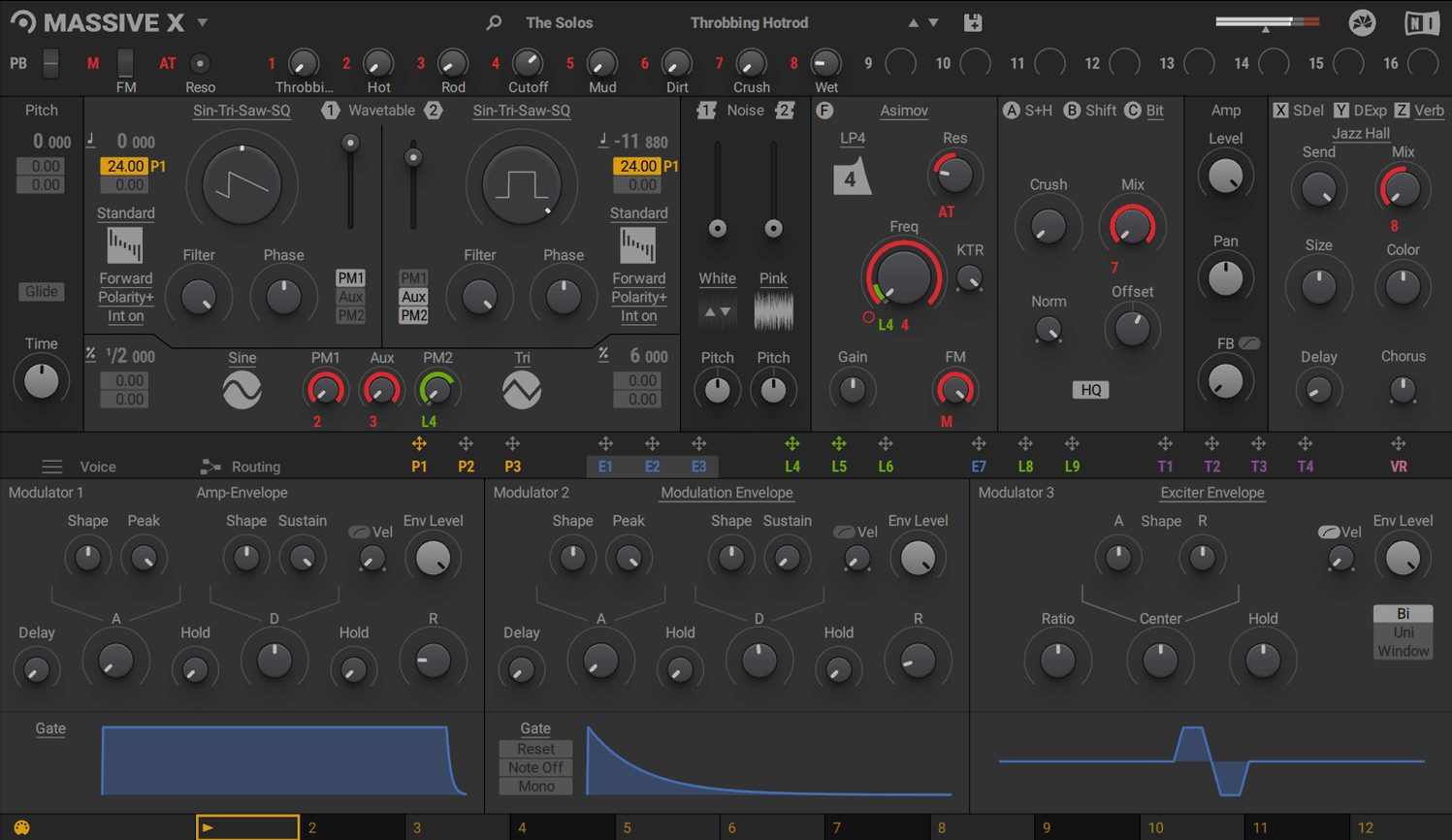
Massive X is a polyphonic wavetable synthesiser that serves as a primary sound design instrument, typically placed on software instrument tracks in a DAW session. Its output can be routed further to effect buses or group channels for processing, while its own internal routing allows any audio-rate output to be connected to any input, creating complex feedback paths without leaving the plug-in.
The synth comes with more than 170 wavetable options and a factory library of 780 presets, spanning basses, leads, pads and evolving textures. The Remote Octave control lets you trigger Performer patterns directly from the keyboard, which makes it practical to audition rhythmic sequences while a session plays. Modulation assignments are handled through a drag-and-drop system that keeps the routing visible rather than hidden behind menus.
On a mixing desk, Massive X sits comfortably on instrument channels, and its multi-output configuration means different parts of a patch can be sent to separate mixer strips for independent level control and external effects. The plug-in supports VST, VST3, AU and AAX formats, so it integrates across most major Mac DAWs without bridging.
Shortening a metallic tension preset for a thriller scene
A composer working on a mid-budget thriller sits down with a scene that needs a creeping, metallic tension bed. Opening Massive X inside a DAW session, they pull up a factory preset named something like Alien Corridor and immediately shorten the amp envelope to tighten the attack. The two phase modulation generators get dialled up slightly, introducing an unstable shimmer that sits just above the low drone. Within five minutes the sound fits the cut, and a second instance is loaded — this time with a percussive pluck built from a formant wavetable — to accent scene transitions.
Later in the same session, the composer uses the Performer section to draw a seven-step modulation pattern assigned to the wavetable position of a bass sound. The Remote Octave control is mapped so that C1 plays the pattern at its original speed, while C2 doubles it and C3 halves it. This turns one patch into three distinct rhythmic layers without duplicating the instrument track. The whole arrangement stays editable from a single plug-in window, which matters when the director asks for a tempo change twenty minutes before the mix deadline.
Lives inside AU, VST, or VST3 hosts — no standalone app
Massive X operates as an instrument plug-in only — there is no standalone application — so it always lives inside a host. On Mac, that means it appears in any DAW that loads AU, VST or VST3 instruments, as well as in Pro Tools via AAX. Logic Pro users can take advantage of the multi-output version to send individual parts of a patch to separate aux channels, each with its own processing chain. In Ableton Live, dragging a Performer-modulated patch onto a MIDI clip slot and triggering it with the Remote Octave range creates evolving loops that respond to key switches rather than static automation lanes.
Apple Silicon Macs run the plug-in natively, and the installer places components in the standard Library folders where hosts expect them. macOS features such as Audio Unit hosting inside compatible video editors or utility apps work without extra configuration, though the plug-in’s reliance on OpenGL 2.1 or higher means older machines without a supported graphics driver may see interface rendering issues. The synth coexists with the original Massive without conflict: both plug-ins appear as separate entries in instrument menus, and projects saved with the older synth continue to load as before.
Users who have explored a massive torrent or searched for a massive mac torrent often discover that the plug-in’s integration with the Native Instruments ecosystem is one of its practical strengths. Presets can be browsed via the Komplete Kontrol software if that is installed, and patches saved from Massive X appear in the unified browser alongside other NI instruments. This matters less for one-off sound design and more for users who build personal libraries across multiple synths and want consistent tagging.
Dialling polyphony down to a specific voice count
A handful of adjustments make an immediate difference to how Massive X behaves in daily use. The first is the voice management section. By default, polyphony is set generously, but dialling it down to a specific voice count — say, six or eight voices — prevents CPU spikes when playing dense chords with long release times. The unison voice count can also be trimmed; eight-voice unison on a pad sound is lush, but four voices often yield a tighter, more mix-ready result without the same processor hit.
The second setting to visit is the global tuning and pitch bend range. The bend range defaults to two semitones, which suits most keyboard playing but limits expressive pitch slides. Setting it to twelve semitones opens the instrument up for sound design gestures, especially when mapped to a ribbon controller or pitch wheel for sweeping wavetable position alongside pitch.
Third, the mod matrix view benefits from a quick declutter. Massive X allows any modulation source to be assigned to multiple destinations, but the list can grow unwieldy. Right-clicking an assignment slot and choosing to remove unused routings keeps the dragging and mapping snappy, particularly on patches that have been through several rounds of experimentation. Lastly, switching the interface scaling to a comfortable percentage early on prevents squinting at the Performer grid during long sessions — the setting is tucked into the preferences menu and persists across host launches.
Near-instant preset changes on Apple Silicon
On an Apple Silicon Mac, Massive X loads quickly — typically within a second or two for most presets — and patch changes are near-instant once the plug-in window is open. The initial library scan after installation takes longer, as the instrument indexes its 780 factory presets, but this is a one-time process. Instances saved as part of a DAW template recall reliably, and sessions with ten or more instances spread across an M-series processor remain playable, though voice-heavy unison patches stacked in parallel will nudge the CPU meter upward.
Stability in version 1.7.1 is solid under macOS 13 and newer. Crashes are rare during normal parameter editing, though the OpenGL dependency means that rapidly resizing the interface while audio is playing can cause a momentary graphic stutter on machines with integrated graphics. The audio engine itself continues unaffected during these brief visual hiccups. Memory usage per instance hovers around the expected range for a modern wavetable synth — not unusually light, but not bloated either — and the 6 GB recommended RAM figure feels sensible for projects that combine multiple instances with sampler instruments and convolution reverbs.
One area where the plug-in shows its heritage is in the size of the patch library on disk. Users who have found the instrument through a massive x torrent or a massive vst torrent sometimes note that the sample content and wavetable data occupy several gigabytes, which is worth budgeting for on machines with smaller internal drives. The installer handles the placement without fuss, but relocating the content afterwards requires attention to the Native Instruments content location preferences.
Option-drag to copy modulator assignments between parameters
Several workflow details sit just below the surface and reward a bit of exploration. The first is the ability to copy and paste entire modulator assignments between parameters. Holding the Option key while dragging a modulation ring from one destination to another duplicates the routing with all its depth and curve settings intact, which saves rebuilding complex modulation chains when a performer pattern needs to affect filter cutoff and resonance in the same way.
The Performer section has a subtle but useful feature: patterns can be saved independently of presets. Right-clicking a performer lane brings up a menu that lets you export the pattern as a small file, which can then be loaded into a completely different patch. This turns the Performer into a personal library of rhythmic modulation shapes that outlive any single sound.
Another easily overlooked detail is the noise generator's routing flexibility. By default it feeds into the main signal path, but it can be sent directly to a modulation input, turning it into a random modulation source with adjustable colour. This is handy for introducing subtle pitch drift on a wavetable that otherwise sounds too static, and the noise type selector lets you choose between several flavours of randomness — from smooth hiss to grainy artefacts — that each produce different modulation behaviours.
Right-clicking most controls resets them to their default value, which is faster than double-clicking or hunting for a tiny reset dot. The wavetable display itself supports click-and-drag to scroll through the waveform view, and holding Shift while dragging snaps to specific cycle points useful for finding harmonic sweet spots. These shortcuts add up over a long sound design session, cutting down the small frictions that accumulate when working with a deep instrument. Lastly, the interface remembers its last size and position per DAW session, so reopening a project puts the window exactly where it was left — a small kindness that makes returning to an unfinished patch feel less like starting over.