Aspecten
 Download (318 MB)
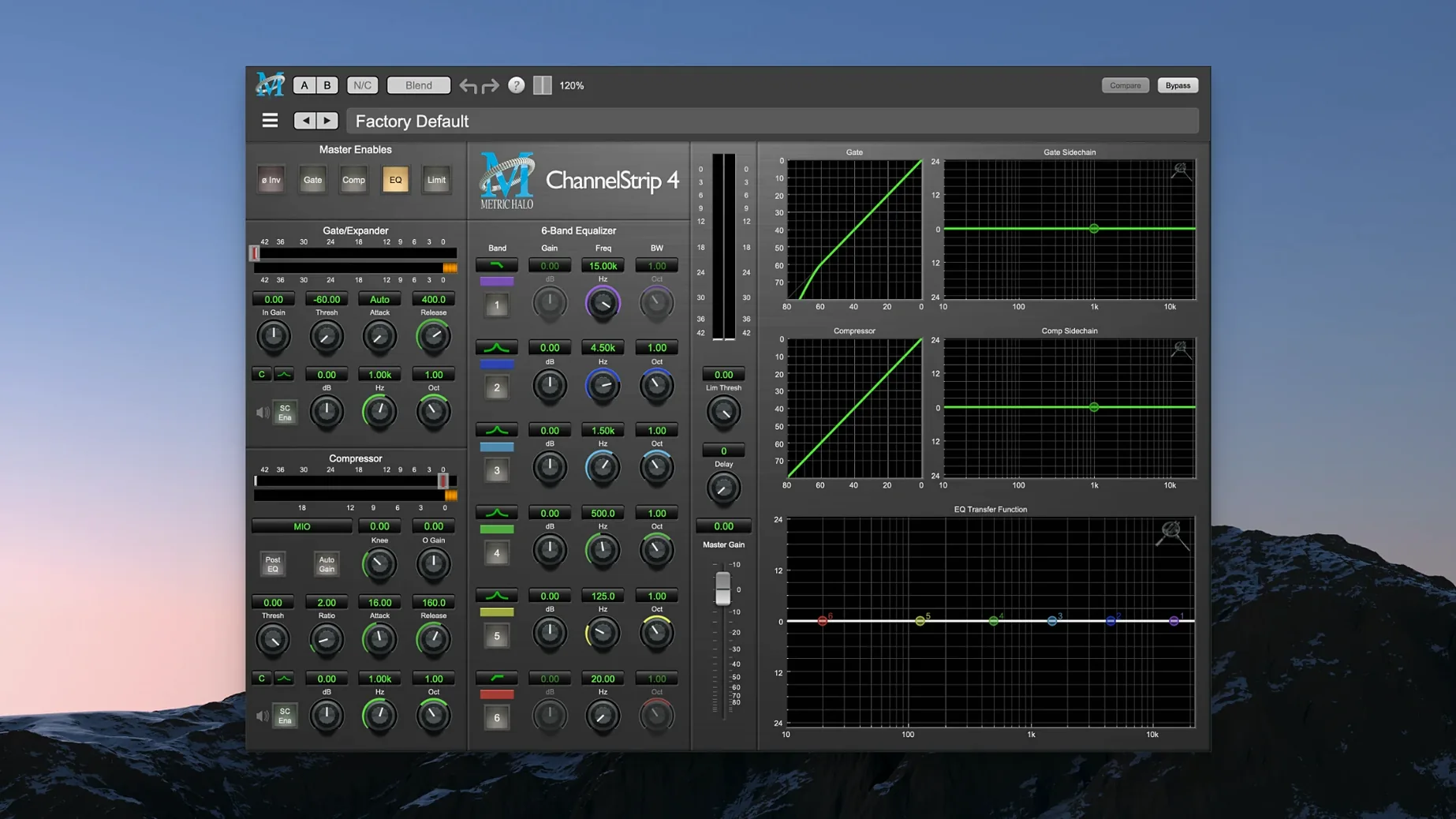
Twelve plug-ins ship in this bundle, but three tend to anchor a session. ChannelStrip handles the utility lane on most tracks: a four-band EQ sits next to a compressor and an expander, with sidechain routing available when a kick and bass line need to talk. Precision De-Esser takes over on vocal buses where sibilance cuts through a mix, splitting the signal into a narrow band that can be pulled down without dulling the rest of the performance.
Metric Halo Thump works differently. Rather than shaping existing audio, it synthesises new low-frequency content — useful on a thin snare or a DI bass track that lacks weight. It is not a substitute for a clean sub-bus, but it can fill a hole that EQ alone cannot reach.
On the master bus, ChannelStrip often reappears for broad tonal shaping and gentle limiting before a dedicated limiter takes over. The bundle does not include a standalone mastering limiter, so it sits earlier in the chain. Across a session, the plug-ins stay predictable: the interfaces use the same control scaling and metering, which means moving from a track insert to a bus feels like staying in the same room.
The bundle runs on Apple Silicon Macs and asks for macOS 11 or newer. It is a single installer; activation follows the instructions inside the package.
Tidying three guests and a host with ChannelStrip’s expander
A dialogue editor working on a podcast series opens a session with three guest tracks and one host mic. The host track is steady, but one guest recorded in a booth with too much low-end reflection, and another has a string of sharp esses that poke through the mix. The third guest’s levels wander — quiet asides drop below the noise floor, then a laugh clips the preamp.
ChannelStrip goes on the boomy guest first. A high-pass filter at 80 Hz cleans up the reflection, and the expander pushes the room tone down by 6 dB between phrases. The EQ section lifts 2.5 kHz by a couple of decibels for clarity. On the sibilant guest, Precision De-Esser sits second in the chain, set to catch the range around 6.2 kHz. The narrow-band reduction pulls the sharpness back without making the voice sound lisped. For the uneven guest, the compressor in a second instance of ChannelStrip catches the peaks at 4:1, and the expander keeps the quiet sections from dragging up background hiss. By the time the editor bounces the stems for the mix engineer, each voice sits in its own space without obvious processing artefacts.
Early mistakes that cost time
One pattern that shows up with new users is stacking Thump on a kick drum and a bass guitar and a sub-bus, then wondering why the low end turned into a rumble. Thump synthesises harmonics, and three instances adding content in overlapping ranges quickly makes a mix muddy. The better approach is to pick one element that genuinely lacks weight — usually the kick or a DI bass — and leave the others alone.
Another mistake is treating Precision De-Esser like a broadband gain control. Dragging the reduction too far into the midrange, or setting the threshold so low that the processor is always active, dulls the whole vocal. Beginners sometimes hear the dulling and reach for a high-shelf EQ afterwards, which brings the sibilance back. The fix is to narrow the frequency range and raise the threshold until the processor only engages on the sharpest syllables.
Using MIOStrip instead of ChannelStrip on tracks that need detailed shaping can also backfire. MIOStrip is lighter on resources, but its controls are coarser. A mix that relies on it for surgical EQ moves on a lead vocal or a snare top will feel limited later. Reserve it for tracks where the processing is simple — room mics, scratch synths, or guide tracks.
Opening Intel-era sessions on Apple Silicon without a compatibility warning
A common snag is opening an older session and finding that the plug-ins report an incompatibility. This bundle runs on Apple Silicon and requires macOS 11 or later. Sessions built on Intel machines with earlier versions of the plug-ins may need the inserts reloaded. In most DAWs, removing and re-adding the plug-in on the same slot restores the settings from the saved state, but it is worth checking the compressor threshold and expander range on ChannelStrip — the scaling shifted subtly between major revisions.
Another point of friction is the sidechain routing on ChannelStrip. The sidechain listens to an external key signal, but in some hosts the routing menu appears only when the plug-in window is open in its expanded view. If the compressor does not seem to react to the key input, expanding the interface usually reveals the routing selector tucked at the bottom of the dynamics section.
Users moving between the metric ab torrent and the full metric ab mac torrent sometimes ask why projects open with missing plug-ins. The bundle covered here is the production suite, not the measurement toolset. The names share a prefix but the products are separate, so sessions that reference analysis plug-ins will not resolve against this installer. Keeping a clean separation between production and measurement plug-ins avoids the confusion. For those who have picked up the metric halo plugin bundle v2026.01 macos [u2b]-flare elsewhere, the activation method differs; the K’ed version of this 2025.05 bundle handles authentication at the system level and does not require additional key files.
HaloVerb sometimes loads with a very long pre-delay or an unusually dark tail on its default preset after a DAW update. Resetting the plug-in to its factory state — usually via the host’s preset menu rather than the plug-in’s own interface — clears the corrupted recall. If that does not work, removing the plug-in’s preference file from the user Library and relaunching the DAW forces a clean default state.
Increasing expander range to 12–18 dB for cleaner phrase gaps
On ChannelStrip, the expander defaults to a 2:1 ratio with a moderate range. For dialogue and vocal tracks, increasing the range to 12–18 dB and setting the threshold just above the noise floor tightens the space between phrases without audible pumping. On a snare drum, a shorter release time — around 50 ms — keeps the expander from cutting off the ring of the drum.
Precision De-Esser’s default centre frequency of 6.4 kHz works for many vocalists, but a female vocal with a brighter timbre often needs the centre moved up to 7.2–7.8 kHz. Switching the monitoring to the sidechain solo lets you sweep the frequency until only the sibilance is audible; set the reduction to taste, then switch monitoring back to the main output. That five-second sweep prevents a lot of guesswork later.
Thump’s output level defaults to unity, but the synthesised content adds peak level without always showing it clearly on a VU meter. Dropping the output by 2–3 dB after dialling in the harmonics keeps headroom predictable. The frequency control interacts with the drive setting: a higher frequency setting with moderate drive produces a tighter, punchier low end for kick drums; a lower frequency with more drive suits a bass guitar that needs a sub-harmonic layer underneath the DI signal.