Aspecten
 Download (178 MB)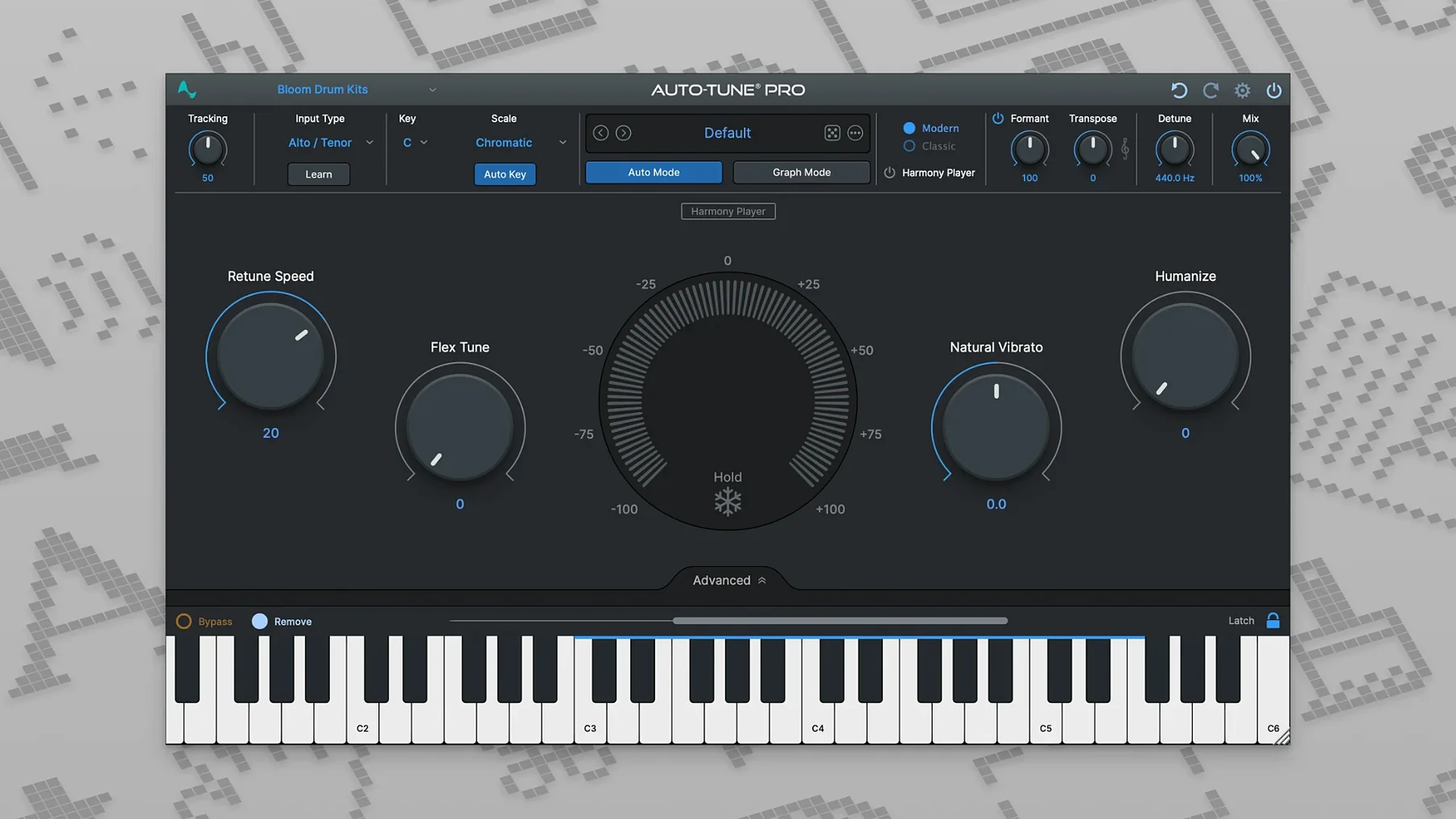
Recording engineers, producers and vocal editors reach for Auto-Tune Pro when a performance needs precise pitch adjustment without destroying its character. It handles two distinct jobs: real-time correction during tracking or live performance, and detailed graph-mode editing where every note can be nudged by hand.
Hosts, formats and architecture
The plugin loads into any 64-bit host that accepts AU, VST3 or AAX formats. Apple Silicon and Intel Macs are both supported natively — there is no Rosetta translation layer for ARM builds. The listed baseline is macOS 11, though Antares currently ships version 11.0.0 and qualifies newer OS releases through incremental updates.
Sound and behaviour
In real-time mode the processing latency stays low enough for tracking with headphones. The pitch detection is quick to lock onto a vocal and the retuning speed control lets you slide from transparent, nearly inaudible correction through to the hard-tuned effect associated with the name. Graph mode offers separate control over pitch and time, so a sharp flat note can be pulled into tune while the original phrasing and vibrato remain untouched.
Pick the input type that matches the vocal register
A fresh install of Auto-Tune Pro 11 defaults to a sensible middle ground, but a few adjustments make it settle into a session more quickly. The first stop is the Input Type menu, tucked near the top left of the interface. Switching from the generic default to Soprano, Alto/Tenor, or Bass tells the pitch detector which frequency range to prioritise. On a low baritone, leaving it on the wrong setting can cause the tracking to hunt around octave jumps unnecessarily.
Next, the Retune Speed knob benefits from being set before you hear the vocal in context. For a natural lead vocal, values between 25 and 40 ms usually keep the singer’s phrasing intact while catching obvious drift. Pushing it below 10 ms produces the quantised, stepped sound that suits certain pop and hip-hop productions — but applying that across a whole verse by accident is easy to do and harder to unhear.
In Graph Mode, the default Note Transition curve tends to be linear. Changing it to a gentler shape in the curve editor avoids abrupt pitch jumps between corrected syllables. It is also worth enabling Show Scale Notes Only in the pitch grid; this strips away chromatic clutter and makes manual retuning decisions quicker when you are working inside a known key.
Polyphonic blob editing versus monophonic line retuning
Celemony Melodyne occupies the same editing bay as the Graph Mode side of Auto-Tune Pro, but the approach differs. Melodyne treats audio as blobs you can stretch, split and reshape on a timeline; its strength is polyphonic material and detailed formant work on sustained notes. Auto-Tune Pro handles monophonic vocals more directly in graph mode — fewer editing gestures per correction — and adds the real-time mode that Melodyne lacks entirely.
Waves Tune Real-Time is a closer match for the live side. It runs with low latency, offers a streamlined set of controls and integrates smoothly into a tracking chain. The trade-off is that it provides no offline graph editor. You get the real-time engine and a basic on-screen keyboard for scale definition, but no facility for surgical note-by-note editing after the fact. Auto-Tune Pro covers both jobs in one plugin, which matters when a session moves from tracking straight into detailed vocal production.
Logic Pro’s built-in Pitch Correction plugin is another comparison point for Mac users. It is lightweight, tightly integrated with Logic’s transport and costs nothing extra. The limitation is control: retune speed and scale are adjustable, but there is no manual editing environment, no formant preservation and no ARA2 bridge for deep timeline integration. Auto-Tune Pro earns its place as soon as a vocal needs individual note attention or a distinct sonic fingerprint rather than background pitch tidying.
A mix engineer’s afternoon
An engineer receives a session with three lead vocal takes for a chorus. The singer has a strong tone but a tendency to land slightly flat on the second and fourth lines. The brief from the producer is clear: keep the take natural, no obvious tuning artefacts.
She drops Auto-Tune Pro onto the vocal bus in Graph Mode, lets ARA2 pull the audio into view inside Logic, and scans the first take. The flat notes are visible immediately — a cluster of pitch curves sitting below the centre of each target note line. She selects each under-pitched phrase individually, drags the pitch centre upward by around 25 cents and softens the transition curve so the correction breathes with the original vibrato. The time handle stays untouched; the timing was never the issue.
By the time the second and third takes are treated the same way, the chorus sits in tune without any of the three performances sounding edited. A quick check with the real-time mode engaged on a duplicate track confirms the manual work holds up against the automatic alternative — but the graph edits keep more of the singer’s weight and drift, which is what the track needs.