Aspecten
 Download (18 MB)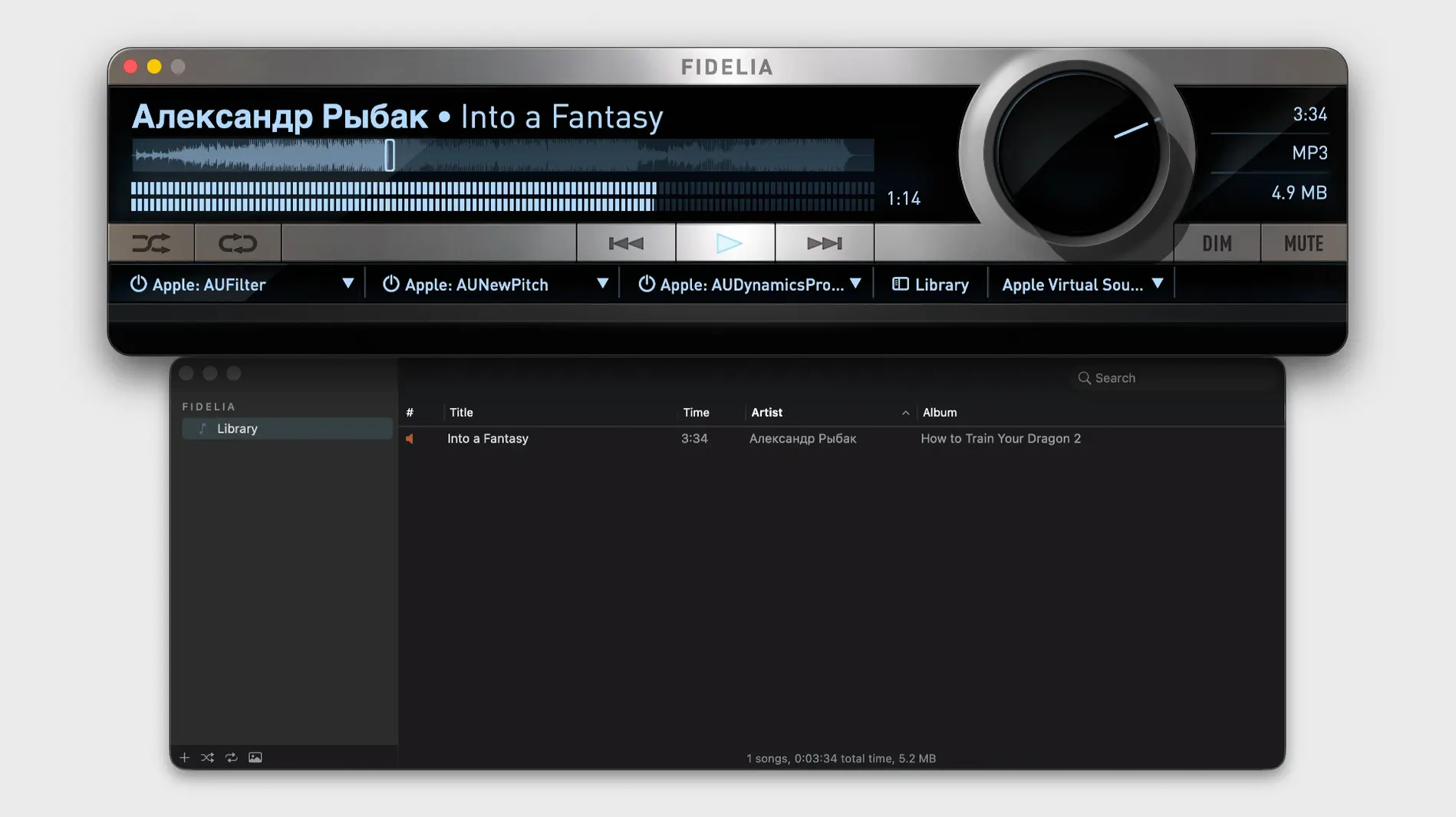
HeadSpace crossfeed is what you open Fidelia for, but the first question is whether it will open at all. A few compatibility points laid out plainly.
macOS 14 — the minimum operating system version. Earlier releases of macOS are not supported.
Apple Silicon / Intel — the app runs natively on both processor architectures. No Rosetta translation layer needed on Apple Silicon.
Local library playback — Fidelia plays files you already own. It reads WAV, AIFF, FLAC, ALAC, CAF, MP3, AAC, OGG Vorbis, Opus, AC3, Sound Designer II, AU/SND, and Wave64. It can sync with the Music app library, pulling in tracks you have already organised there.
Bit-perfect output — the signal path avoids unnecessary sample-rate conversion, keeping the data intact up to the DAC.
Three Audio Unit slots — you can insert third-party effects directly into the listening chain. The built-in DSP covers mastering-grade processing, psychoacoustic noise shaping via Pro Dither, and the HeadSpace crossfeed circuit for headphone listening. Gapless playback keeps live albums and DJ mixes flowing without inserted silence.
Silent playback despite a running track
Fidelia's straightforward layout hides a few recurring trouble spots. The most frequent is a silent player. It launches, the track appears to play, but nothing reaches the headphones or speakers. The cause is usually an output routing mismatch. Check the output device selector in the menubar — Fidelia uses its own output assignment, separate from the system setting. If the selected device does not match what you expect, or if a multichannel interface is selected but only two channels hold audio, the signal goes nowhere audible. Switching to the correct stereo pair and restarting playback resolves it.
A second snag involves the three Audio Unit slots. When a plugin crashes or refuses to validate, Fidelia can stall on launch. The culprit is almost always a third-party unit that has not been updated for the current version of macOS. Removing the offending component from ~/Library/Audio/Plug-Ins/Components/ and relaunching restores normal behaviour. Re-add plugins one by one to isolate the troublemaker.
Library syncing with the Music app also trips up new users. The sync is one-directional: it pulls tracks and playlists from the Music database, but changes made inside Fidelia do not write back. People who delete a track in Fidelia expecting it to vanish from their Music library discover the file returns on the next sync. Treat Fidelia as a reader, not an editor, of the Music library.
DSF-to-ALAC conversion confuses those unfamiliar with the import settings. The conversion defaults to 24-bit/176.4 kHz, which suits most DSD material, but if the source file uses a different rate the output can be misconfigured. Check the import preferences before dragging files in. The same applies to APE conversion: Fidelia preserves the original sample rate and bit depth, but only if the import destination format is set to Apple Lossless before the conversion begins.
Bit-perfect mode locks the volume control
A common early misstep is enabling bit-perfect mode without understanding what it demands. When bit-perfect output is active, the system volume control stops working, and all other audio is blocked while Fidelia plays. Beginners toggle it on, find they cannot adjust volume with the keyboard, and assume the app is broken. What they are seeing is the intended behaviour. The gain must be controlled from the DAC or an analogue stage downstream.
Another beginner habit is stacking plugins in the three Audio Unit slots without checking gain staging. A compressor followed by a loudness processor, then an EQ with a broad boost, pushes the signal into clipping before it reaches the output meters. Fidelia's internal metering is pre-fader on the slot chain, so a clipped signal can pass unnoticed until distortion is audible. Reducing the output level of each unit in sequence keeps headroom intact.
HeadSpace crossfeed gets switched on and forgotten. The processing is subtle by design, but leaving it active during speaker playback colours the stereo image in a way most listeners do not want. Beginners who move between headphones and desktop monitors without toggling HeadSpace off often blame the speakers for a softened centre image. The same applies to Pro Dither: it matters at the final output stage, but running it while still applying further processing in external hardware yields double-dithering artefacts that degrade rather than refine the sound.
Library of thousands scrolls with zero lag
Fidelia loads a library of several thousand albums without visible hesitation. Metadata browsing scrolls smoothly, even with high-resolution artwork embedded in the files. The interface redraws at the display's refresh rate, with no lag when switching between the five player sizes or pulling up the mini player. Search filters apply as you type; the results narrow with each keystroke, and the track list updates in under half a second on a moderate-sized library.
Memory use sits in a comfortable range. During playback of 24-bit/192 kHz FLAC files, the app hovers between 180 and 260 MB of RAM while remaining responsive to track changes and GUI interaction. CPU draw is modest on Apple Silicon: an M-series chip handles the decoding pipeline and three active Audio Unit slots while staying under 8% utilisation. Intel machines run warmer but remain usable, especially with the resampling engine set to minimum-phase rather than linear-phase for less computational load.
Stability has improved noticeably since the early post-relaunch versions. Crash-on-quit was a known issue in version 2.5 that was addressed in 2.6, and the 2.7.1 build has been solid through long listening sessions. The only remaining instability I have reproduced involves unloading an Audio Unit while playback is running. Pausing first avoids the occasional hang. The app handles sleep-wake cycles gracefully; it pauses playback when the lid closes and resumes without losing its place in the queue.
For a music player that routes audio through a modular DSP chain, the footprint is lean. The disk image weighs in small, the installation is a straightforward drag to Applications, and there are no background daemons, helper processes or telemetry agents running after the app quits. A user looking to get a well-behaved local player on modern macOS, perhaps after locating an Audiofile Engineering Fidelia Mac torrent distribution, will find the current 2.7.1 release a quieter, cleaner experience that builds on what circulated years ago under the same name.