Aspecten
 Download (112 MB)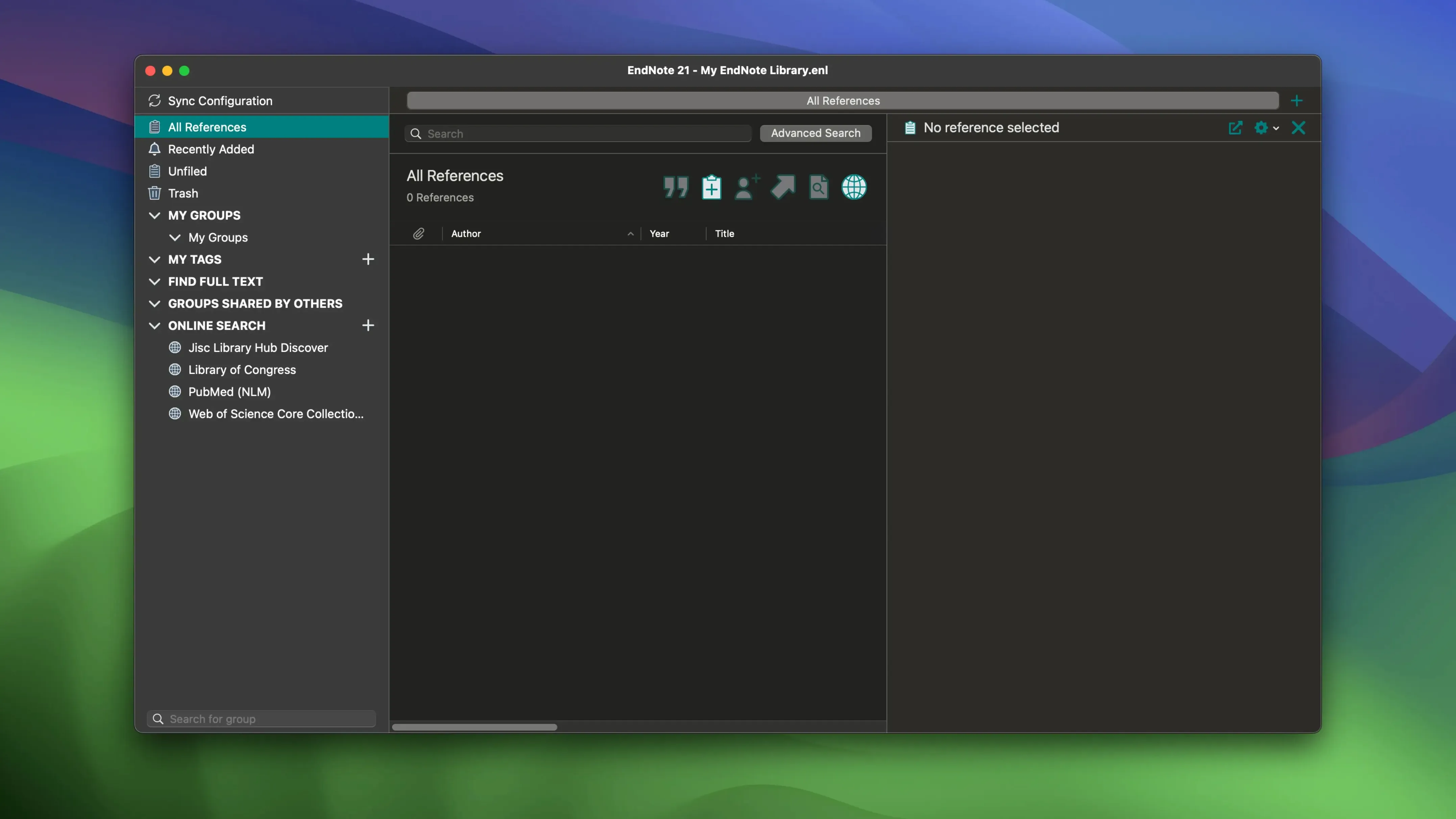
Over 45 output styles ship with the application, from APA 7th to Vancouver. For someone opening EndNote 2025.3 for the first time, the library window can feel dense. A few deliberate first steps make it legible.
A newcomer’s first workflow
- Create a library and choose a reference type. File → New, name the library, then References → New Reference. The dropdown at the top of the blank record sets the type — journal article, book section, web page, and two dozen others. The fields below adapt to the selection.
- Import a handful of references. Drag a PDF into the attachment panel and EndNote attempts to pull the metadata. For batch work, online search connects to PubMed, Web of Science, and hundreds of university catalogues directly from the left panel. Results land in a temporary pane; move the keepers across.
- Tag and group. Right-click a reference, pick a colour label, or drag it into a group set you create. Tags do not alter the reference, but they let you sort a growing library before it becomes unwieldy.
- Connect the word processor. Install the Cite While You Write add-in for Microsoft Word or Google Docs. In Word, an EndNote tab appears; in Docs, the add-on runs from the Extensions menu. Insert a citation, and the bibliography entry follows automatically in the style you set.
These four actions — create, import, tag, cite — form the spine of daily use. Once they feel routine, the rest of the application fills in around them.
Version 2025.3 arrived as a maintenance release, and its effect on everyday use is more about friction removed than features added. The headline fix resolves a crash in Microsoft Word that triggered when the Select Matching References dialogue appeared. For anyone who inserts citations into a long document with several hundred footnotes, that crash could interrupt a session three or four times an afternoon. With the fix, the dialogue appears, the reference list populates, and the cursor moves on. Less visibly, a handful of bug fixes tightened PDF metadata extraction. A paper that previously imported with a garbled author field now often arrives with the names correctly split, which means less manual correction before citing.
Simplified Chinese localisation also appeared in this release. Menus, field labels, and dialogue text switch to Chinese when the system language matches, and the change extends to the Cite While You Write add-in for Word. For a bilingual research group working across English and Chinese journals, the localisation removes a small cognitive tax: the field for "Author" reads the same in the library and in the manuscript draft. It is a quiet change, but one that cuts down on misdirected keystrokes during a long editing session.
How EndNote sits alongside macOS and other apps
A reference manager does not work alone. EndNote on a Mac talks to the operating system in several practical ways. The PDF viewer inside the library panel uses the same rendering engine that Preview relies on, so highlights and notes added to a PDF inside EndNote stay visible when the same file opens in Preview or Mail. The Sync function pushes the library, attachments, and annotation data to EndNote Web, but the local copy remains a standard .enl file plus a .Data folder — both of which Time Machine backs up without special configuration. When a reference goes missing after a sync conflict, the Restore Previous Versions command inside the reference editor can often pull it back from a local snapshot.
Tight integration with Microsoft Word and Google Docs is the obvious pairing, but other connections exist. Apple Pages does not have a Cite While You Write plug-in, yet EndNote exports a formatted bibliography as RTF or plain text that drops into a Pages document with minimal reformatting. For LaTeX users, the BibTeX export handles accented characters and special symbols reliably, and a library of several thousand references exports in under ten seconds. The application also reads and writes RIS files, which makes it a middle ground between Zotero, Mendeley, and institutional databases. A librarian who maintains a shared catalogue can export a RIS batch from EndNote, and a colleague using a different manager imports it without losing the DOI links or the abstract text.
A task, start to finish: building a literature review bibliography
Imagine a doctoral student preparing a literature review on coastal erosion models. The search begins in the online search panel, with PubMed and GeoRef selected as sources. The query "shoreline retreat prediction model" returns 147 results. The student scans titles in the temporary pane and moves 26 into the main library. For each kept reference, a quick right-click attaches the PDF through the Find Full Text feature — EndNote pings the university proxy and retrieves 19 of the 26 articles automatically.
Tagging follows. Three colour labels go on: green for primary modelling papers, blue for case studies, orange for review articles. A group set called "Dissertation – Chapter 2" contains smart groups that populate by colour label, so the case study group updates itself as new blue-tagged references arrive. With the Word document open, the student begins writing the section on equilibrium models. Insert Citation opens a floating search bar; typing "bruun rule" filters the library to four references. A tap of Return inserts the citation in APA 7th, and the bibliography entry appears at the end of the document. When the supervisor requests a switch to Harvard style, the student opens the Style dropdown in the EndNote tab, selects Harvard, and the entire document reformats in a few seconds — citations, reference list, and all.
The final step before submission is a quick library audit. The student sorts references by the Date Added column, spots two duplicates from overlapping database results, and merges them. The Find Duplicates command catches three more that share a DOI. The library now holds 143 references, all tagged, grouped, and attached to their PDFs. The bibliography exports as plain text for the university's plagiarism-checking upload, and the .enl file syncs to EndNote Web so the student can read annotations on a tablet during a train journey the next morning.
Compiling an arsenic bibliography for Environmental Science & Technology
Emma manages reference services for a mid-sized earth sciences faculty. Her morning begins with a request from a postdoctoral researcher who needs a bibliography of 200 papers on groundwater arsenic contamination, formatted for submission to Environmental Science & Technology. Emma opens EndNote and connects to Web of Science, Scopus, and the university's own catalogue. She runs three separate searches with date and language filters and merges the results into a single library. The deduplication routine finds 31 overlaps, and she resolves them manually in batches of ten, comparing abstracts and DOIs to confirm.
Once the library is clean, Emma applies a custom output style that matches the journal's strict formatting requirements — hanging indent, abbreviated journal names, no issue numbers. She exports the bibliography as RTF and pastes it into an email draft. A second request arrives while she works: an undergraduate needs to recover a library that disappeared after a macOS update. Emma walks to the student's desk, opens Finder, and navigates to the .enl file that Time Machine archived the week before. She restores it, checks that the PDF attachments are still in the .Data folder, and shows the student how to enable automatic syncing so a copy stays in the cloud.
By lunchtime, Emma has fielded four reference queries and built two bibliographies. The afternoon is quieter — she updates the faculty's shared EndNote group set with ten new publications from the week's journal alerts, adds tags for the upcoming seminar series, and writes a short internal note about the 2025.3 crash fix for Word, because three colleagues had reported the exact problem the month before. The application sits in her dock, unflashy but busy, bridging the gap between raw database results and a properly formatted reference list that a researcher can drop into a manuscript without a second thought.