Aspecten
 Download (2.3 GB)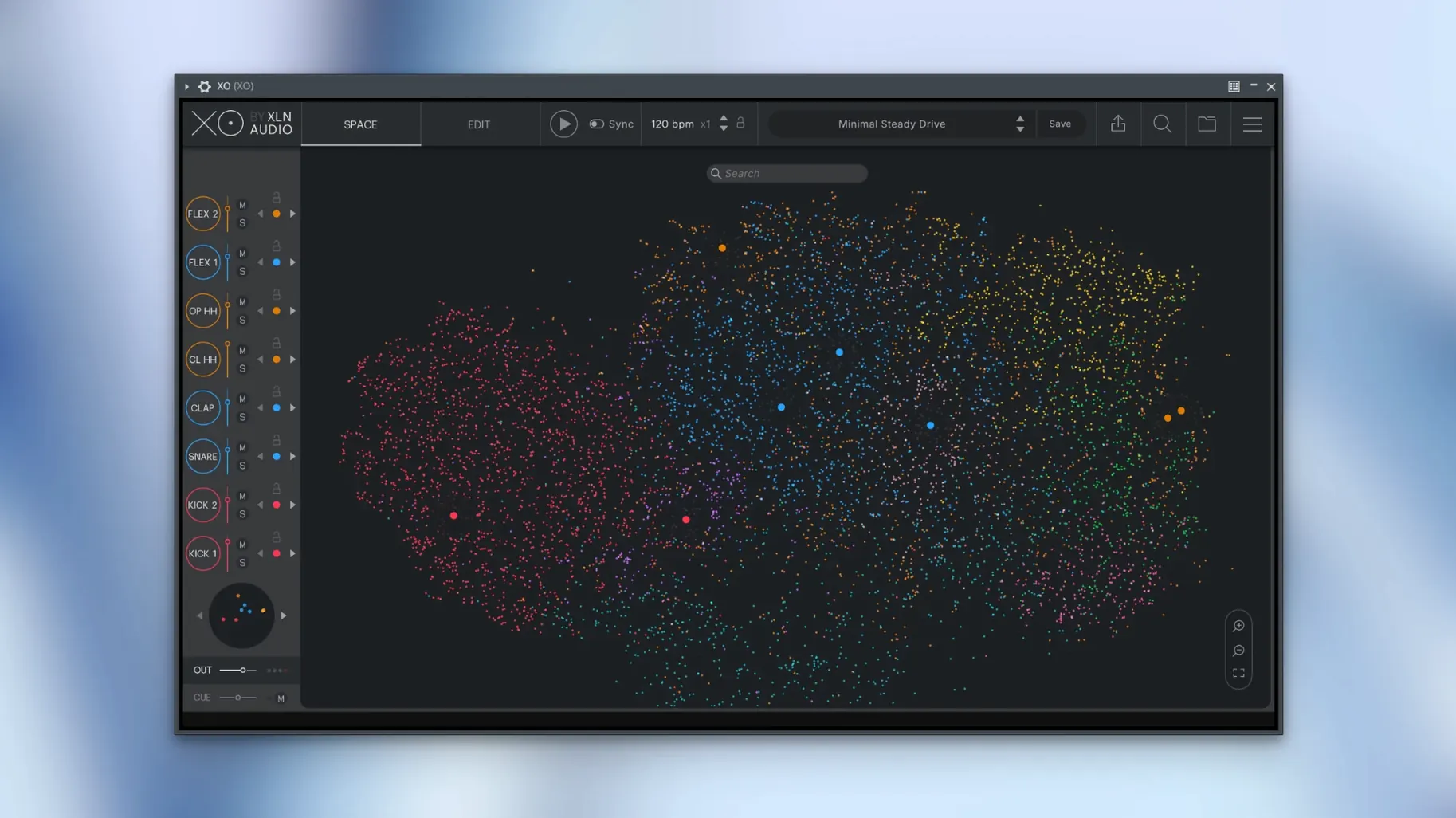
You open a folder of kick drum samples collected over several years. XO lays them out on a map, clustering the short, clicky ones in one region and the round, boomy ones in another. Dragging across the map auditions them in sequence.
Formats, hosts and architecture
XO loads as a VST, AU or AAX plug-in inside any compatible macOS host. It also runs as a standalone instrument. The current build is a universal binary, so it opens natively on both Intel and Apple Silicon Macs. The minimum system requirement is macOS 10.13. The plug-in exports audio while the host plays, a behaviour corrected in this release after earlier versions could stumble during simultaneous playback and export.
How the sound library works
The core of XO is a browser that organises one-shot drum samples by sonic character rather than by folder name. It ships with more than 8,000 factory samples, and you can point it at your own collection. Samples appear as dots on a two-dimensional map; similar-sounding hits sit close together. A built-in sequencer lets you build patterns from the selected kits, and more than 240 editable presets provide starting points for different genres. Groove Templates add swing and timing variations to the sequencer output. A rare slow start-up problem was addressed in version 1.8.10 alongside other minor maintenance fixes.
Clicking a single dot versus dragging across the map
A common early misstep is treating the Space map as a fixed category system. New users sometimes click a single dot and assume the surrounding cluster is all they have — missing that the real strength lies in dragging across regions while a pattern plays, hearing how a rim shot morphs into a clave, then into a woodblock. The map is a continuous field, not a set of drawers.
Another is ignoring the Accentuator entirely for the first few sessions. A beginner will load a preset, like the groove, and leave the sample selection as-is, unaware that the Accentuator can pull quieter ghost notes forward or push snare backbeats back without touching the sequencer grid. The result is a flat, lifeless loop that the tool is already equipped to fix.
Loading too many user folders at once trips up newcomers as well. XO analyses every sample on import, and dumping a terabyte of uncurated recordings into it produces a map so dense that navigation slows to a crawl. The better approach is to feed it one or two folders, work with those, then add more gradually. The analysis is quick per folder but cumulative across a sprawling library.
Finally, some producers treat the internal sequencer as a throwaway scratchpad and export MIDI too early. A beat that sounds compelling inside XO can lose its timing character if the Groove Template is not captured in the MIDI export. The release notes for version 1.8.10 confirm a fix for muted lanes during MIDI export, but the broader point stands: check what the exported pattern actually plays in the DAW before deleting the XO instance.
Lighter footprint, but no built-in library
Atlas 2 from Algonaut takes the same core idea — a similarity map for drum samples — and executes it with a lighter footprint. Atlas does not include a built-in sound library; it works entirely with your own collection. The map feels snappier on older machines, and the sequencer is simpler, more like a traditional step grid. Where XO pulls ahead is the factory content and the Accentuator. Atlas gives you a map and a sequencer. XO gives you a map, a sequencer, a curated library of 8,000-plus sounds, and a dynamics processor that shapes the groove without editing individual hits.
Waves CR8 Creative Sampler approaches drum browsing from a different angle. It is a general-purpose sampler with a strong drum focus, offering a multi-slot layout and extensive modulation. CR8 can spread samples across a keyboard and layer them, which XO does not do. But CR8 lacks any similarity-sorting concept. Finding a snare that sits well with a kick means manual auditioning, one file at a time. XO users who value speed of discovery will find CR8 feels like a step backward in workflow, even though it wins on deep sound-design features.
XO's closest conceptual sibling might be the browser in Native Instruments Battery 4, which uses a tagging system rather than a similarity map. Tags are precise — you can filter by style, articulation, and tonal character — but they rely on metadata someone had to enter. XO's map is algorithmically generated from the audio itself, so it catches family resemblances that a human tagger might miss. Battery's sequencer is absent; it is purely a sampler. For someone who wants to find sounds fast and build a groove inside the same window, XO remains the more integrated option.
A short session: beat maker on a deadline
A producer working on a synth-pop track has forty minutes to replace a lacklustre programmed kit with something livelier. She opens XO in her DAW, loads a dry 808-style preset, and immediately starts swapping the kick. A slow drag across the lower-left region of the Space map auditions several deep, short-decay kicks. She settles on one with a slight pitch drop, then moves to the snare cluster. The Accentuator knob for the snare lane gets a gentle clockwise turn, pulling the rim-shot ghost notes out of the background. The hi-hat pattern feels too rigid — she applies a Groove Template labelled MPC 55% and the shaker-like top end relaxes. Within fifteen minutes the kit is replaced, the pattern has swing, and she exports MIDI to the DAW for the final arrangement. The remaining time goes into mixing, not sound-hunting.
DAW plug-in support versus standalone only
One question surfaces more than any other: whether XO works as a plug-in inside a specific DAW or only as a standalone application. It loads in any host that supports VST, AU or AAX formats — Logic Pro, Ableton Live, FL Studio, Pro Tools, and others on macOS 10.13 and above. The standalone mode is there for quick browsing without opening a full session, but the plug-in workflow is the primary design.
Many ask if the built-in library is enough on its own or if it only makes sense with a large personal collection. The 8,000-plus factory samples cover a broad range of electronic and acoustic drum sounds, and the 240 presets span several genres out of the box. Users with no sample collection can start making finished beats immediately. Adding personal folders simply extends the map further.
A third common query concerns latency. Because XO generates sound from samples triggered by its internal sequencer or by MIDI from the host, the latency is determined by the audio buffer settings of the DAW, not by the plug-in itself. On a modern Mac it runs comfortably at buffer sizes that most producers use for composition.
Some users wonder whether the similarity map can distinguish between subtle variations, like the difference between a nylon-tip and a wood-tip hi-hat stroke. In practice it does group such samples closely, though the exact placement depends on the spectral content of the specific files. The map works best as a relative guide — nearby dots are related — rather than an absolute categorisation of articulation type.
Finally, people ask about CPU load when the Space map is open during playback. The graphical rendering of hundreds of moving dots can tax older integrated graphics, but the audio engine itself is efficient. Collapsing the map view while a pattern plays reduces the load on systems where the animation causes glitches.